CPS100 SERIES OPERATION MANUAL
SECTION 6:
Front Panel Operation
Entire Contents Copyright 2018 by Adaptive Power Systems, Inc. (APS) • All Rights Reserved • No reproduction without written authorization from APS.
APS CPS100 Series Power Source Operation Manual Page 75 of 231
6.7.1 Output & More Settings
This screen allows control over the following
output settings using these soft keys:
• Coupling
• Range
• Waveform Preview
• Zo Program
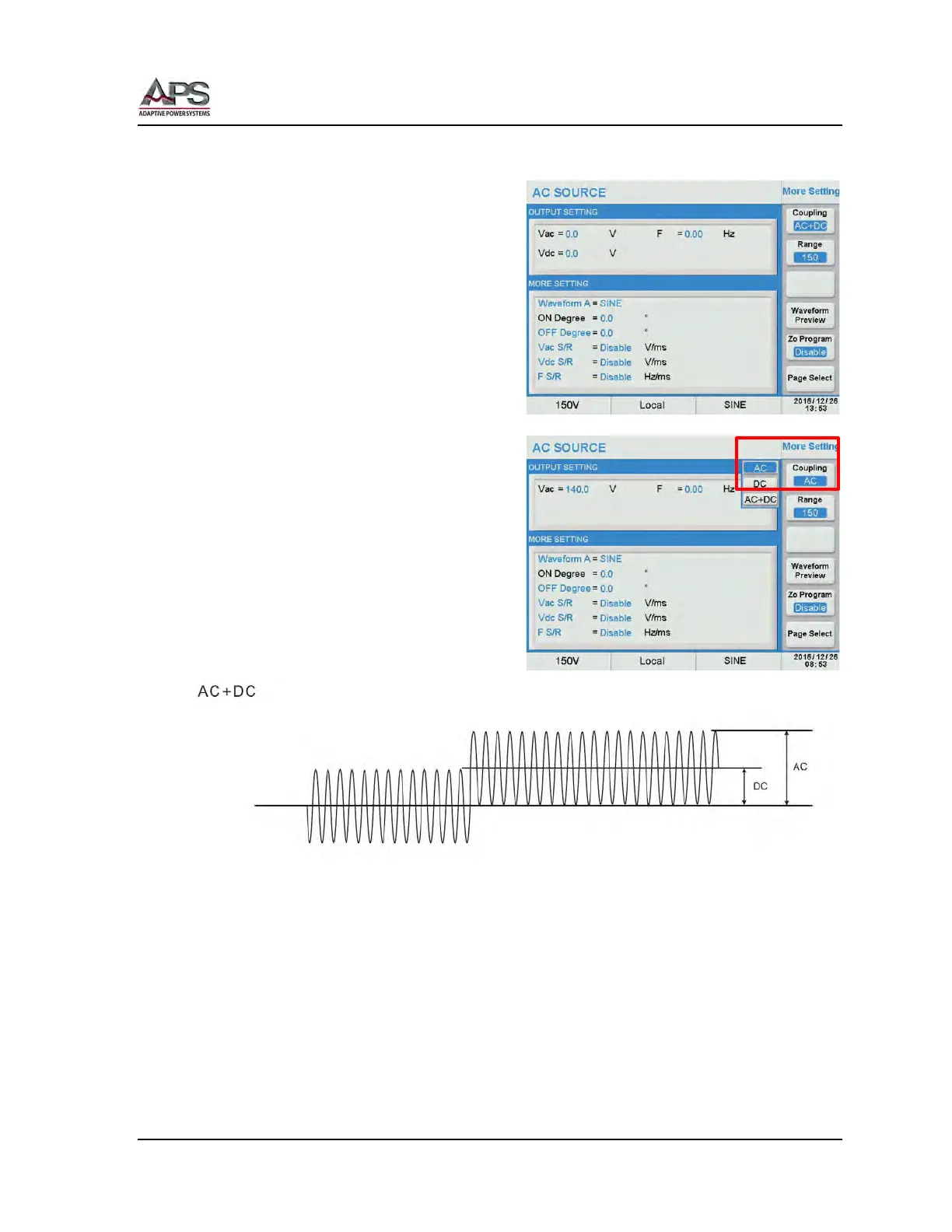
6.7.1.1 Coupling Mode
Available modes are AC only, DC only or
AC+DC combination. Press the Coupling soft
key to display the drop down list. Available
entries to select are AC, DC and AC+DC. Use
the shuttle and Enter key to select of press
the Coupling soft key repeatedly to toggle
through the available selections.
When selecting AC+DC mode, both the Vac =
and Vdc = values are displayed in the
OUTPUT SETTING portion of the screen.
Note: In AC+DC Coupling mode, any combination of AC and DC voltage may be selected as
long as the positive or negative peak voltage of the combined output does not
exceed the allowable maximum peak voltage. Refer to figure above.



 To Next Page