CPS100 SERIES OPERATION MANUAL
SECTION 6:
Front Panel Operation
Entire Contents Copyright 2018 by Adaptive Power Systems, Inc. (APS) • All Rights Reserved • No reproduction without written authorization from APS.
APS CPS100 Series Power Source Operation Manual Page 73 of 231
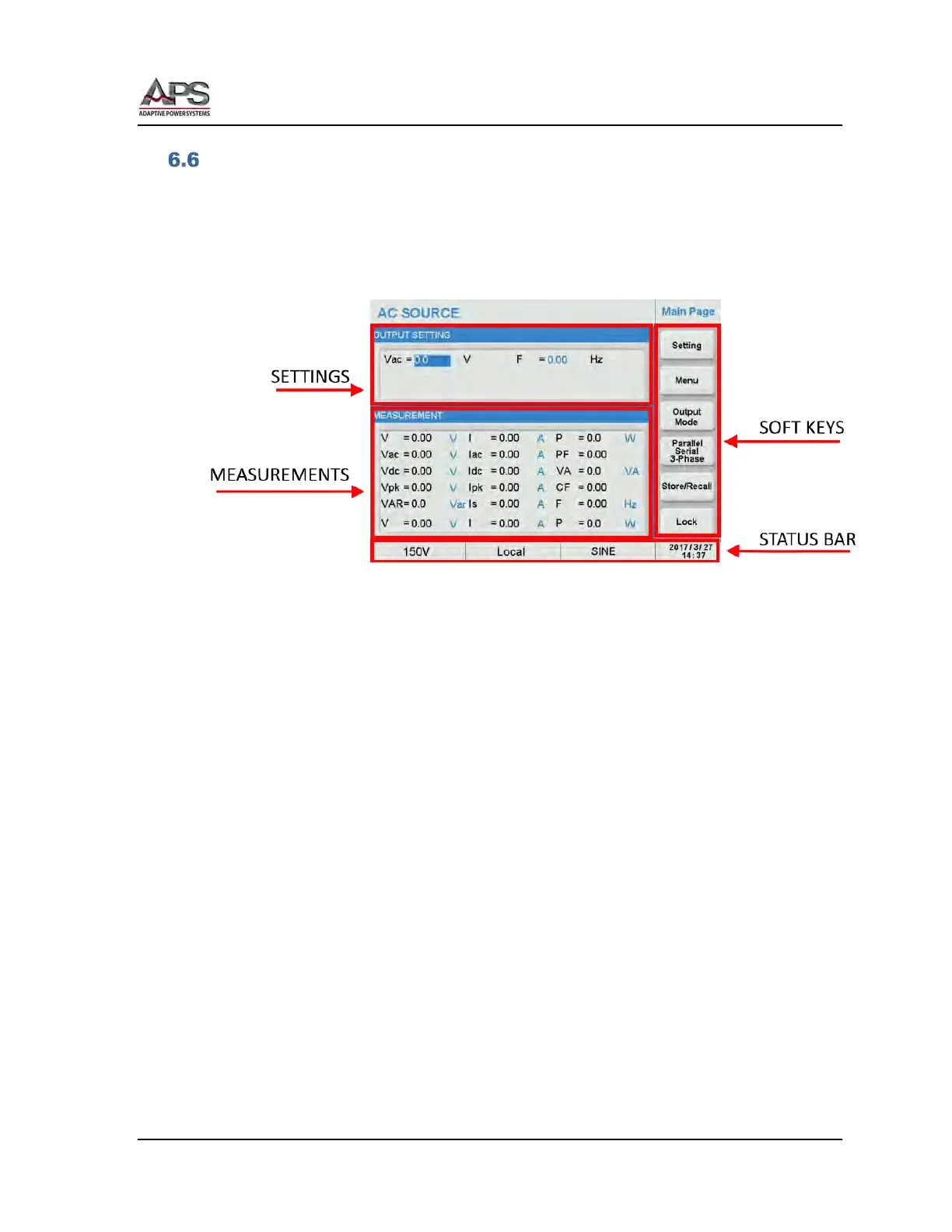
MAIN Screen
The MAIN screen shows after power up or whenever the [Main] key is pressed. It displays
the Output settings in the top portion of the screen and all available measurements in the
lower portion of the screen. Thus, all settings and measurements are visible on this screen.
At the bottom of the screen, a status bar is visible. This status bar displays selected voltage
range, Local or Remote State, Waveform selected in AC mode or DC and the date and time.
The following soft keys are available on the right hand side of the Main screen:
• Setting Displays Settings screen
• Menu Displays Menu screen
• Output Mode Displays Output Mode screen
• Parallel, Serial, 3-Phase Display P/S/3Phs screen
• Store/Recall Displays Store/Recall screen
• Lock Displays Lock screen



 To Next Page