CPS100 SERIES OPERATION MANUAL
SECTION 6:
Front Panel Operation
Entire Contents Copyright 2018 by Adaptive Power Systems, Inc. (APS) • All Rights Reserved • No reproduction without written authorization from APS.
APS CPS100 Series Power Source Operation Manual Page 95 of 231
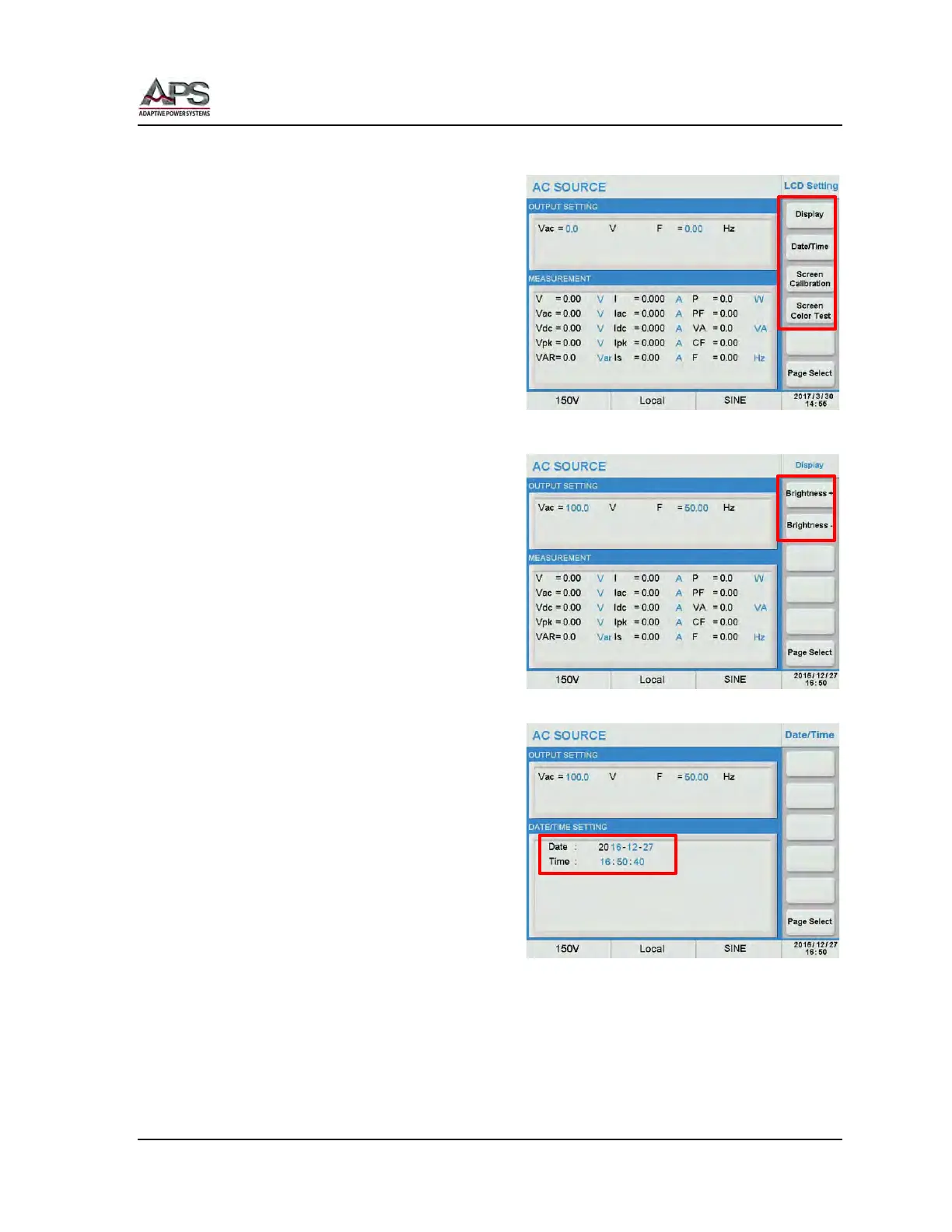
6.8.2 LCD Setting
The LCD setting screen controls the following
aspects of the LCD display.
• Display Brightness
• Date & Time
• Touch screen calibration
• Screen Color Test
6.8.2.1 Display Brightness
The two soft keys in this screen control LCD
brightness adjustment. The brightness can be
adjusted up [Brightness+] or down
[Brightness-].
Adjust the display brightness as needed. for
best viewing experience.
6.8.2.2 Date & Time Setting
The power source has a real-time date and
time clock which is battery backed. It is set
at the factory at the time of shipment but
will have to be adjusted for local date and
time zone.
Select the [Date/Time] soft key to display the
present date and time setting. Select the
year, month, day, hours and/or seconds field
to make and adjustment.
Once selected, use the [0] ~ [9] keys to enter
the local date and time. Press Enter to
confirm each change.



 To Next Page