CPS100 SERIES OPERATION MANUAL
SECTION 6:
Front Panel Operation
Entire Contents Copyright 2018 by Adaptive Power Systems, Inc. (APS) • All Rights Reserved • No reproduction without written authorization from APS.
APS CPS100 Series Power Source Operation Manual Page 142 of 231
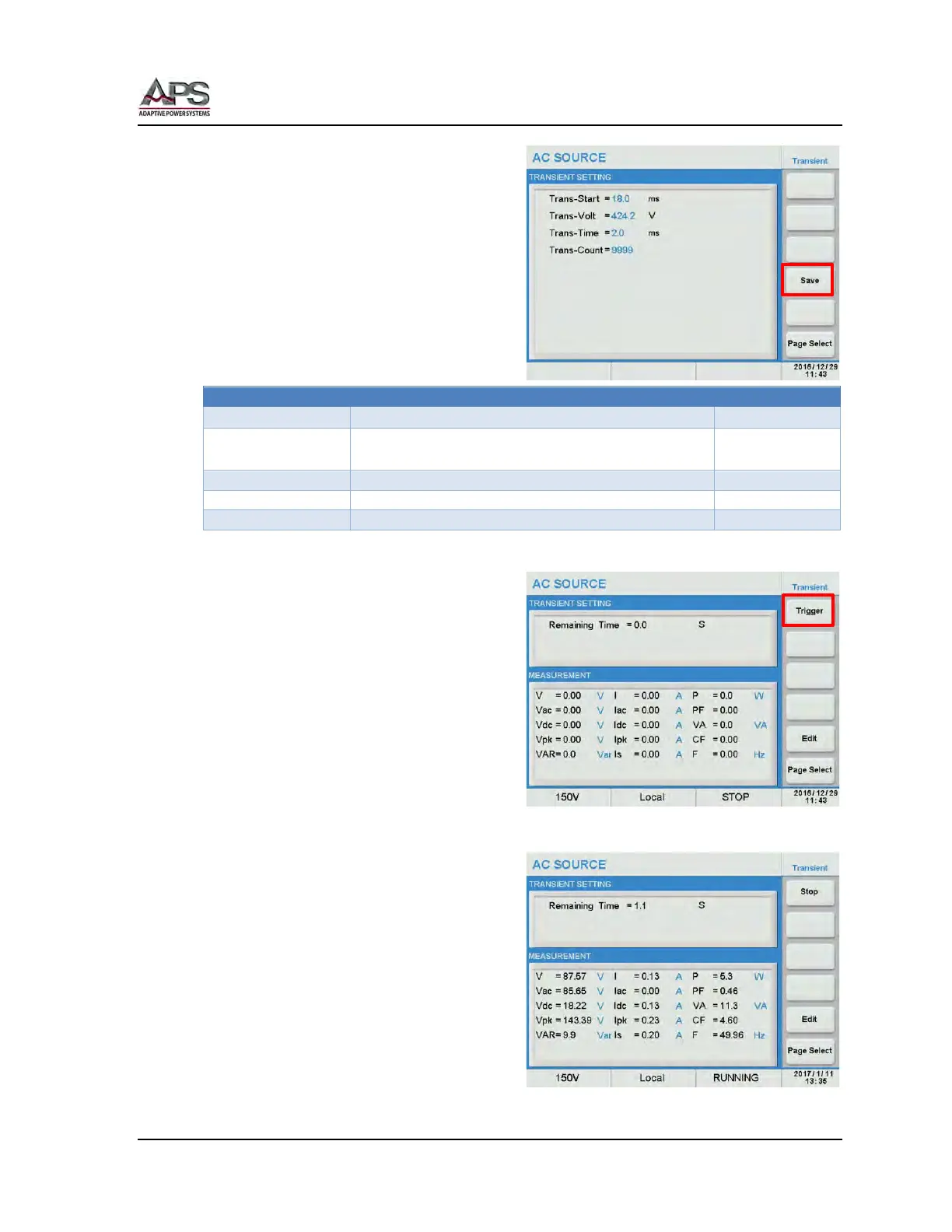
The Transient Edit mode allows the following
parameters to be set:
• Trans-Start Set the starting position
in msec.
• Trans-Volt Set the voltage level.
• Trans-Time Set the duration of the
transient event in msec.
• Trans-Count Set the repeat count.
The following specifications apply to the
Transient test mode:
-212V ~ +212V on 150V range
-424V ~ +424V on 300V range
Table 6-5: Transient Function Specifications
When done, press the Save soft key to save
the transient settings to non-volatile
memory.
Note: If the setting is not saved, it will be
lost when the power source is turned
off.
Running the Transient test
Return to the Transient menu by pressing the
[Esc] key.
Press the Trigger soft key to apply the test to
the unit under test. Once pressed, it changes to Stop.
The test will run for the duration x count set
with the Transient parameters.
At the completion of the test, the Stop soft
key will revert to Trigger. To abort a test in
progress, press the Stop soft key during a
test run.



 To Next Page