CPS100 SERIES OPERATION MANUAL
SECTION 6:
Front Panel Operation
Entire Contents Copyright 2018 by Adaptive Power Systems, Inc. (APS) • All Rights Reserved • No reproduction without written authorization from APS.
APS CPS100 Series Power Source Operation Manual Page 80 of 231
6.7.2 Measurement Settings
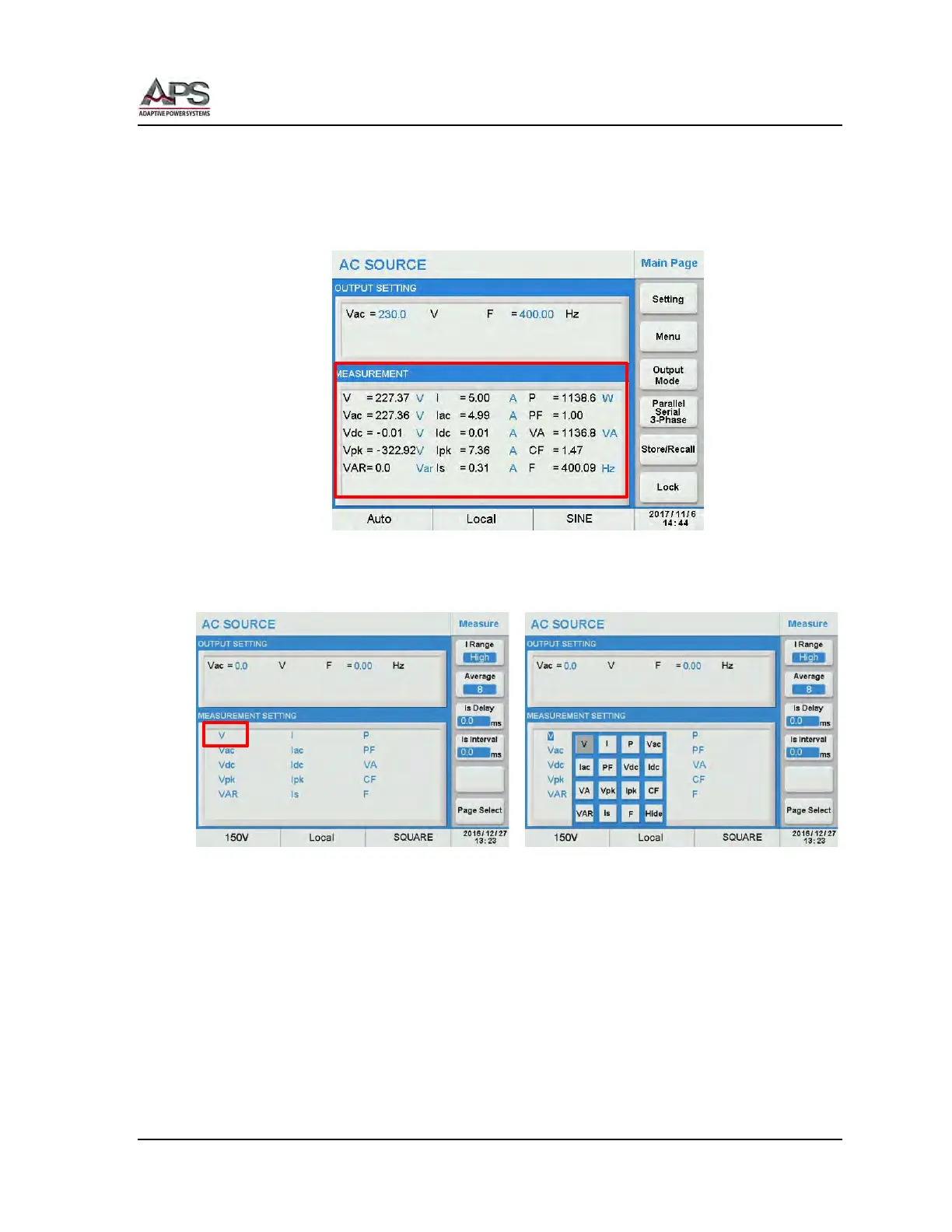
The CPS100 Series power sources support 15 different output measurements. All 15 can be
displayed at the same time in the Measurement display area of the MAIN screen as shown
below.
The Measure screen arranges these measurements in any way the user prefers. You can
either display all measurement parameters or just a few by customizing this display using
the Measure screen shown below.
To change a selection, press the location on the screen or move the cursor to the position
you would like to edit. A on-screen touch pad will be displayed at that location containing
all 15 measurements and a Hide button. Select the desired read-out at this position by
pressing it or press Hide if you want no readout at this position.



 To Next Page