www.ayyeka.com | +1 (310) 876-8040 | info@ayyeka.com 46
Viewing the List of Technical Alerts
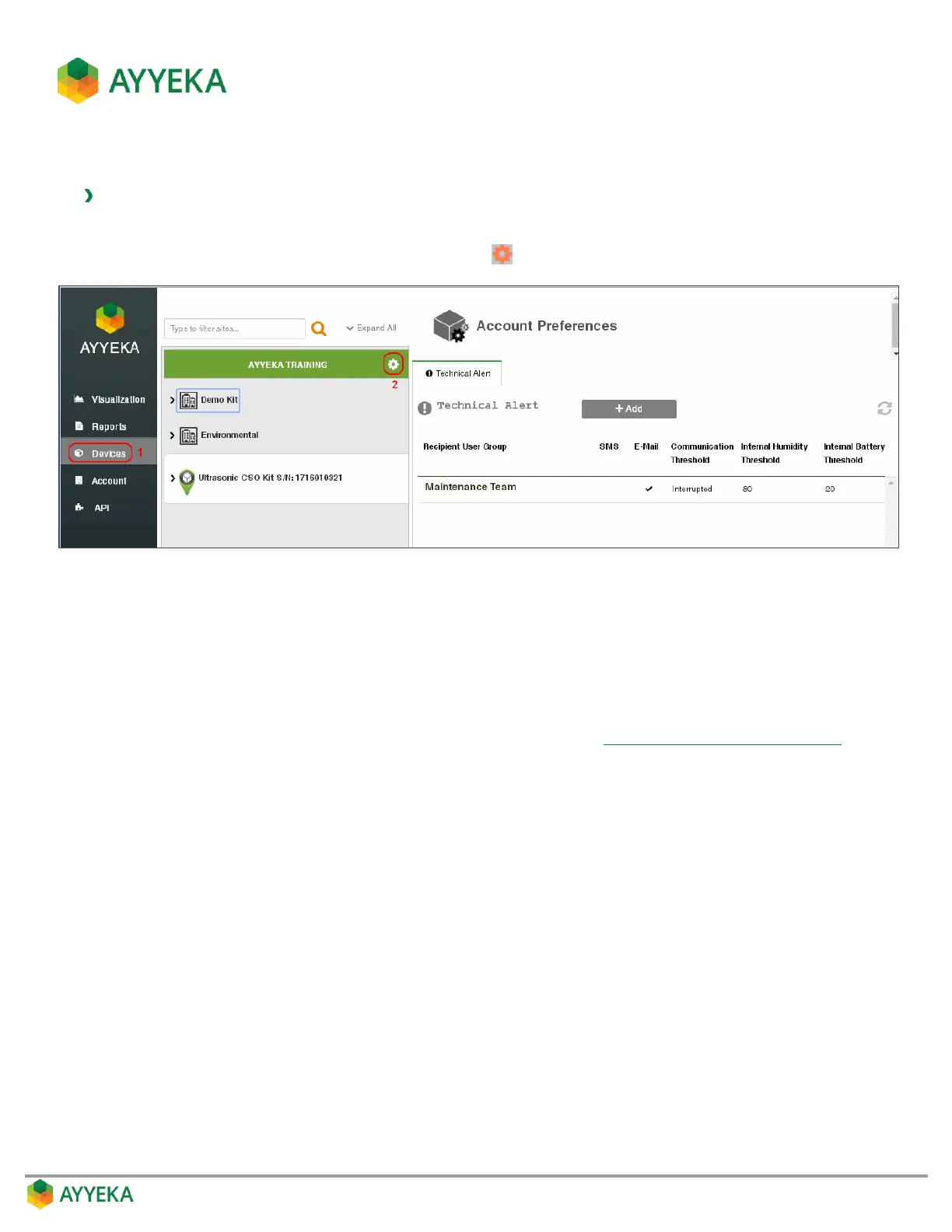
To view all device technical alerts:
1. Click Devices in the sidebar.
2. In the Sites Tree pane, click the Preferences icon adjacent to the account name.
Figure 35: Selecting Account Preferences
3. View the technical alerts listed in the Technical Alert table. The table shows, for each technical alert:
Whether the alert is sent in an SMS text message and/or in an email.
Whether an alert is sent when communication is Delayed or Interrupted beyond a certain
threshold. An empty cell indicates that no alert is sent if communications are delayed or interrupted.
Please note: Each device has its own Delayed Transmission and Interrupted Transmission
thresholds, which are set at the device level, as described in Setting the Device Reporting Profile.
The internal humidity threshold. If the internal humidity level in the device rises to above this
threshold, a humidity threshold alert will be sent. An empty cell indicates that no alert is sent for
humidity levels.
The internal battery threshold. If the internal battery level falls to below this threshold, a battery
threshold alert will be sent. An empty cell indicates that no alert is sent for battery levels.



 To Next Page