208
EVINRUDE ICON REMOTE CONTROL SYSTEM
ICON SYSTEM SETTINGS
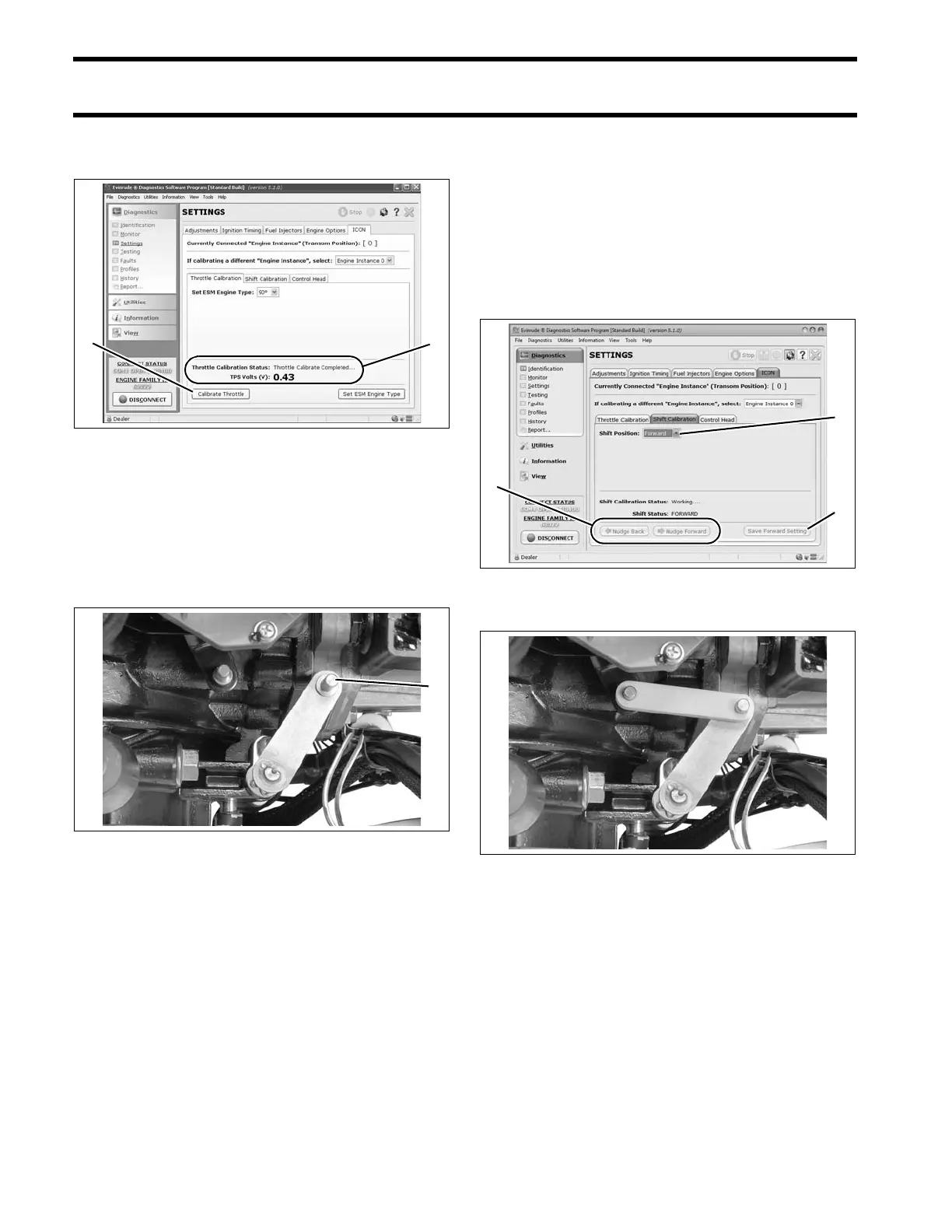
linkage. Evinrude Diagnostics report s when the
process is complete.
Shift Actuator Stroke
To set forward gear shift stroke:
• With the shift link disconnected, rotate the pro-
peller and manually shif t the outboard int o for-
ward gear with the shift lever.
IMPORTANT: Make sure the ge ar is fully
engaged and the lever is all the way forward.
• Select FOR WARD under Shift Position on t he
ICON screen. The actu ator arm will move for-
ward.
• Use the Nudge butt ons to move the actuator
arm forward or backward until the shif t link
aligns with the actuator arm and shift lever pins.
• When the link and pins are exactly aligne d,
install the link a nd click th e Save button . The
actuator will move to the neutral position.
To set reverse gear shift stroke:
• Remove shift link.
1. Calibrate Throttle button
2. Process complete message
008583
1. Shift lever in forward 008510
1. Shift position
2. Nudge buttons
3. Save button
008579
008511







 To Next Page