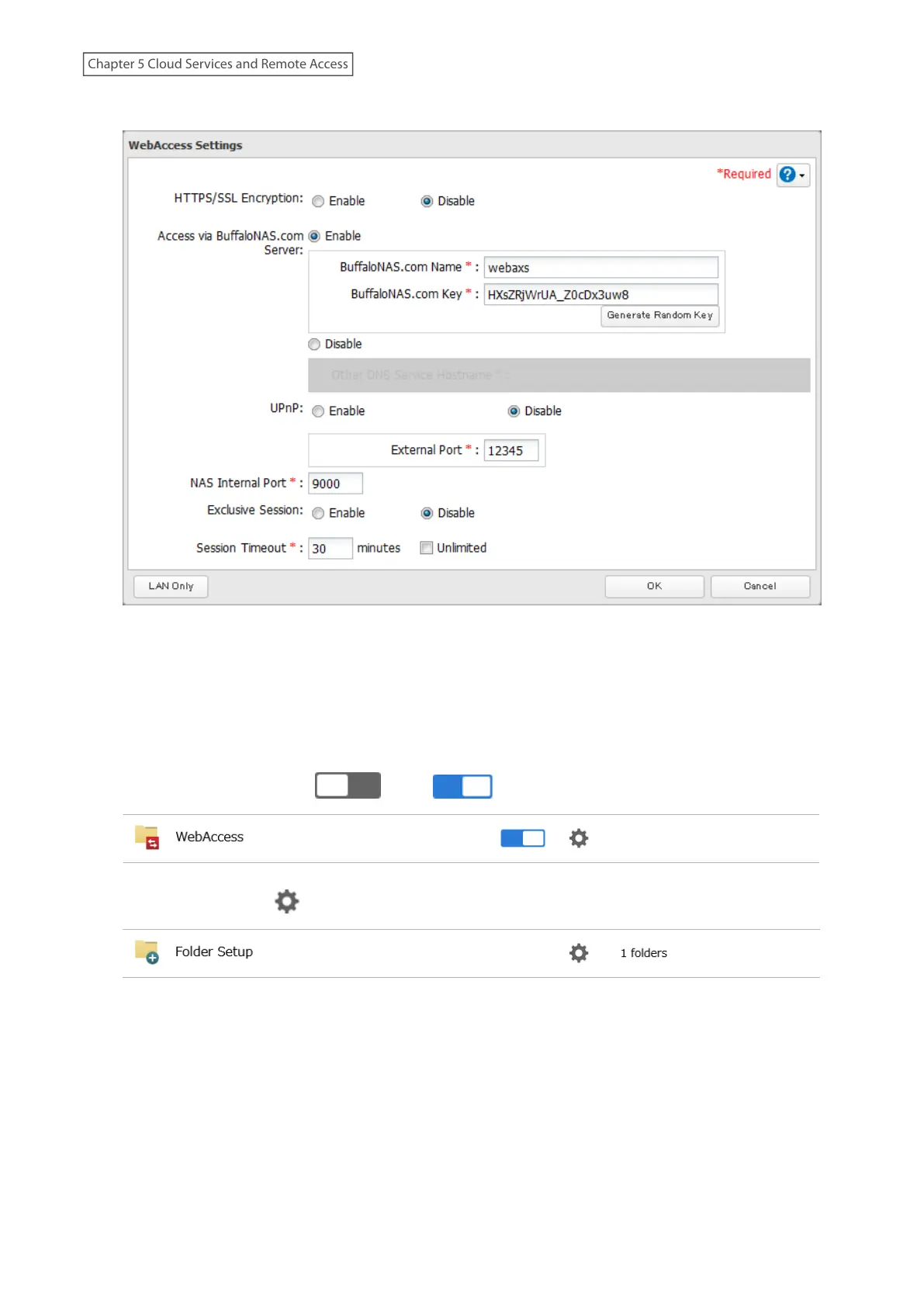
4 Configure the desired settings, then click OK.
• To use SSL encryption for more secure data transfers, enable “HTTPS/SSL Encryption”.
• You may use the BuffaloNAS.com server as a DNS server, or disable it to use a different DNS server.
• Choose a “BuffaloNAS.com Name” and “BuffaloNAS.com Key” for your WebAccess account. Names and keys
may contain between 3 and 20 alphanumeric characters, underscores (_), and hyphens (-).
• If “Exclusive Session” is enabled, multiple users cannot be logged in to WebAccess at the same time. Only the
last login will be active.
• Enter a time in minutes (1 to 120, or “Unlimited”) before inactive users are logged out of WebAccess.
5 Move the WebAccess switch ( ) to the position to enable WebAccess.
6 Click the settings icon ( ) to the right of “Folder Setup”.
7 Select a shared folder to publish.
Notes:
• For best results, create a new dedicated share for WebAccess.
• When accessing shared folders through WebAccess from a remote location, a username and password
may be required for certain operations. For best results, create a user account with permissions on the
WebAccess share before using WebAccess.
124
Chapter 5 Cloud Services and Remote Access











 To Next Page