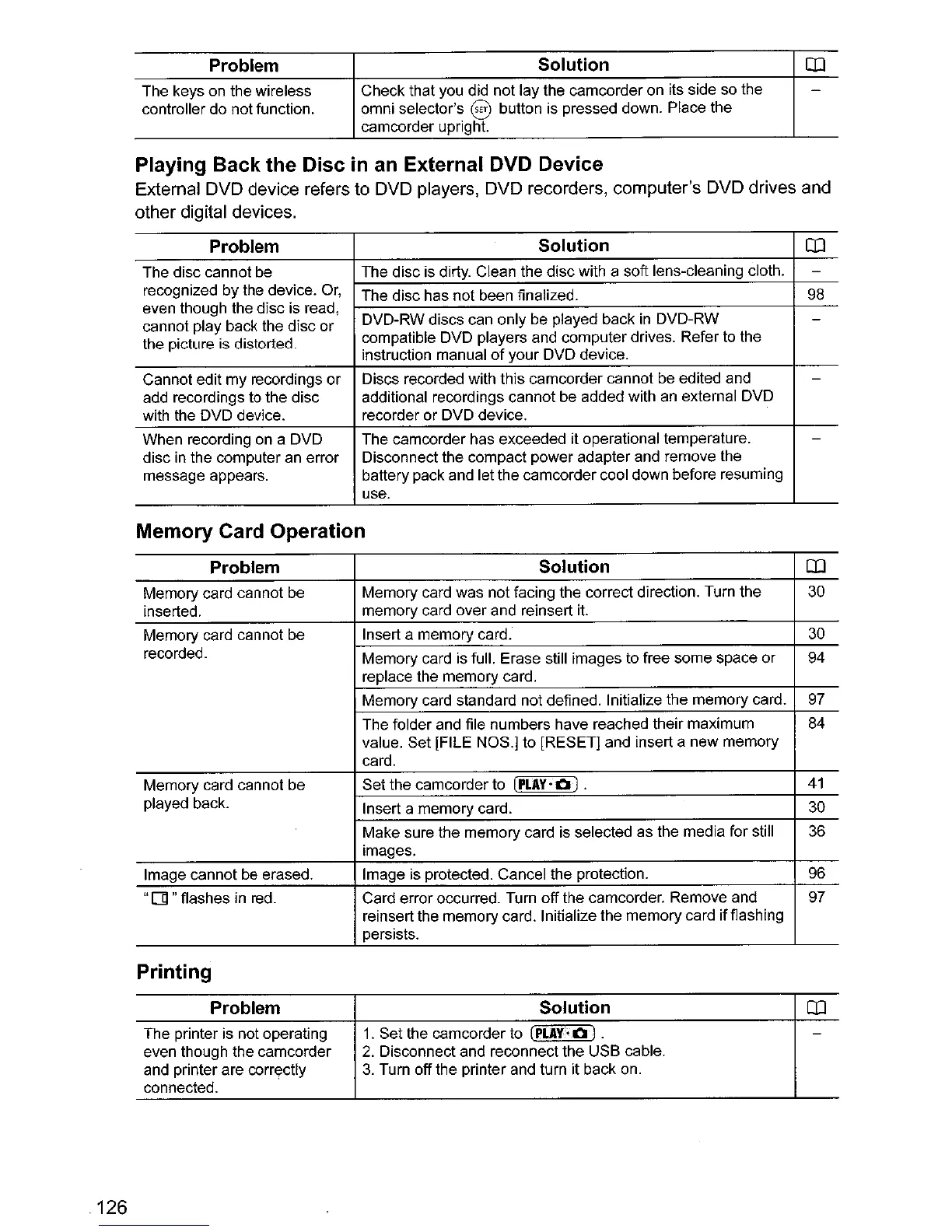
Problem
The keys on the wireless
controller do not function.
Solution
Check that you did not lay the camcorder on its side so the
omni selector's
§ button is pressed down. Place the
camcorder upright.
CD
Playing Back the Disc
in
an External DVD Device
External DVD device refers to DVD players, DVD recorders, computer's DVD drives and
other digital devices.
Problem
Solution
CD
The disc cannot be The disc is dirty. Clean the disc with a soft lens-cleaning cloth.
-
recognized by the device. Or,
The disc has not been finalized.
98
even though the disc is read,
DVD-RW discs can only be played back
in
DVD-RW -
cannot play back the disc or
the picture is distorted.
compatible DVD players and computer drives. Refer to the
instruction manual
of
your DVD device.
Cannot edit
my
recordings
or
Discs recorded with this camcorder cannot be edited and
-
add recordings to the disc additional recordings cannot be added with
an
external DVD
with the DVD device. recorder or DVD device.
When recording on a DVD The camcorder has exceeded it operational temperature.
-
disc in the computer an error Disconnect the compact power adapter and remove the
message appears. battery pack and let the camcorder cool down before resuming
use.
Memory Card Operation
Problem Solution
CD
Memory card cannot
be
Memory card was not facing the correct direction. Turn the
30
inserted.
memory card over and reinsert
it.
Memory card cannot be
Insert a memory card.
30
recorded.
Memory card is full. Erase still images to free some space or
94
replace the memory card.
Memory card standard not defined. Initialize the memory card.
97
The folder and file numbers have reached their maximum 84
value. Set [FILE NOS.] to [RESET] and insert a new memory
card.
Memory card cannot be
Set the camcorder to
[PLAY,
1:1
) .
41
played back.
Insert a memory card.
30
Make sure the memory card is selected as the media for still
36
images.
Image cannot be erased. Image is protected. Cancel the protection.
96
"
01
"flashes
in
red.
Card error occurred. Turn off the camcorder. Remove and
97
reinsert the memory card. Initialize the memory card ifflashing
persists.
Printing
126
Problem
The printer is not operating
even though the camcorder
and printer are
corr~ctly
connected.
Solution
1.
Set the camcorder to
(PLAY;I:IJ
.
2.
Disconnect and reconnect the USB cable.
3.
Turn off the printer and turn it back on.
CD



 To Next Page