53
Quick Control
3
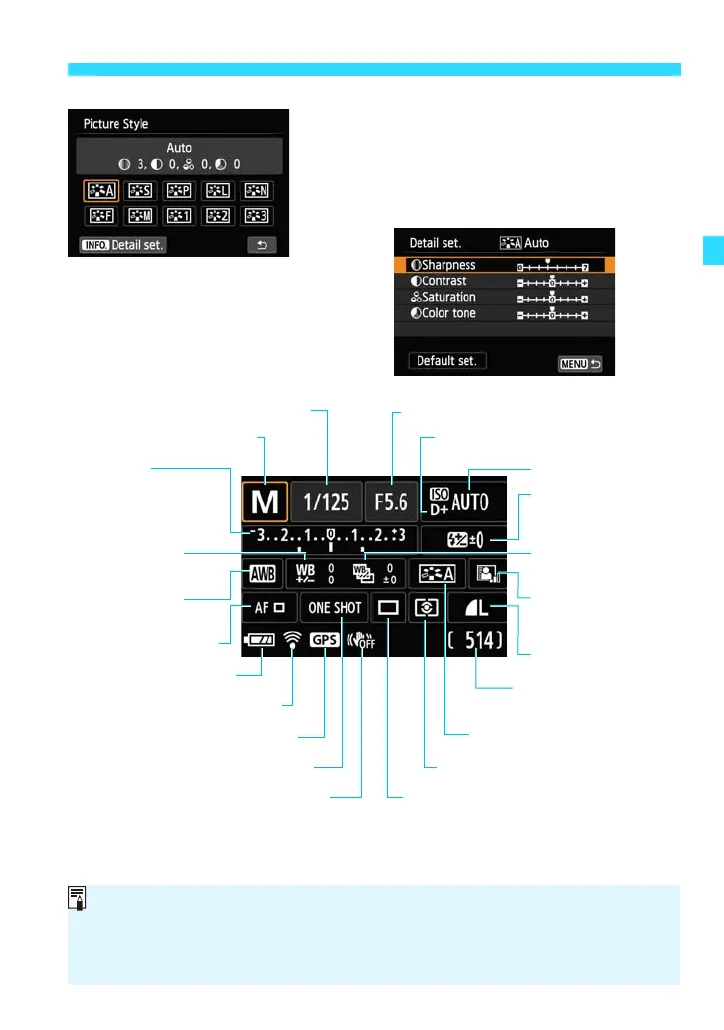
Set the desired function setting.
On the screen that appears, tap a
function setting to set it.
There are also functions with more
settings when you tap [zDetail set.].
Shutter speed (p.136)
White balance
(p.168)
Highlight tone priority* (p.289)
Auto Lighting
Optimizer (p.153)
Metering mode (p.146)
Picture Style (p.106)
Exposure
compensation/
AEB setting
(p.148, 150)
Flash exposure
compensation
(p.302)
ISO speed (p.102)
Aperture (p.139)
White balance
bracketing (p.172)
Drive mode (p.75, 124, 126)
White balance
correction (p.171)
Possible shots*
(p.98)
Shooting mode (p.27)
AF method (p.113)
AF operation (p.110)
Image quality (p.97)
Battery check* (p.39)
Image Stabilizer: OFF* (p.46)
Eye-Fi card* (p.305)
GPS connection indicator*
You can also perform the setting procedure with the Main Dial’s <S> or
<5> and <0>.
* These functions cannot be set with the B Quick Control screen.
The settable functions differ depending on the shooting mode.















 To Next Page