Appendix – Examples Control Station Duetto
148 2.0/0518
b Define logic rule: Optical feedback on the button
With this logic rule, the button behaviour of all buttons will be changed when the DND mode toggles.
Go to: Customization > Logic Rules in the Web interface (see page 66).
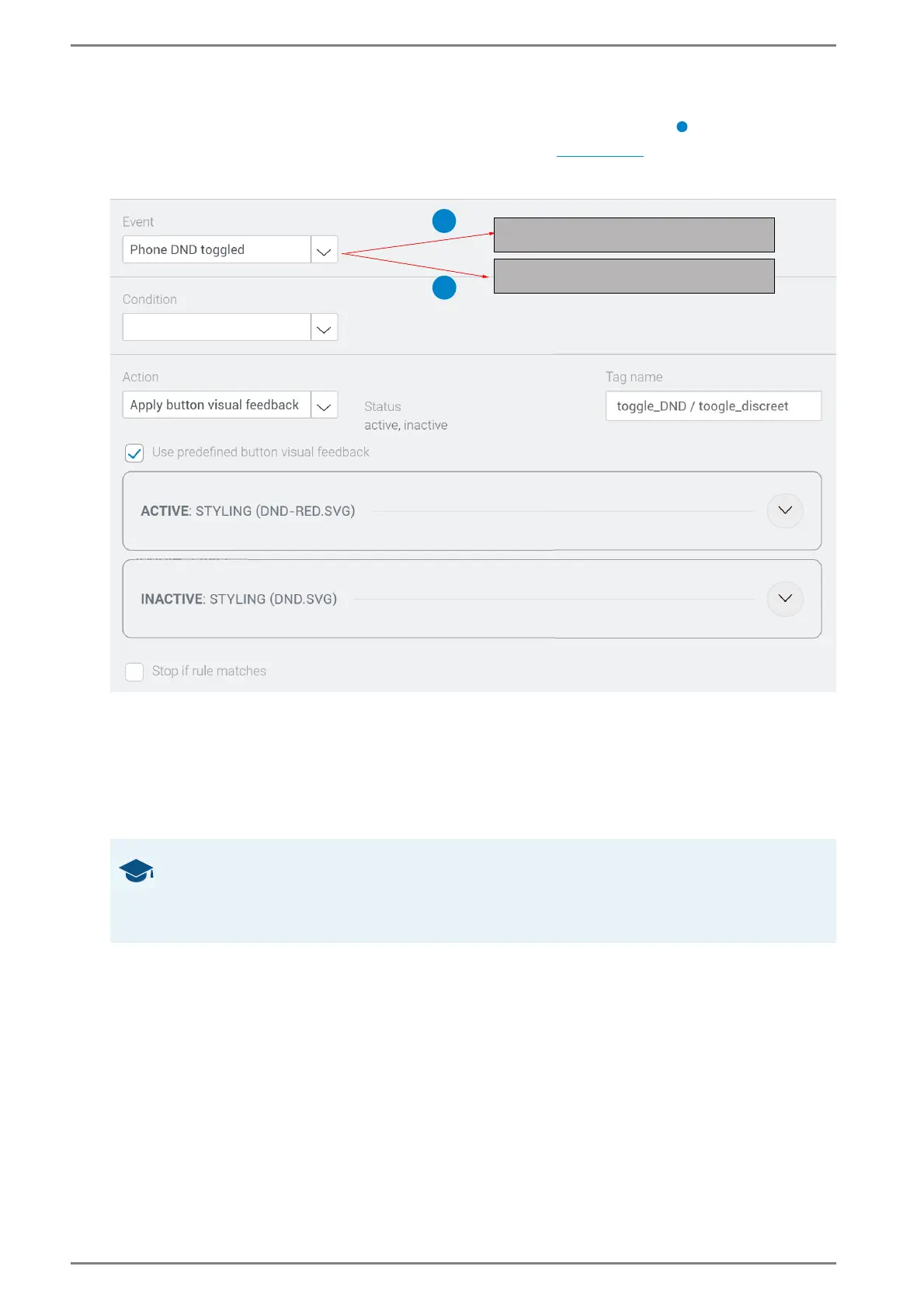
Add a new logic rule. See the following screenshot:
This logic rule changes the button behaviour when the DND mode toggles
Select the event “Phone DND toggled”.
Select the action “Apply button visual feedback” and in the field Tag name, enter the same logic tag
that has been entered for the button in the custom screen (in this case “toggle_DND”).
Activate the checkbox Use predefined button visual feedback to use the default settings of the
DND button in the active and inactive DND mode (background transparent, no blinking and icon
“dnd.svg” selected).
➥ Click on Save.
GOOD TO KNOW: Order of the configuration
The configuration of logic rules is independent from the order of its individual steps. As log-
ic tags are just used to connect individual elements, it is irrelevant which element is defined
first. If needed, you can define logic tags prior to the associated button.
_
1
2
Toggle intercom privacy mode
Toggle phone DND mode



 To Next Page