•
•
•
•
4.2 Controller types
The selection of the controller type determines the regulation and control functions as well as the basic settings.
The following controller types and their areas of application are available in the case controller for refrigeration
pointswithpulse-widthmodulatedclockedorcontinuousexpansionvalves(motorvalves):
Controller type Applications
Case controller UA 121 E Normal temperature refrigeration (multidecks, islands, chests,
counters) with defrost heater
Multidecks without defrost heater
UA 131 E Low-temperature refrigeration (islands, chests, cabinets,
freezer set) with defrost heater
for refrigerated cases that are operated on a refrigeration pack
system with 2-pipe hotgas defrost
UA 131 E LS As for UA 131 E, but with advanced fan control
UA 141 E Service counters with / without defrost heater
Cold room controller UR 141 NE NT cold rooms with / without defrost heater
UR 141 TE LT cold rooms with / without defrost heater and hotgas defrost
Only UA 410 E AC (complete design)
Sub cooler controller UK 100 E Subcooler controller with special characteristics for regulation
of a refrigerant subcooler
Cascade controller KR 160 E
Cascade controller with special characteristics for regulation of
a cascade with heat exchanger
Special feature
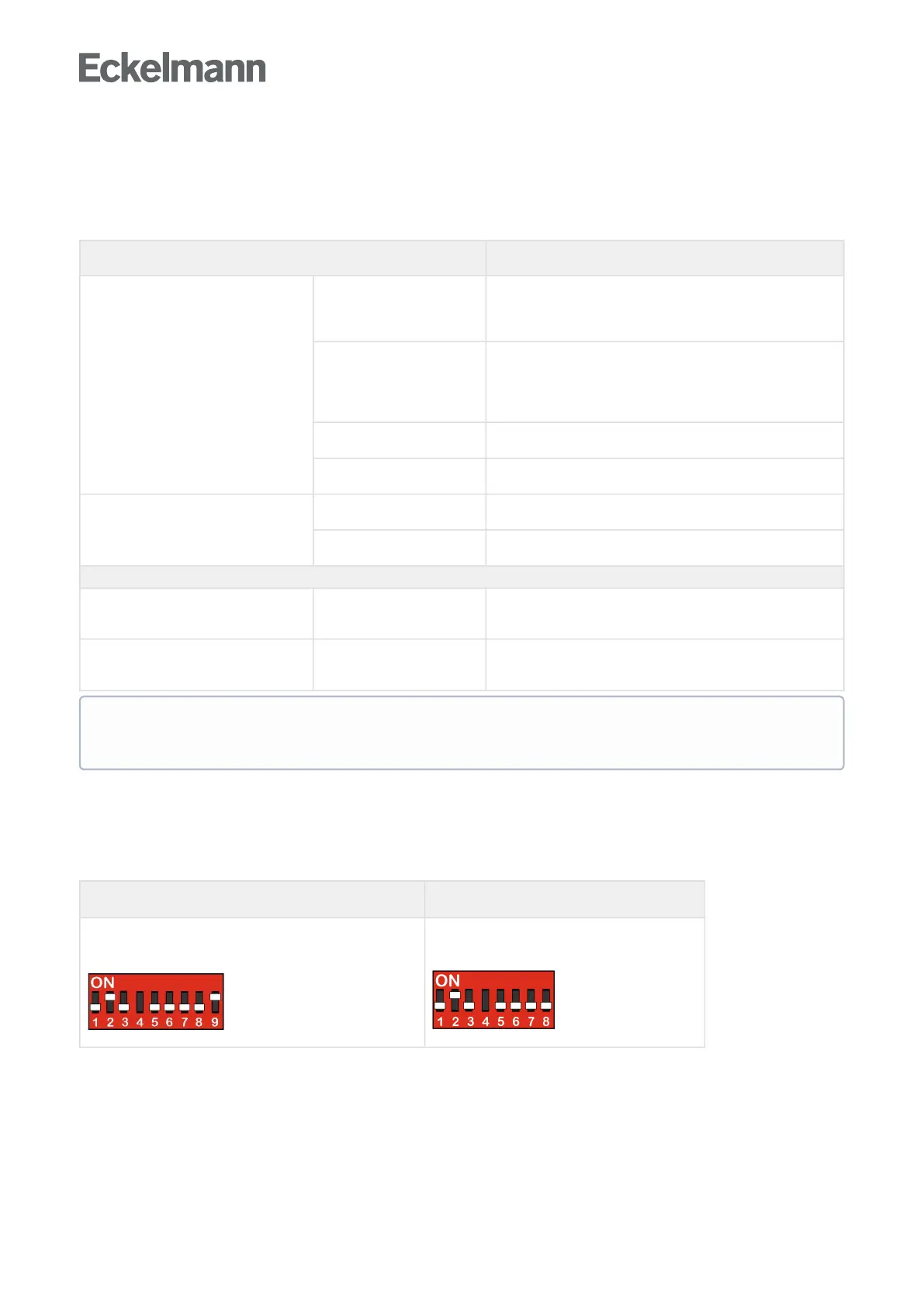
Two device generations are available. The DIP switch S3 provides a quick distinguishing feature.
Example: Setting of the coding switches for the controller type UA 131 E; for details about the configuration,
see chapter Setting the controller type and other functions.
2nd generation controller
(from Oct. / Nov. 2018)
1st generation controller
(since 2011)
UA 400 E CC / UA 401 E CC / UA 410 E AC
Characteristic: 9-pole DIP switch
UA 400 E CC / UA 410 E AC
Characteristic: 8-pole DIP switch
Thecontrollercanbeoperatedvia
a central computer e.g. via network / modem with connection to the system centre / store computer,
the system centre, a store computer or an operator terminal,
a local BT 300 operator interface x via the DISPLAY interface on the controller or
a laptop (PC) with the PC software LDSWin connected via USB.
For definition of the basic control action, only one controller type can be set, which is set using the
DIP switch S3.



 To Next Page