•
•
In order to fully utilise its performance features, the case controller is typically connected to the CAN bus, using
which it communicates with further control and monitoring components across the entire network. Intelligent
data exchange with the following system components takes place via the CAN bus:
System centre / store computer: Archiving of the operating data and alarm and message management,
connection to LDSWin for analysis, configuration and evaluation
Pack controllers: Adaptive control in connection with the associated pack controller, consumer lock
(emergency function in the event of pack failure)
3.2 Hardware
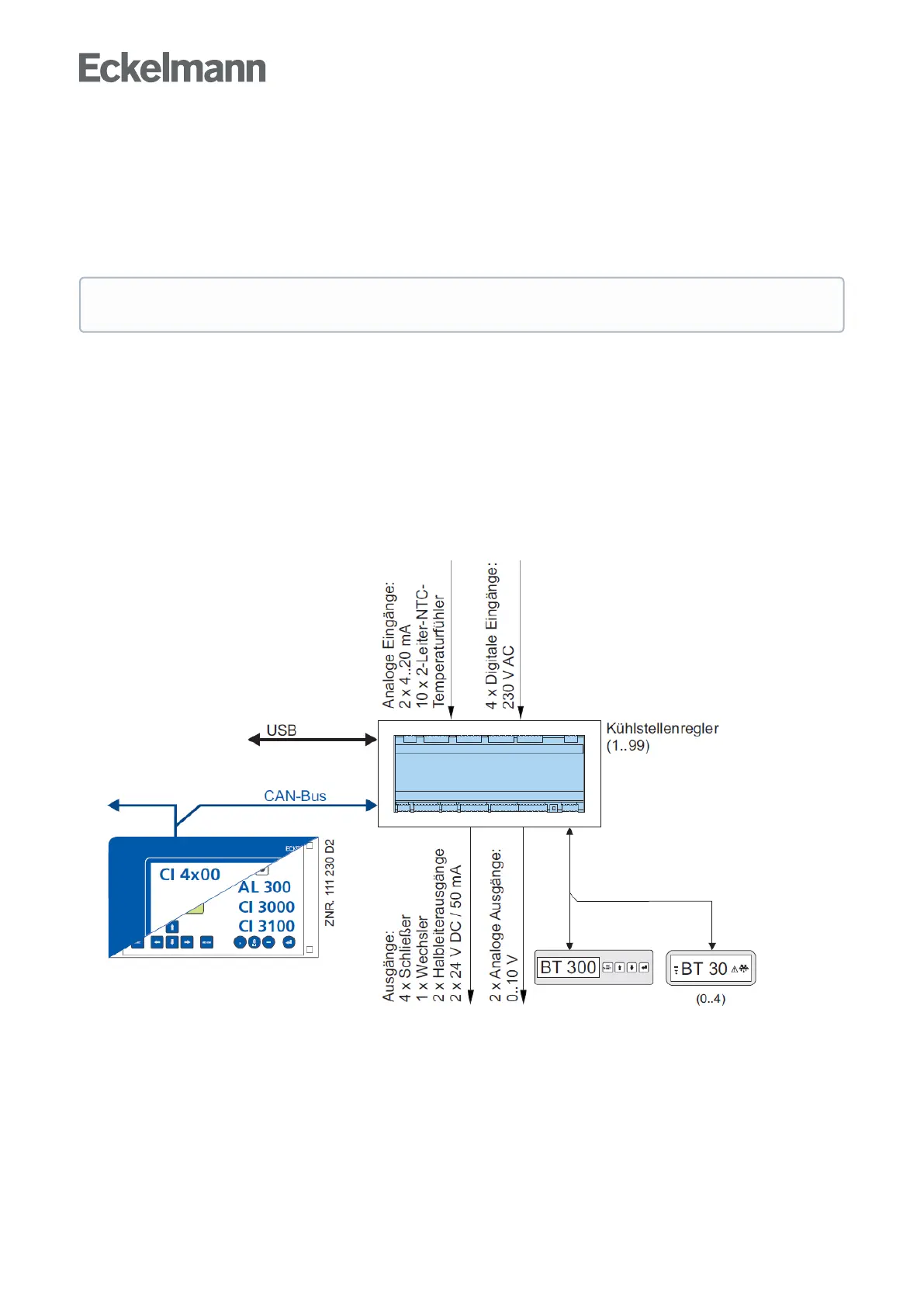
The case controller is housed in a plastic casing for DIN rail mounting and does not require any further optional
extension modules. Up to 99 case controllers can be used in the E*LDS system. If required, a BT 300 x
Operator Interface and up to 4 BT 30 Temperature Displays can be connected. For the direct parametrisation of
the case controller via LDSWin, for carrying out a firmware update of the case controller or for the
parametrisation of system components via CAN bus using LDSWin, the controller can be connected to a
notebook or a PC via the USB port. The following diagram illustrates the system architecture of the UA 410 E
AC case controller (complete design):
The range of functions described in this operating manual refers to the complete design.



 To Next Page