A selection of Programs have been curated from the Factory Lists and added to the User 1 List. To
explore this curated List, press the Select knob to enter Select Mode (Section 5.1). To search
through all the Programs on the H90, press the Programs Button to enter Programs Edit Mode
(Section 6.1).
3.2. Two Mono Inserts
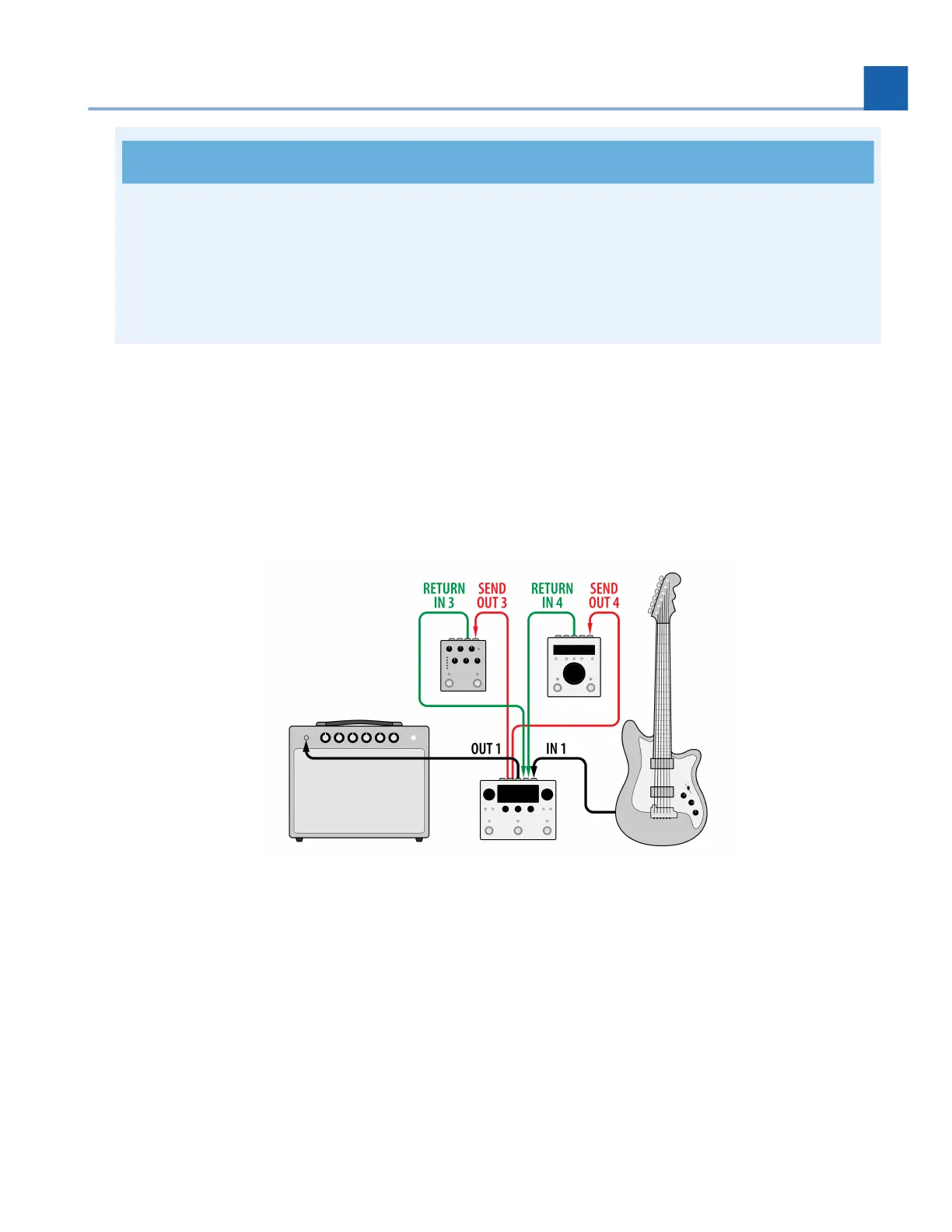
This configuration introduces two mono inserts. In this example an Eventide dot9 MicroPitch stompbox is
being used for Insert 1, and an Eventide H9 Max is being used for Insert 2.
Fig. 3.3 Two Mono Inserts
Connect your guitar to H90 Input 1.
Connect H90 Output 1 to your guitar amp.
Connect H90 Output 3 to MicroPitch Input.
Connect MicroPitch Output to H90 Input 3.
Connect H90 Output 4 to H9 Max Input.
Connect H9 Max Output to H90 Input 4.
•
•
•
•
•
•
3. SETUP














 To Next Page