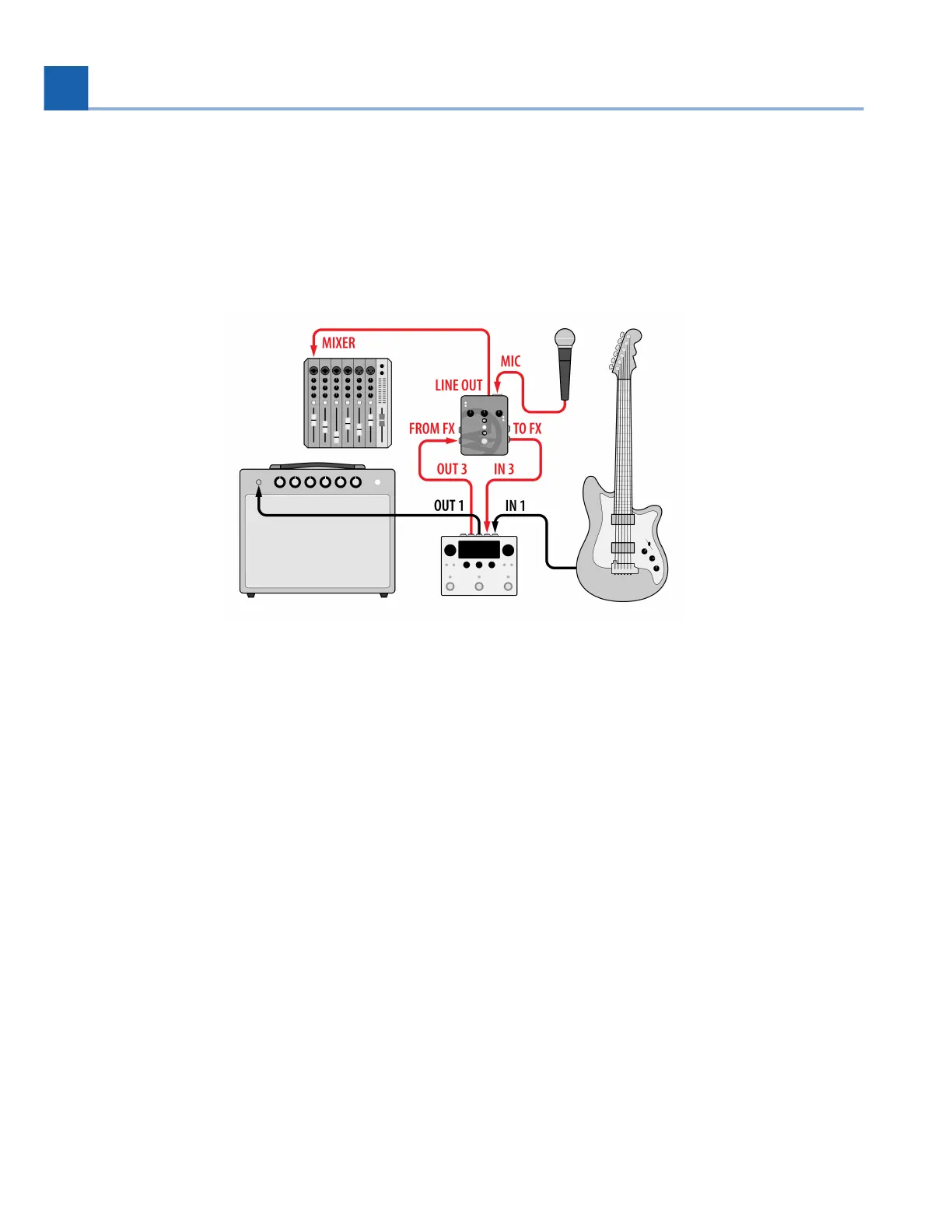
3.6. Guitar and Vocals with MixingLink
Using the Eventide MixingLink, you can easily amplify a microphone signal, as well as another signal such
as guitar, on two separate effects paths using the H90’s Dual Routing feature.
Fig. 3.10 Guitar and Vocals with MixingLink
Configure your H90’s Global Routing Configuration (Section 7.1) to use Dual Routing from the
System Menu.
Connect your guitar to H90 Input 1.
Connect H90 Output 1 to your guitar amp.
Connect your microphone to the MixingLink mic input.
Connect MixingLink Line Output to a monitor input, such as a mixing console.
Connect MixingLink ‘To FX’ Output to H90 Input 3.
Connect H90 Output 3 to MixingLink ‘From FX’ Input.
Press the Routing Button and turn Quick Knob 1 to adjust the routing position to Pre/Post. This
enables Preset A to be on Path 1 and Preset B to be on Path 2. Now we can use Preset A to process
our guitar signal into the guitar amp, and Preset B to process the microphone signal into a different
input source.
Check out Dual Routing (Section 6.2.2) for more info.
•
•
•
•
•
•
•
•
•
3. SETUP














 To Next Page