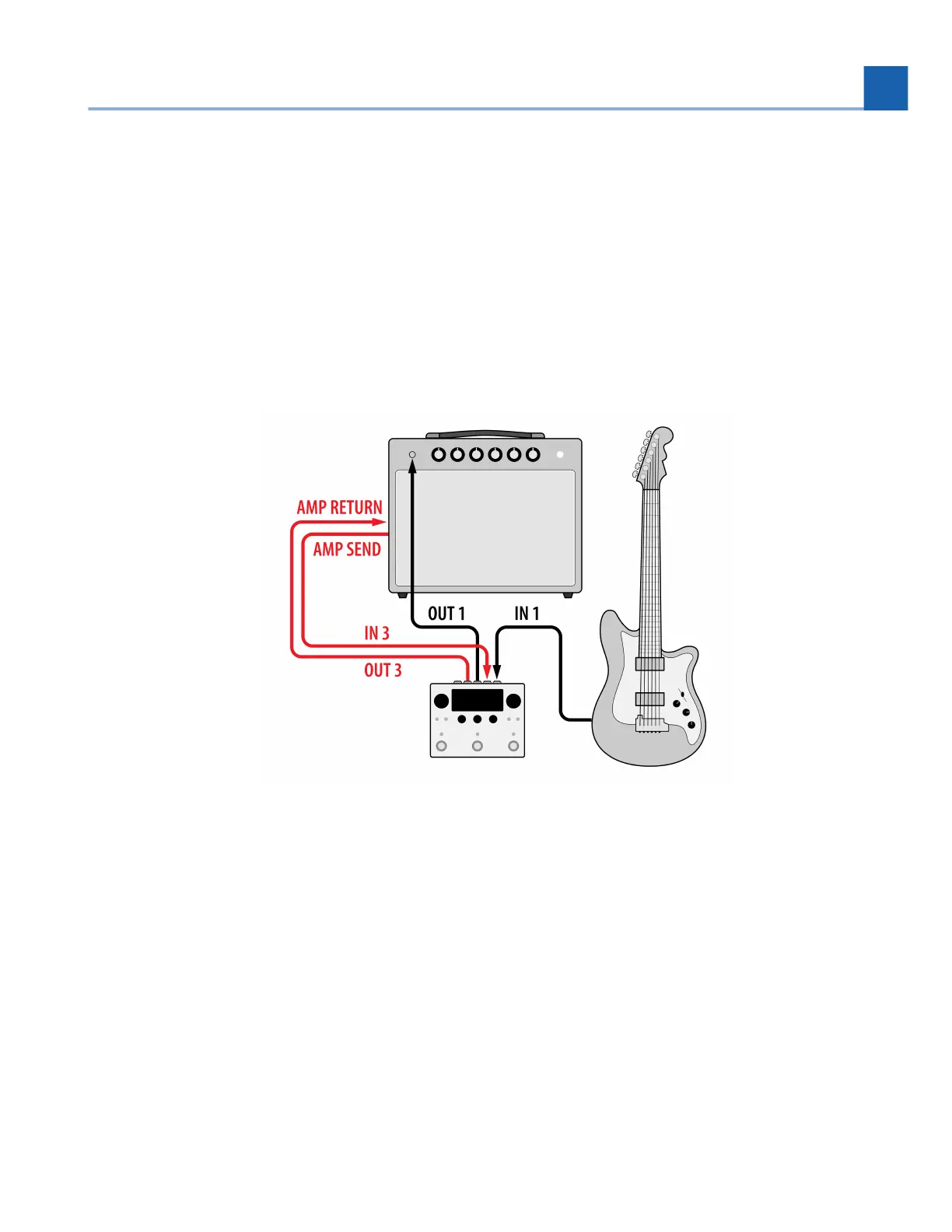
3.7. Pre/Post Amplifier
If your guitar amp has an effects loop, it is sometimes desirable to put certain effects such as drive or
compression before the preamp, and other effects such as delay and reverb after the preamp. This can be
referred to as a Pre/Post setup, or the four-cable method (4CM).
Dual Routing allows you to setup a variety of Programs that use different routing configurations with your
favorite effects at different positions of your amp’s signal path.
Fig. 3.11 A Pre-post or 4-cable method guitar amp configuration
Configure your H90’s Global Routing Configuration (Section 7.1) to use Dual Routing from the
System Menu.
Connect your guitar to H90 Input 1.
Connect H90 Output 1 to your guitar amp’s preamp input.
Connect your guitar amp’s effects send to H90 Input 3.
Connect H90 Output 3 to your guitar amp’s effects return.
Press the Routing Button and turn Quick Knob 1 to adjust the routing position to Pre/Post. The will
place Preset A between your guitar and preamp on Path 1, while Preset B will be placed in the
amp’s effects loop on Path 2.
•
•
•
•
•
•
3. SETUP














 To Next Page