173
MB1 User Manual
© 2016 Expert Electronics
TRANSCEIVER OPERATIONS
The chosen microphone is displayed in the software Main window on the indicator
there you can see the set level of the microphone AGC gain.
Note:
(
Max microphone AGC gain is stored for each microphone input separately.
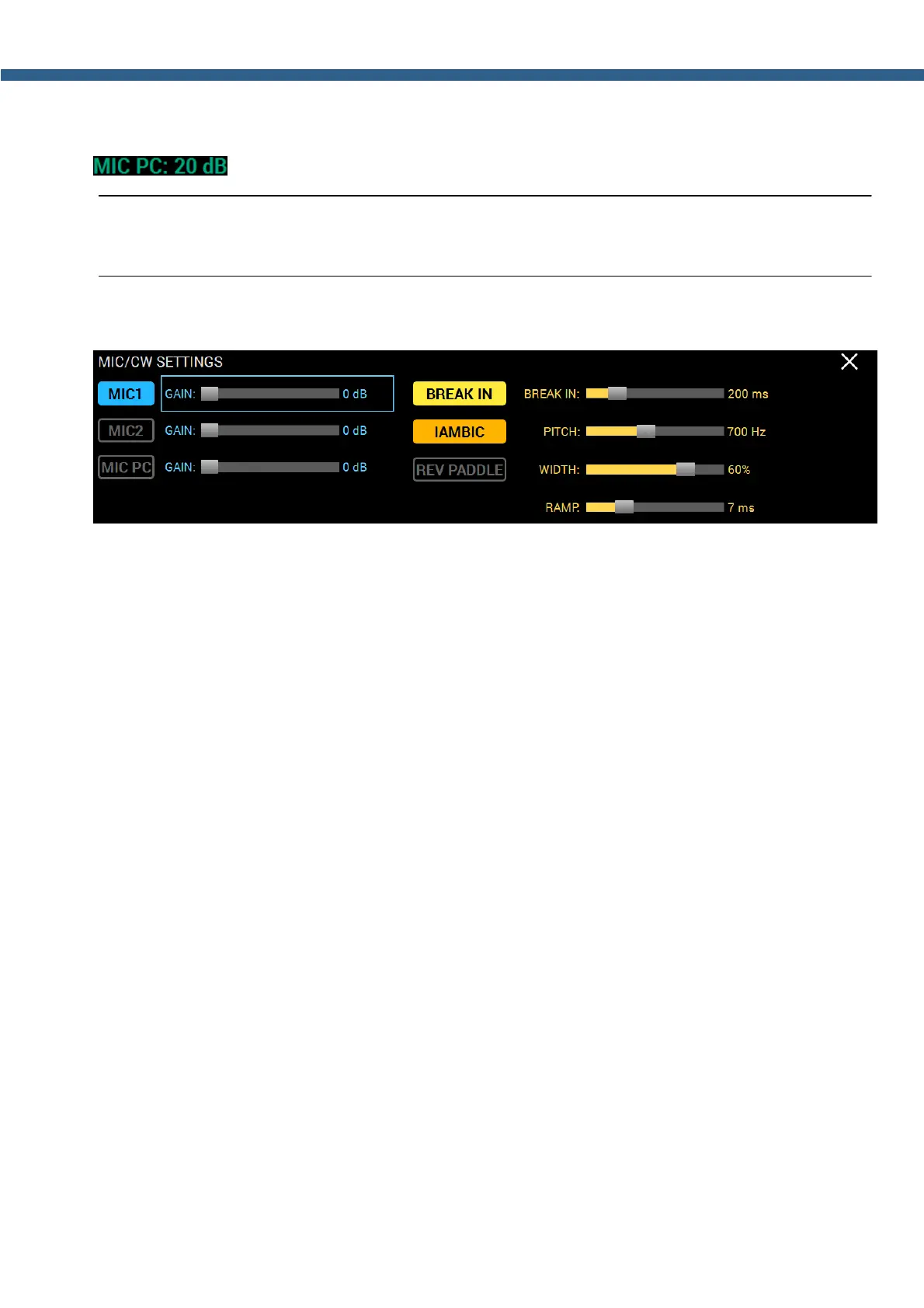
In the MIC/CW SETTING local panel you can see the microphone settings.
MIC1 - MIC 1 button.
Press the MIC1 button to choose corresponding microphone.
MIC1 GAIN - Microphone input gain control.
Set the required gain level of the microphone input. Control sets the max microphone's AGC
gain, while the microphone AGC is active.
MIC2 - MIC 2 button.
Press the MIC2 button to choose corresponding microphone.
MIC2 GAIN - Microphone input gain control.
Set the required gain level of the microphone input. Control sets the max microphone's AGC
gain, while the microphone AGC is active.
MIC PC - PC's sound card MIC.
Press the MIC PC button to choose PC's microphone.
MIC PC GAIN - Microphone input gain control.
Set the required gain level of the microphone input. Control sets the max microphone's AGC
gain, while the microphone AGC is active.



 To Next Page