19
MB1 User Manual
© 2016 Expert Electronics
CONNECTIONS
2.5 Rear Panel
2.5.1 Accessories
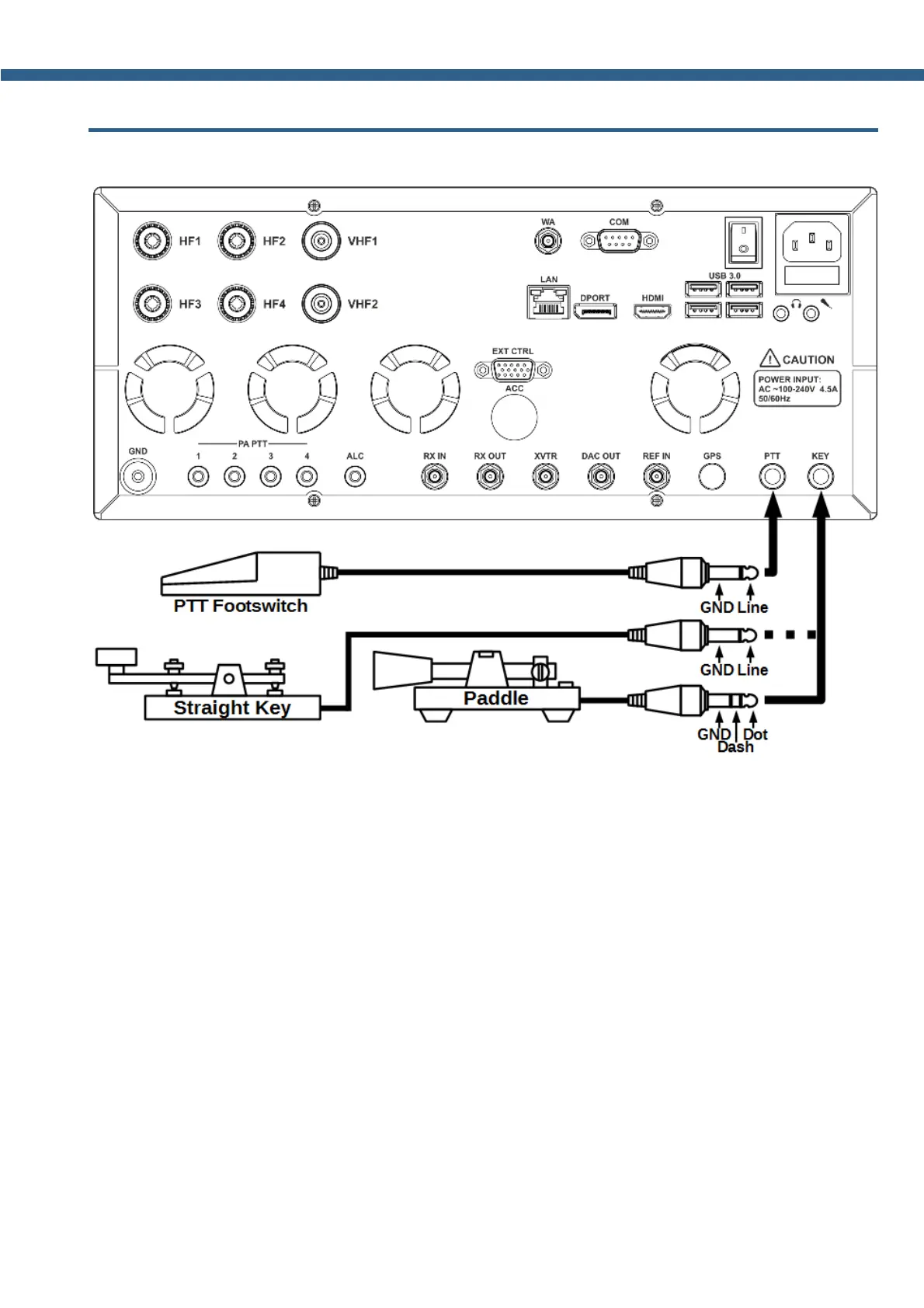
You can connect several accessories to the transceiver's rear panel, as shown on the picture
above.
PTT Footswitch. Connects to the PTT socket and controls transceiver's TX mode. Connector
type - 6.3 mm Jack.
When you press the footswitch, PTT Line connects to the Ground (Case), it causes the
transceiver to switch into the TX mode. A red LED TX indicator on the front panel and in the
software window, indicates that the TX mode is on.
Releasing the footswitch returns the transceiver to the RX mode.
Straight Key. Connects to the KEY socket using the mono 6.3 mm Jack. Pressing the key
switches the transceiver to the TX mode and when closed generates a continuous CW signal
(manual mode). The key is manipulated according to the message required.
Releasing the straight key returns the transceiver to the RX mode.



 To Next Page