Chapter 4 Installation and Wiring
PAGE 4-61
4-9-2 TCP/IP Setting Procedures (User Console Software)
1. If the TCP/IP settings of the MFC controller are set to anything other than the default settings,
then the new IP address will need to be registered in the AFC3000 User Console Software.
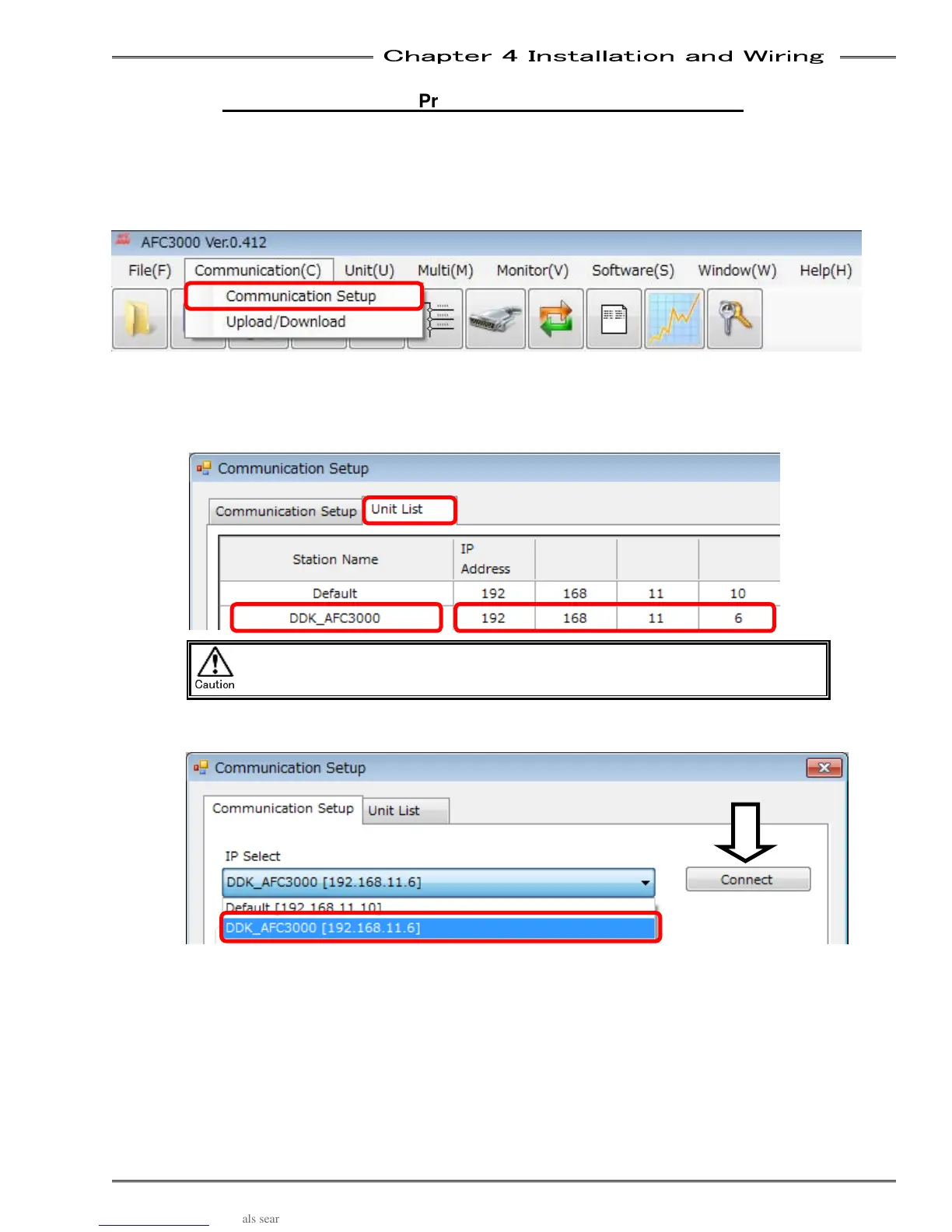
The communication setting window is displayed automatically when the User Console software is
started. Or, if the AFC3000 User Console has already been opened, select “Communication (C)”
→ “Communication Setting” in the Menu.
2. Select the communication setting window and then select the “Unit List” tab. Register the new
TCP/IP settings set in the controller you would like to communicate with.
2-1. Enter the station name (30 letters at max.).
2-2. Enter the IP address (0 to 255, 4 positions). (hit “TAB” or “→” to adv. to next position)
The settings will not be effective if the station name is not entered.
3. Return to the “Communication Setup” tab and select the station name you just entered in “ IP
Select,” pull down menu, then click “Connect.”
Caution



 To Next Page