Chapter 8 System Operation
PAGE 8- 12
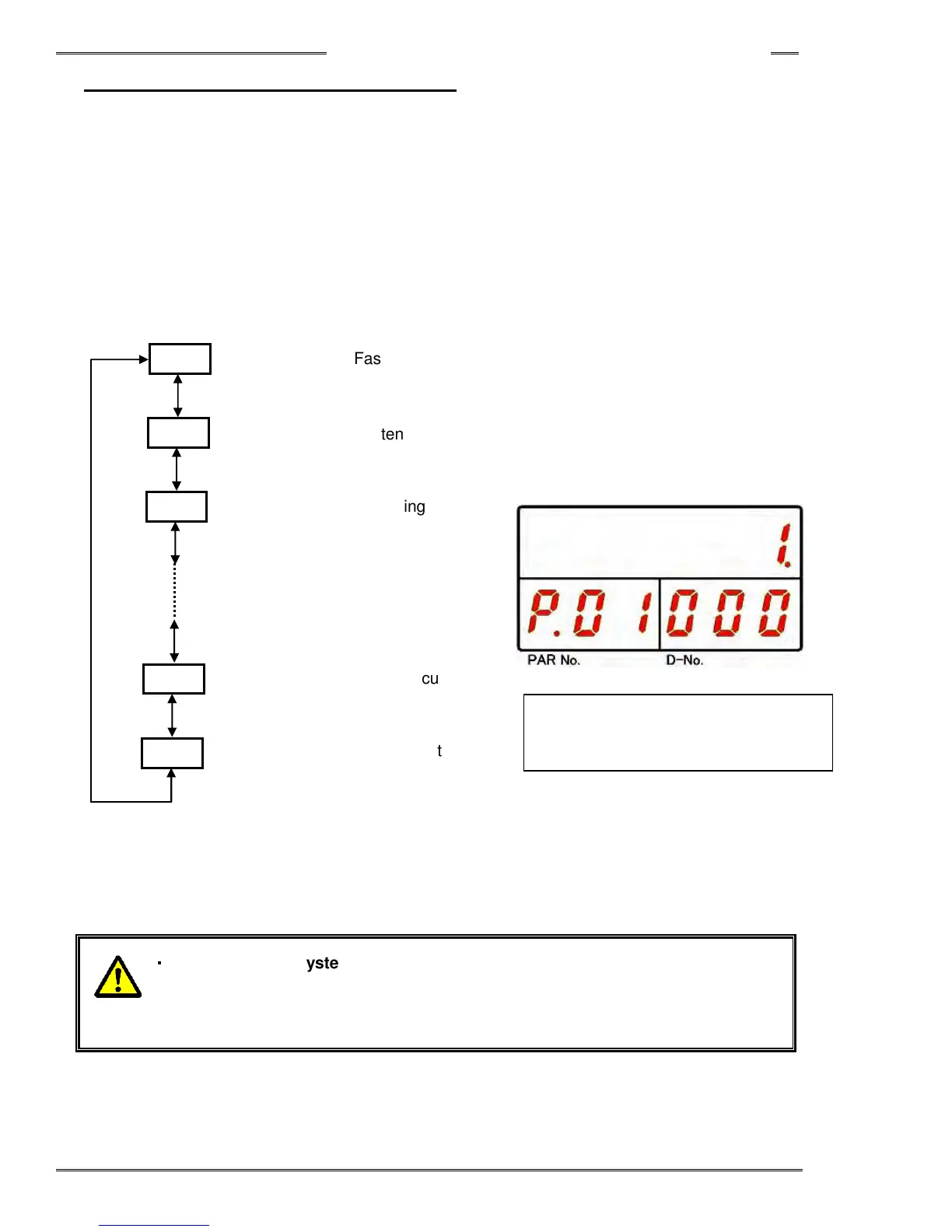
8-3-4 Fastening Parameter Display Mode
The following data is displayed in Fastening Parameter Display Mode. In the parameter setting mode, “P.” is
indicated at the leftmost digit of the PAR No. indication part and the parameter No. (01 to 32) is indicated by
the 10s and 1s digits.
The D-No. Display can be changed by pressing [▲], [▼] pushbuttons and the content of that data No. is
displayed. By pressing the [▲] or [▼] push-button, the “D-NO” can be changed ±1. The numbers can be
advanced 10 at a time by holding the [▲] or [▼] push-button longer. Refer PAGE 24 “Parameter List”
regarding the detailed about parameters.
「
「「
「D-No.
..
.」
」」
」
「
「「
「PAR No.
..
. 」
」」
」
「
「「
「DATA」
」」
」
01~32
Fastening Method
01~32
Fastening Steps
01~32
Fastening Option
01~32
Low limit current
01~32
Current limit
・
・・
・
When using a system setup as a
multi system, in addition to fastening
parameter setting, the “Sequence Setting
” must be set in the MASTER Axis
from the AFC3000 User Console to start the fastening operation.
[▲] switch or [▼] switch
Skip 10 numbers while holding
~
000
001
002
522
523



 To Next Page