FT-111, User Manual Rev. 2.0.0, June 2022 Page 22 of 137
Step 6: RS 485 Serial Port
FT-111 weighing terminal has a RS485 serial port on the main board. The use of this galvanically isolated
serial port and its specifications are described in the Table 4-4 and its pin configuration is shown in Table 4-5.
RS485 serial port is named as Int 3 on the main board. Refer to page 39 to configure RS485 serial port and
page 39 for details on data formats.
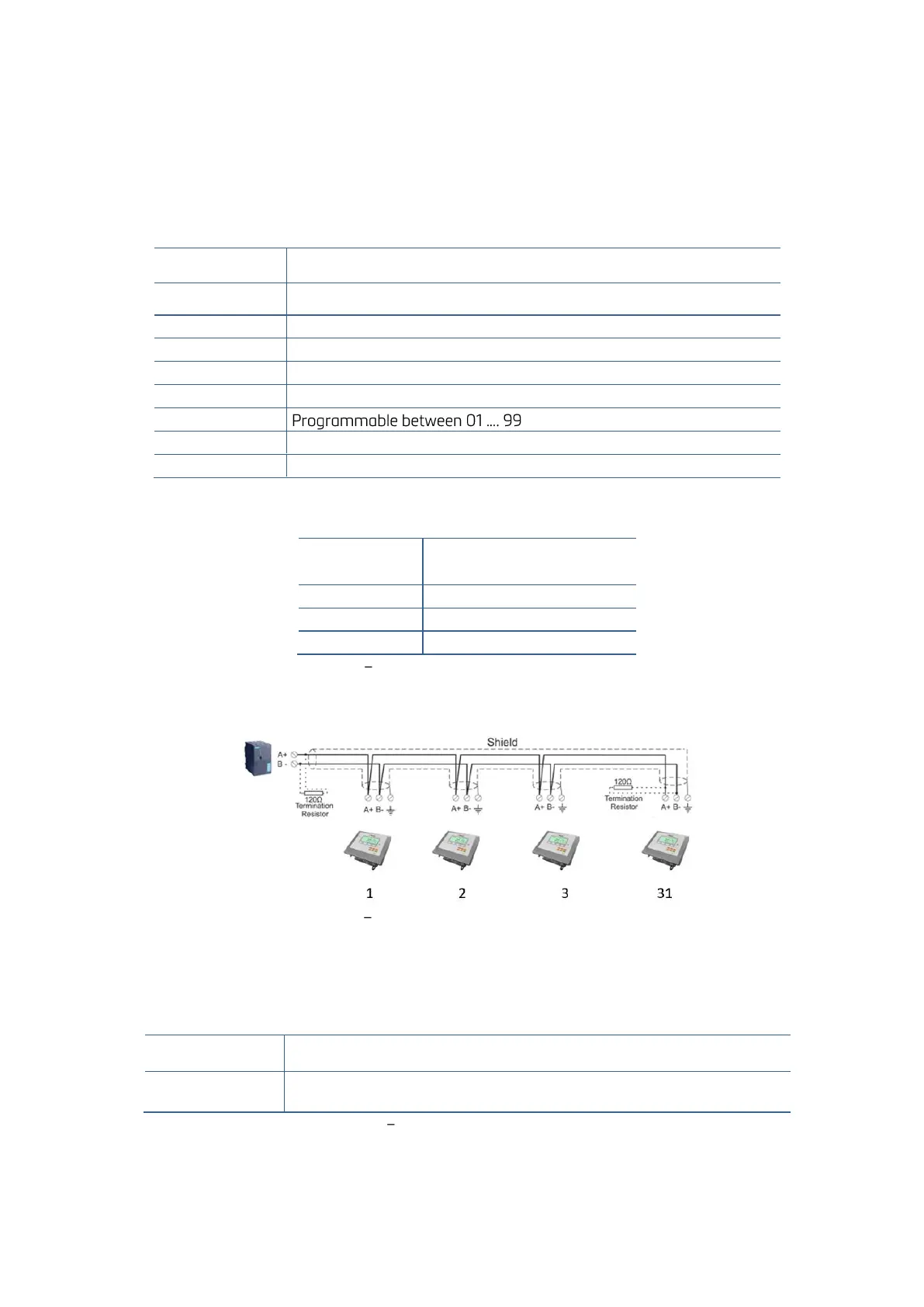
Remember 120-ohm line termination resistors should be installed on both ends of the RS 485 line.
Interfacing with printer, PC, PLC, remote display etc.
Continuous, Fast Continuous, Printer, BSI Protocol or Modbus RTU.
1200 / 2400 / 4800 / 9600 (Default) / 19200 / 38400 / 57600 bps
Even, Odd or No (default)
1 start bit and 1 stop bit
Maximum 31 instruments on the line.
Table 4-4 - RS485 Serial Interface Specifications
Table 4-5 Pin configuration of RS 485 terminal
RS485 serial connection is done with two wires as indicated below in
Figure 4.11 Multi instrument connection with PLC
Step 7: Ethernet TCP/IP
The usage of the Ethernet port on the main PCB and its data formats are shown in the Table 4-6 and its pin
configuration is shown in Table 4-7. Refer to Section 8 of the manual to configure this interface. Use the
RJ45 connecter with metal body and connect shield of the Ethernet cable to the metal body of the connector.
Interfacing with Printer, PC, PLC, remote display etc.
Continuous, Fast Continuous, Printer, BSI Protocol, Modbus TCP
Table 4-6 Data formats of Ethernet port



 To Next Page