5 Check Mailbox
168
Check Mailbox
5
Checking Mailbox Procedure
The procedural steps for using [Check Mailbox] features and their reference pages are
listed below.
Step 1 Opening the [Check Mailbox] Screen............................................................................168
Step 2 Selecting Box Type........................................................................................................168
Step 3 Selecting Box.................................................................................................................169
Step 4 Checking/Selecting Box Documents .............................................................................169
Step 5 Printing Copy & Print Jobs Document ..........................................................................169
Step 1 Opening the [Check Mailbox] Screen
Follow the procedure below to open the [Check Mailbox] screen.
Note • Features displayed may vary according to the machine’s configuration.
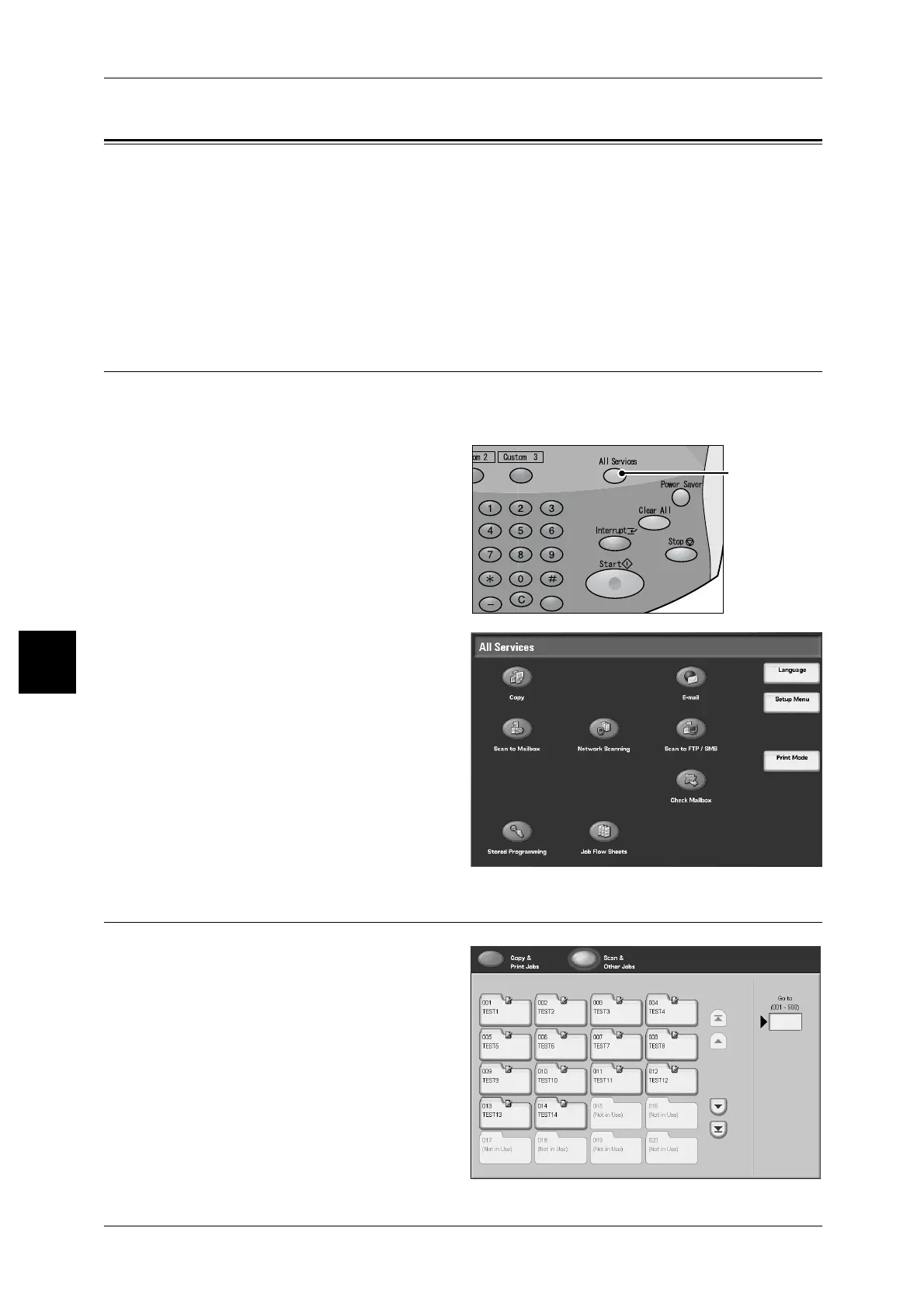
1 Press the <All Services> button.
2 Select [Check Mailbox].
Step 2 Selecting Box Type
1
Select [Copy & Print Jobs] or [Scan
& Other Jobs].
<All Services>
button



 To Next Page
 Loading...







