Chapter 8 Monitoring using EMS Alarms
© 2012 Harmonic Inc. 168 ProView 7000 v.2.6, Rev. E
8.2 Alarms
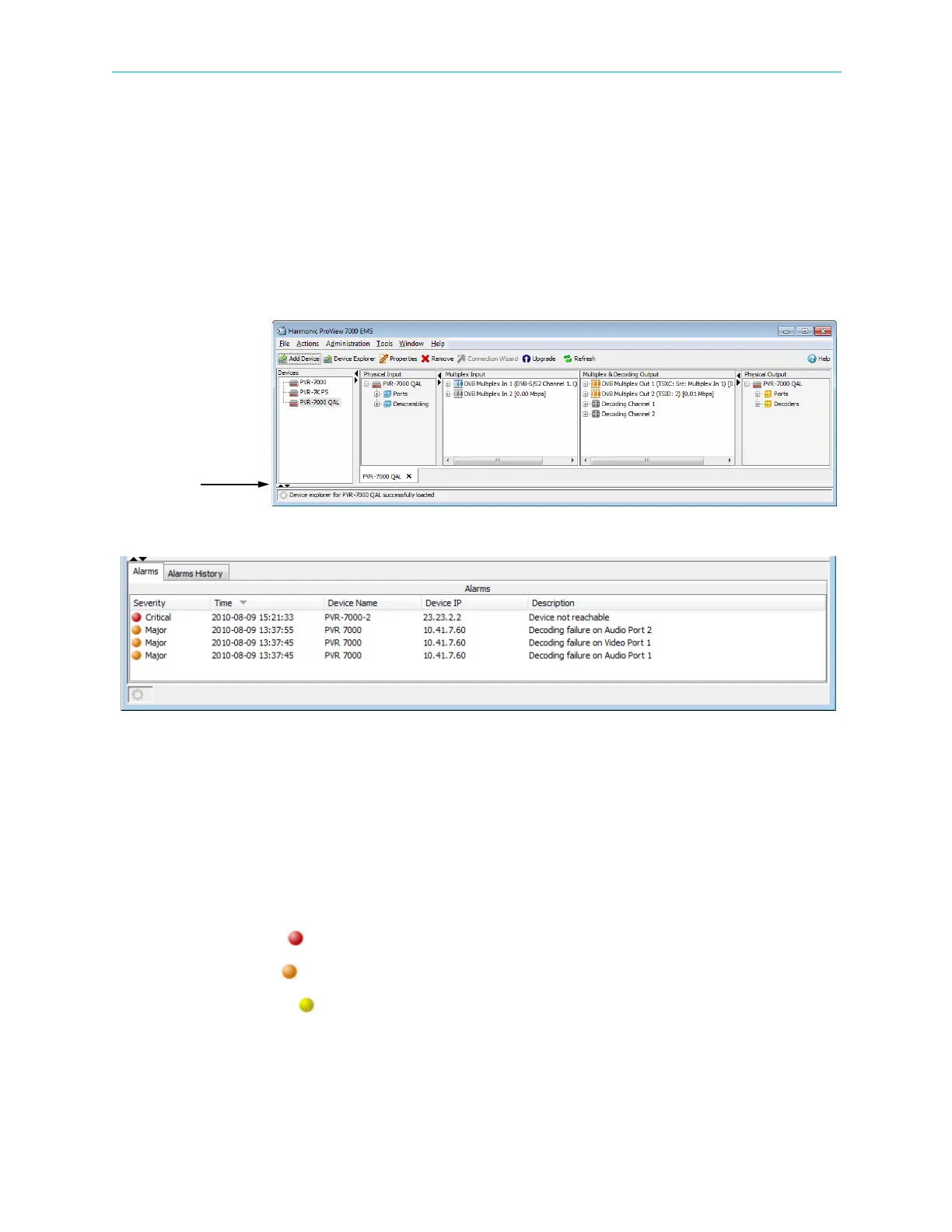
Use the Alarms tab to display the active alarms. Alarms alert the user to conditions that may
require attention. Concerning multiplex input redundancy, alarms on the backup source port
of a multiplex in port display on the Alarms tab if the relevant redundancy trigger is enabled
and the threshold matches the Redundancy Triggers configuration, see 7.2.4 Multiplex In Port
Properties.
To display the Alarms tab:
❖ If the Alarms tab is collapsed, click the left most of the two triangles in the bottom left of
the EMS window to expand it.
Figure 8–1: Alarm tab
To refresh the alarm list on demand:
1. Right-click any alarm in the list.
2. Select Refresh Alarms.
The information provided for each alarm displayed consists of the following:
■ Alarm Severity – The alarm severity level.
The alarm severity color codes are:
❑ Critical ( red)
❑ Major ( orange)
❑ Warning ( yellow)
■ Time – Alarm generation date and time (yyyy-mm-dd hh:mm:ss format).
■ Device Name and IP – The identification name and IP address of the ProView 7000™ device
which have raised the alarm.
■ Description – The alarm identification and description information.



 To Next Page