Chapter 7 Device Configuring Using EMS Multiplex & Decoding Outputs
© 2012 Harmonic Inc. 99 ProView 7000 v.2.6, Rev. E
Related topics:
■ 7.3.1 Multiplex Output
■ 7.3.2 Multiplex Output Properties
■ 7.3.3 Transport Stream Port Route Properties dialog
■ 7.3.4 Output Multiplex Program Properties
■ 7.3.5 Output Multiplex Elementary Stream Properties
■ 7.3.6 Output Tables Properties
■ 7.3.7 Output Unreferenced PID Properties
■ 7.3.8 Decoding Channel Properties
7.3.1 Multiplex Output
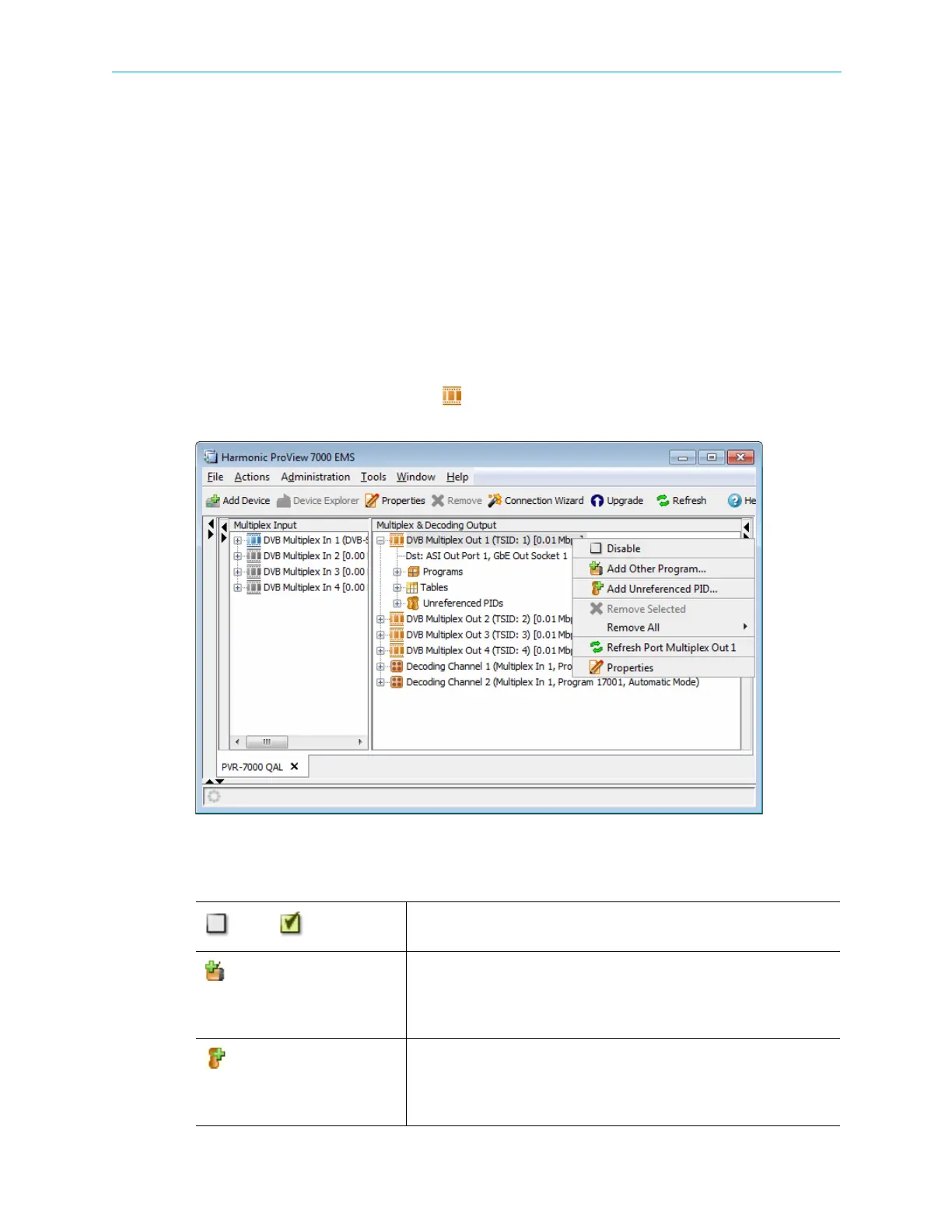
Right-click a Multiplex Output icon ( ) or any of the sub elements to display a context menu
which comprises the following:
Table 7–1: Multiplex Output Context Menu
Disable/ Enable
A dynamic command, changing according to the multiplex output
operational status.
Add Other Program…
Enables adding a program from the multiplex input to the multiplex output
programs.
NOTE: Not available when the device is configured to pass-through the
input stream to the output port.
Add Unreferenced PID…
Enables adding a specific PID from the multiplex input to the multiplex
output unreferenced PIDs.
NOTE: Not available when the device is configured to pass-through the
input stream to the output port.



 To Next Page