© 2012 Harmonic Inc. 32 ProView 7000 v.2.6, Rev. E
Chapter 3
Front Panel Overview
The front panel of the ProView 7000™ multifunctional receiver platform provides a managing
interface for local monitoring and configuring the operation of the ProView 7000™ unit. This
chapter describes the operation of the front panel interface.
Topics:
■ Main Elements and Structure
■ Front Panel Display
3.1 Main Elements and Structure
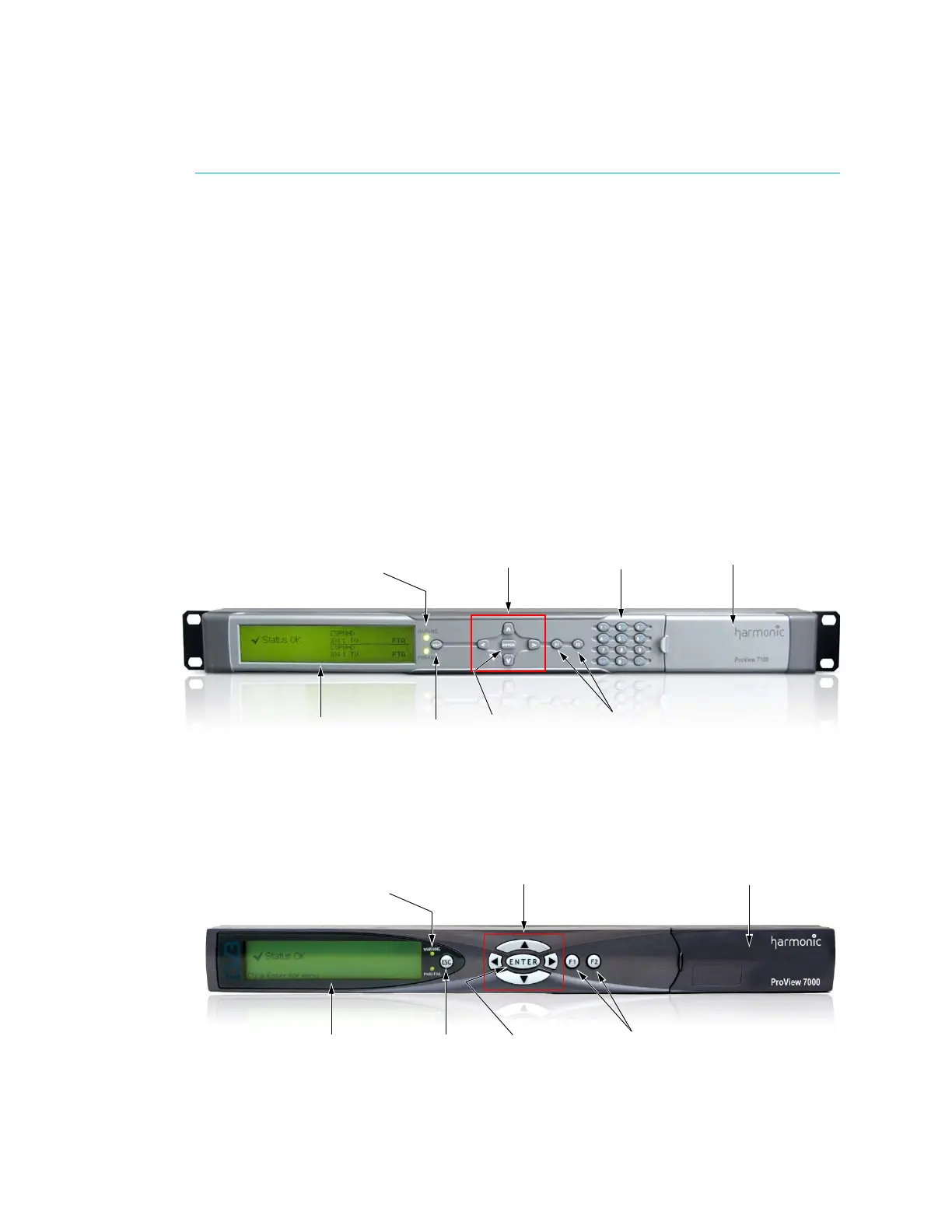
The ProView 7100™ and ProView 7000™ front panels display information regarding the input
streams and output streams and to perform basic operations. Figure 3–2 and Figure 3–1
illustrate the front panels.
Figure 3–1: ProView 7100™ front panel
Figure 3–2: ProView 7000™ front panel
Alpha-Graphic LCD
ESC and ENTER
control keys
WARNING, PWR/FAIL
LEDs
Four direction
touch-pads
DVB-CI
Alphanumeric
keypad
Function keys
Alpha-Graphic LCD ESC and ENTER
control keys
Function keys
WARNING, PWR/FAIL
LEDs
Four direction
touch-pads
DVB-CI



 To Next Page