Chapter 7 Device Configuring Using EMS Physical Input Ports and Slots
© 2012 Harmonic Inc. 85 ProView 7000 v.2.6, Rev. E
7.1.4 CAM Slots
The ProView 7000™ has two PCMCIA slots and the ProView 7100™ has four PCMCIA slots on
the front panel that can each accommodate a DVB-CI module with a smart card to
descramble incoming video, see Figure 3–2 on page 32 for the location.
7.1.4.1 Inserting a CAM
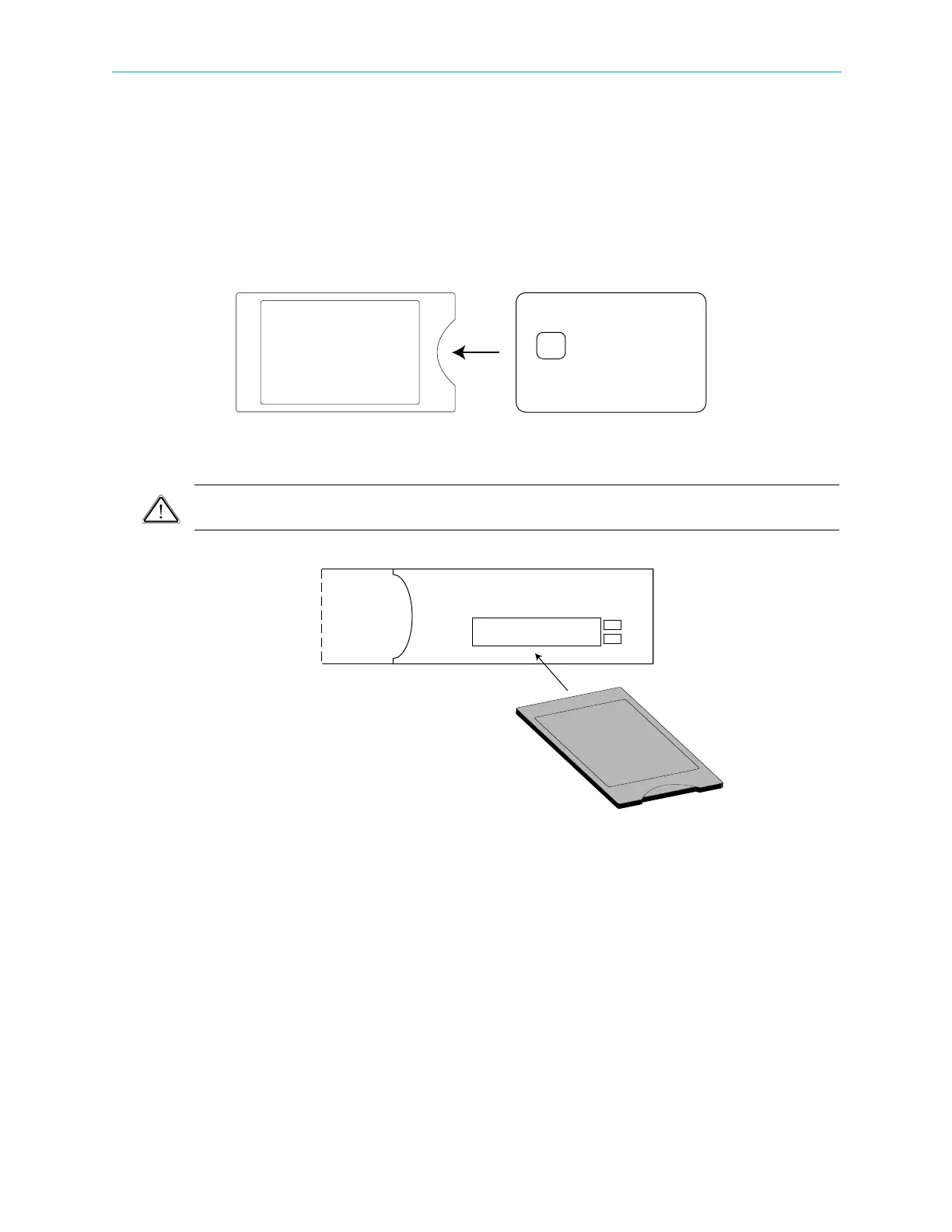
1. Insert the smart card into a DVB-CI module with the contacts facing up and towards the
front end.
2. Insert the DVB-CI module into one of the two PCMCIA slots with the up arrow pointing
upwards and in the direction of insertion.
CAUTION: Do not remove or insert the DVB-CI module or the smart card while the ProView 7000™ is
powering up or initializing.
Figure 7–6: ProView 7000™ with the DVB-CI module and Smart Card
When installed, the card is detected automatically by the ProView 7000™ and enabled if the
following conditions are met:
■ The installed card must be EN50221 compatible
■ Services have been selected
■ A valid card license



 To Next Page