Chapter 2 Quick Start Configuring and Monitoring
© 2012 Harmonic Inc. 26 ProView 7000 v.2.6, Rev. E
2.4.2.2 Launching EMS
Prerequisites:
The device IP address must be configured using the ProView 7000™ front panel, see
2.3 Configuring the IP Parameters.
To launch the ProView 7000™ EMS:
❖ Double-click the Harmonic ProView 7000™ EMS launch icon to launch EMS.
The EMS GUI displays.
2.4.2.3 Adding a Device
The IP Address is the same one you configured in 2.3 Configuring the IP Parameters on
page 20. For details on usernames and passwords see 7.10.5 Log-In / Log-Out Control of the
Device on page 147 and 7.11.4 Device Users’ Access Properties on page 162.
To add a device:
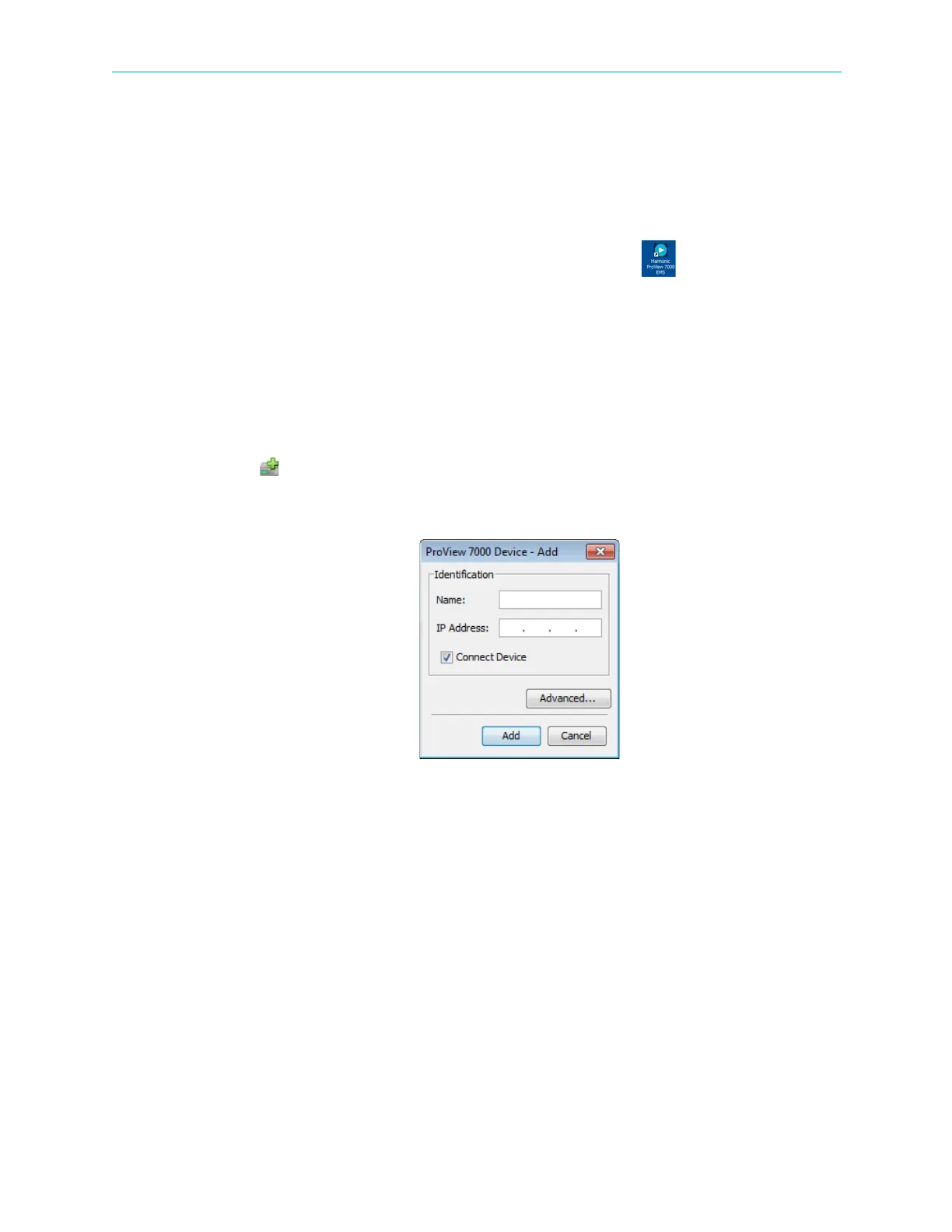
1. Click Add Device on the EMS toolbar
—or—
select Administration > Add ProView 7000.
Figure 2–1: Add Device dialog
The EMS displays the Add ProView 7000™ Device dialog.
2. Enter a name for the new ProView 7000™ device.
3. Enter the IP Address of the new ProView 7000™ device.
4. For automatic connection when launching the EMS, mark the Connect Device
checkbox.
5. Click Add.
The Log In dialog displays.
6. Select a username from the drop down menu, configure or monitor, the password is the
same as the username by default.
The device connects automatically.



 To Next Page