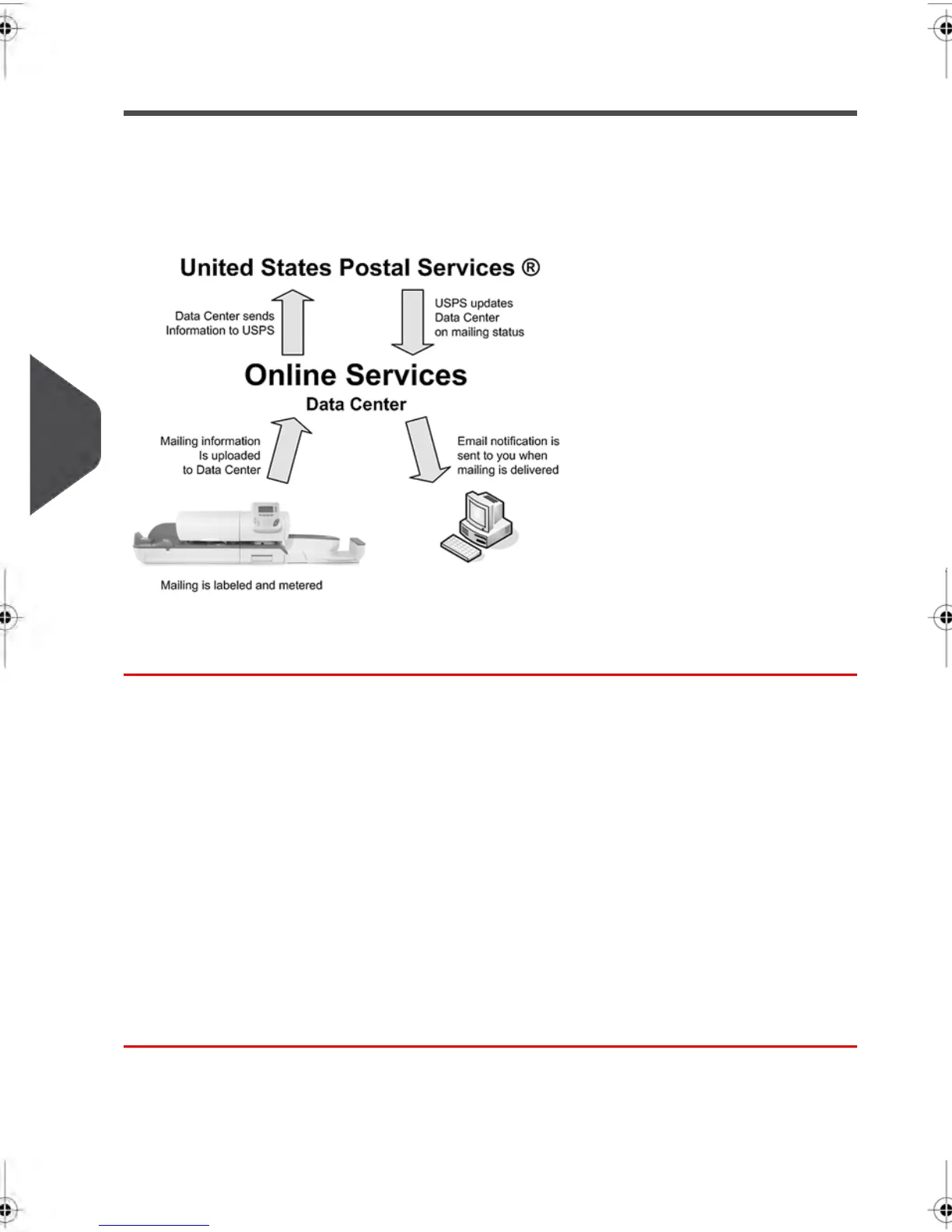
How e-Confirmation Service Works
You can track mail delivery through the Online Services server because the server is in
constant communication with the USPS. The diagram below shows how tracking information
flows from your mailroom, through the Online Services server and on to the USPS, and
then back to you.
The Process in your Mailroom
1. Apply a tracking label (supplied by your Customer Service) to your mail.
For information about ordering new labels, please contact your Customer Service.
2. Select the appropriate rate and e-Confirmation service on your machine display.
3. Apply the metered postage to your mail.
4. Deposit your mail with the USPS (e-Confirmation does not require additional special
paper work, as do retail mail confirmations).
5. Upload your daily mailing information to the Online Services Server.
This function is performed everyday via an automatic call during the night.
6. Receive USPS updates about your mail’s delivery status via emails from the Online
Services server. You can also check the status of your mail on the web by logging on
to the Online Services Web page.
140
| Page 140 | feb-14-2014 12:06 |
7
Online Services



 To Next Page