EasyManua.ls Logo

Heska Element DC5X - Function Menu Operations; Overview of Function Menu

Heska Element DC5X
125 pages
Print Icon
To Next Page IconTo Next Page
To Previous Page IconTo Previous Page
Loading...
95
Element DC5X
Veterinary Chemistry Analyzer
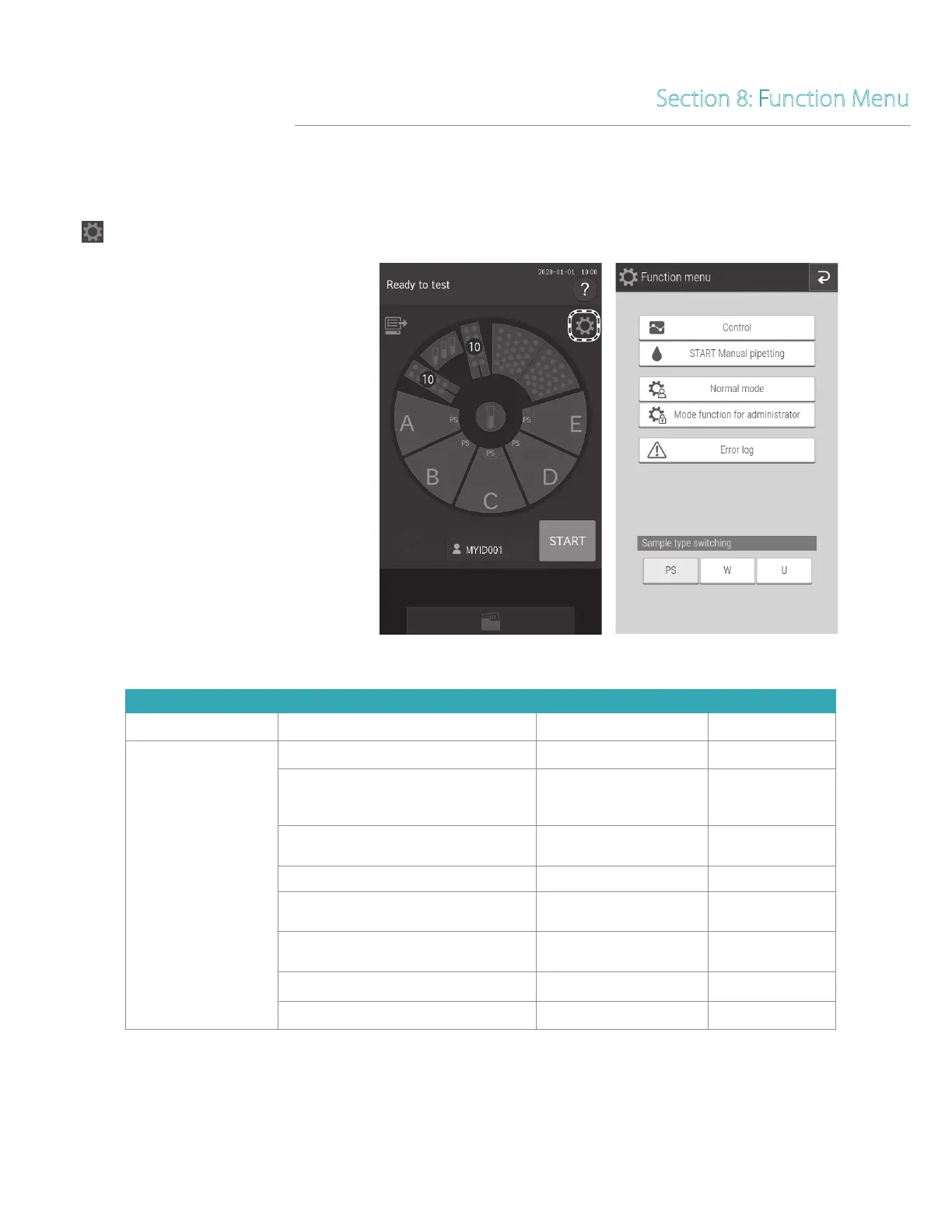
8.1 Function Menu
If the (Function menu) is touched, the Function menu screen appears.
Section 8: Function Menu
Function menu list.
Function Menu Items Settings Advanced Settings Reference Section
Control
8.2
Normal mode
Date & time settings 8.3.1
Brightness • Volume
Display brightness
Error sound
Other general sound
8.3.2
Lamp management
Lamp ON time
Lamp OFF timer setting
8.3.3
Lot information 8.3.4
Sampler leak check
Sample nozzle
Reference fluid nozzle
6.6.1
Replace O-ring
Sample nozzle`
Reference fluid nozzle
6.6.2
Reference plate level check 6.3.1
Cleaning mode 6.3.2

Table of Contents

Other manuals for Heska Element DC5X

Related product manuals