12
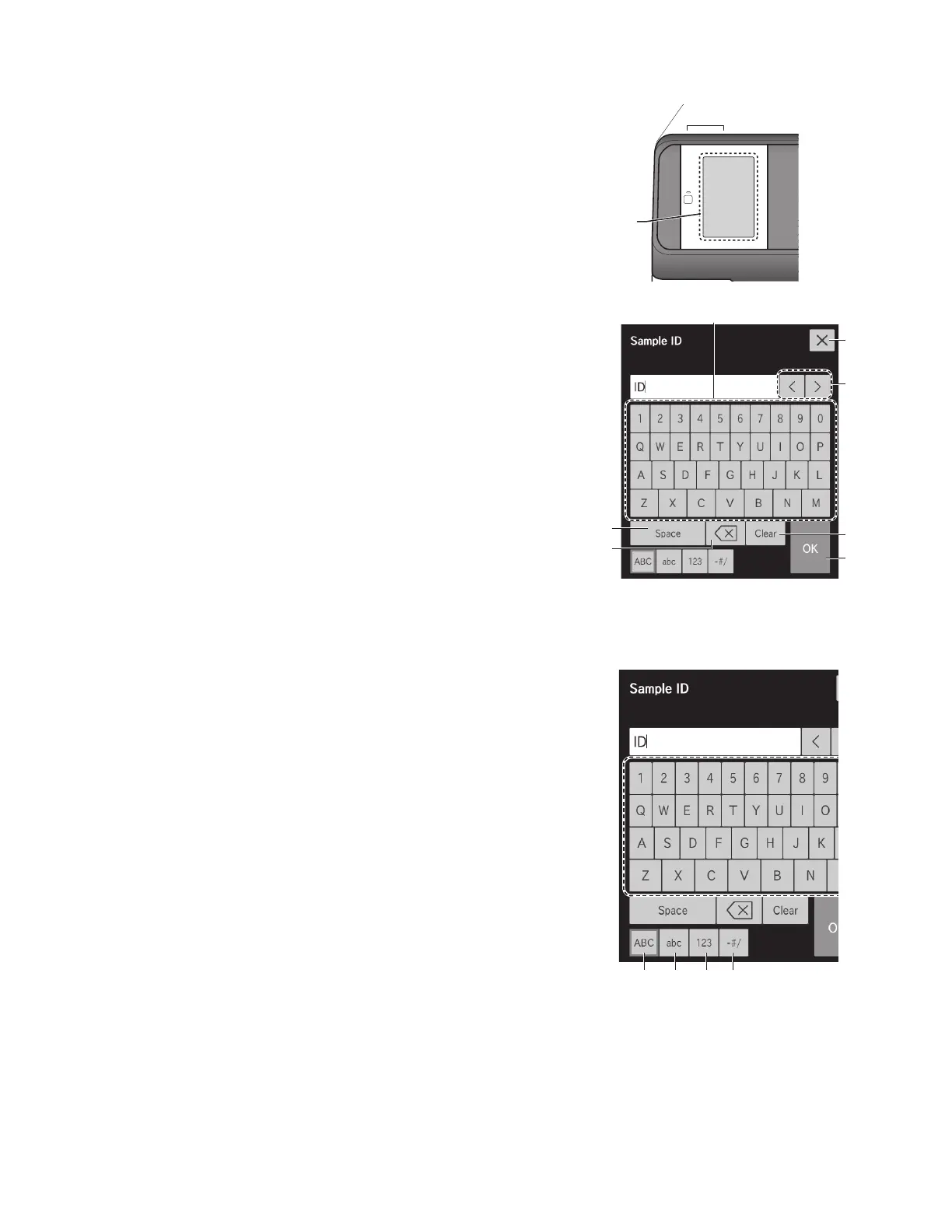
2.3 Names and Functions of Software Keyboard Screens
When data entry for operations and configurations is necessary, the software keyboard appears on the LCD automatically.
Enter alphanumeric characters and symbols.
1. Alphabetical characters, numbers and symbols.
Enter alphabetical characters, numbers and symbols.
2. X button
Delete all entered characters, and then quit keyboard entry.
3. MOVE CURSOR buttons
Move the position of the cursor left or right by one character.
4. CLEAR button
Delete all entered characters.
5. OK button
Confirm the entered characters.
6. BACKSPACE button
Delete the character to the left of the cursor.
7. SPACE button
Enter a space of one single character width.
Change the entry screen by using the ABC, abc, 123, or -#/ button.
When the ABC button is selected
8. ABC button
Display the entry screen for uppercase alphabetical characters and
numbers.
1
2
5
4
7
6
3
LCD
(LCD touch panel)
8 9 10 11
When the [ABC] button is selected



 To Next Page