67
6.4 Replacing Recording Paper
When red lines appear along the sides of the recording paper, the printer is nearly out of paper, so replace the recording paper
roll with a new one.
NOTE: Use the recording paper specified for the Element DC5X Analyzer.
2
1
Press the
concave
section.
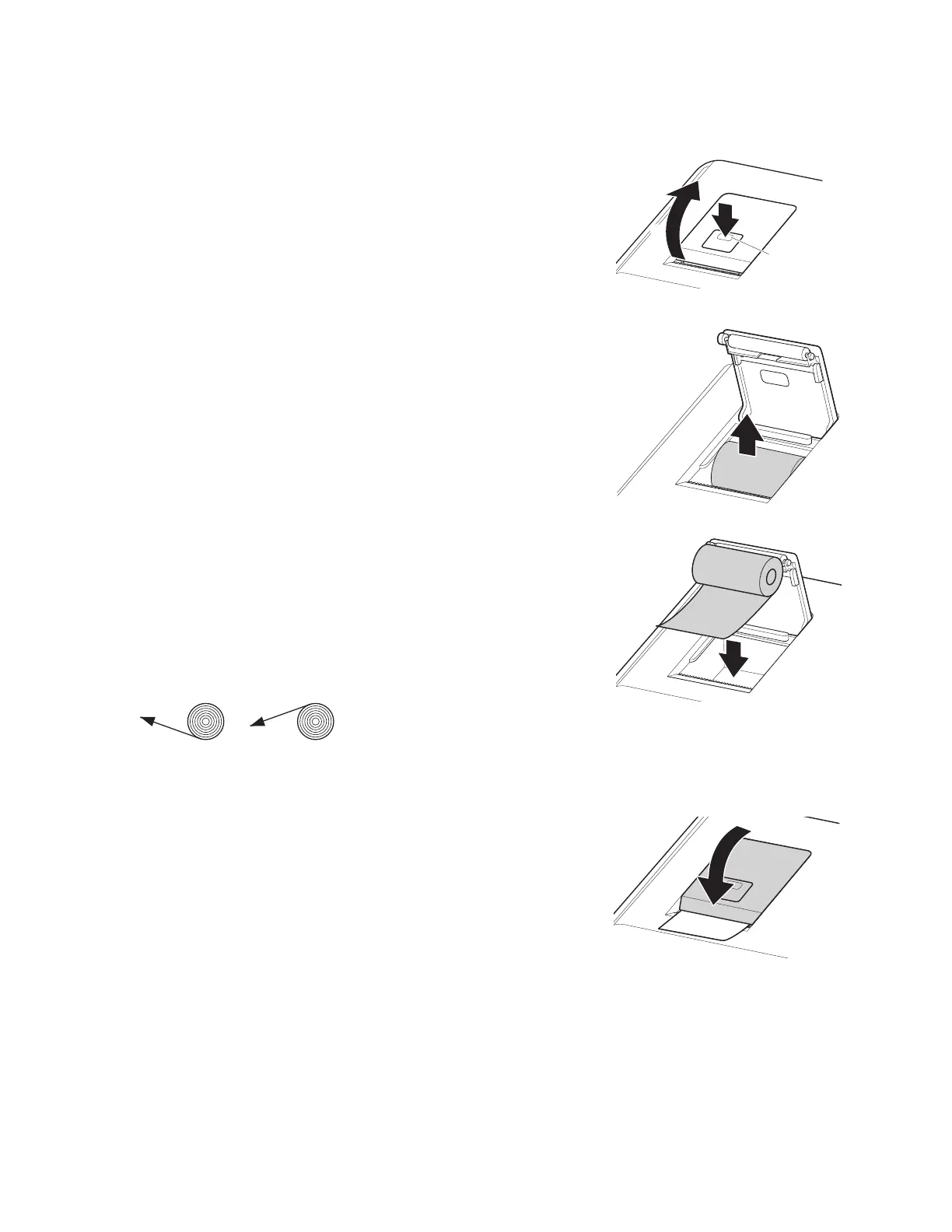
1. Press the section indicated in the illustration (1) to release the
lock, and then open the cover (2).
2. Remove the remaining recording paper.
3. Load the new recording paper.
NOTE: If the paper replacement was performed during a
measurement, the measurement results might be printed out.
NOTE: Set the paper roll so the paper is pulled from under the paper
roll as shown below.
NOTE: If the paper is loaded in reverse, no text is printed on the
thermal paper.
4. Pull the top end of the recording paper out slightly and then
close the cover.
OK Incorrect



 To Next Page