Home
Heska
Measuring Instruments
Element DC5X
Page 112
Heska Element DC5X - Page 112
125 pages
Manual
Save Page as PDF
To Next Page
To Next Page
To Previous Page
To Previous Page
Loading...
106
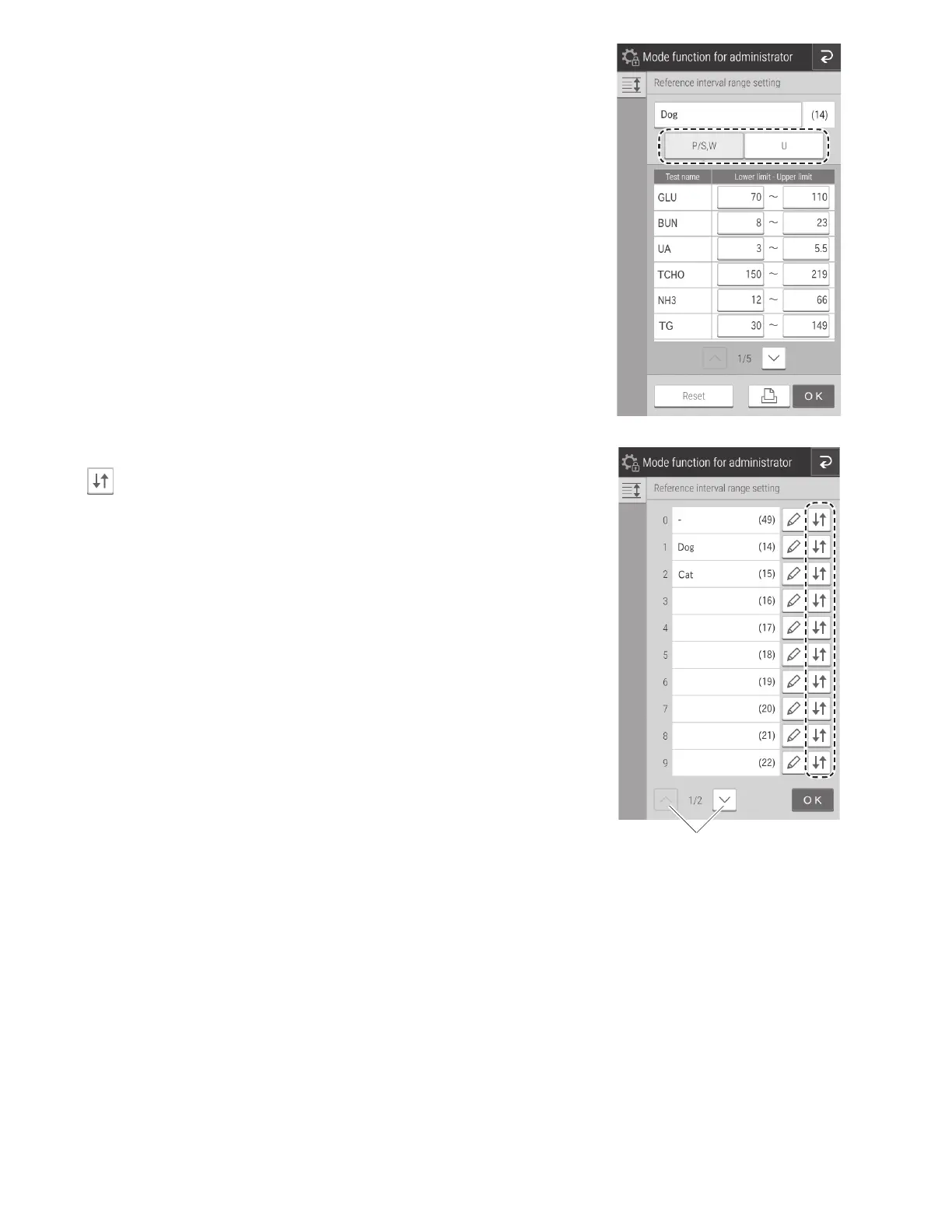
If an entr
y field is touched, the software ke
yboard appears in
order to edit the t
est name and other details.
Section 2.3
Make sure the sample type selec
ted is [P/S,
W
].
Next-page buttons
Changing the display or
der
.
T
ouch
of the test to change the display order
.
111
113
Table of Contents
Main Page
Table of Contents
3
Cautions and Warnings Used in the Manual
7
Operating Cautions
7
Biohazards and Disposal
7
Warnings Regarding Explosives
8
Warnings Regarding Electric Shock
8
Electromagnetic Compatibility (EMC)
8
Caution Regarding Moving Parts
9
Installation Locations
9
Measurement Results
10
DRI-CHEM Slides
10
QC Card System
11
Samplercover
11
1.13 DRI-CHEM AUTO TIPS, Sample Tubes and DRI-CHEM MIXING CUPS
11
Light Source Lamp
12
1.15 Recording Paper
12
Labels
12
Part Names
13
Touch Panel Screen Names and Functions
16
Measurement Preparation Screen
16
Help Screen
17
Names and Functions of Software Keyboard Screens
18
Accessories
19
Consumables and Optional Accessories
20
Consumbables
20
Optional Accessories
21
Section 3: Measurement
22
Operation Overview
22
Measurement Preparation
24
Basic Measurements
26
Lamp off and Measurement Start Scheduling
31
Measurement Results Screen
32
Measurements Results Display
32
Measurement Results Screen Buttons
34
Calendar Display
35
ISE Test Measurements
35
Dilution Tests
36
Powering off the Element DC5X Analyzer
38
Sample Tubes for the Element DC5X Analyzer
40
Blood Collection Tubes
40
Producing Samples Using Sample Tubes
40
Sample Racks
41
QC Card System
41
Calculation Method
41
Interrupting Sample Application and STAT Tests
43
Interrupting Sample Application
43
Requesting a STAT Test
44
Running Tests
46
Slide Loading Order When Measuring Different Items Simultaneously
48
Automatic Acquisition of Sample Information (Work Lists)
48
Editing Sample Numbers and Sample Ids
52
Using the Sample Barcode Reader
53
When Imputing the Operator ID
54
Loading Consumables
55
Setting Tips
55
Loading Mixing Cups
57
Loading Diluent
59
Loading Reference Fluid
61
Periodic Maintenance Items
64
Items for Daily and Periodic Inspection by the User
64
Cleaning the Air Filters
64
Inspecting and Cleaning the Transfer Bar, Incubator, Spotting Part and ISE Unit
65
Reference Plate Level Check
65
Cleaning the Transfer Bar, Incubator, Spotting Part and ISE Unit
67
Reassembling Parts and Ending Cleaning
72
Replacing Recording Paper
73
Replacing and Cleaning the Light Source Lamp
74
Inspecting and Replacing the Sampler O-Ring
75
Performing the Sampler Leak Check
75
Replacing the Sampler O-Ring
78
Cleaning the Slide Reading Section
80
Cleaning and Replacing the Reference Fluid Cap
81
Section 7: Troubleshooting
82
Error Display
82
Error Log
82
Error Code and Reference Section Table
84
Printout Reference Table
86
Troubleshooting
87
Startup Errors
87
Printer or LCD Trouble
87
Slide Reading Errors
88
Sampler Errors
88
Photometric System Errors
91
Transfer Errors
92
Temperature Controller Errors
93
Circuit Board Signal Errors
94
QC Card and DI Card Errors
96
Slide Loading Errors
97
ISE Measurement Errors
97
Errors Related to Data Communication and Sample Barcode Reader
99
Other Errors
99
7.3 Slide Code Table
100
Section 8: Function Menu
101
Control
102
Normal Mode
103
Date and Time Settings
103
Brightness and Volume
104
Lamp Management
104
Lot Information
105
Mode Function for Administrator
105
Language Setting
106
Host Connection Setting
106
Calculated Parameter
108
Unit Conversion
110
Switch Measurement Range Display
111
Reference Interval Range Setting
111
Sample No. and ID Settings
113
Work List Selection Setting
114
Correlation Coefficients
114
8.4.10 Lot Compensation Coefficients
118
Dilution Setting
119
Tube Setting for Diluent and Reference Fluid
121
Print Setting for Measured Result
121
Operator ID Setting
122
Test Item Name Setting
122
Data Communication
123
Section 10: Specifications
124
Specifications
124
Section 11: Glossary
125
Other manuals for Heska Element DC5X
Quick Step Guide
9 pages
Related product manuals
Heska Element DC
124 pages
Heska Element COAG
108 pages
Heska DRI-CHEM 4000
118 pages



 To Next Page