27
Connecting the RM2611 Electrode Resistance Meter to a PC with a USB Cable
2.5 Connecting the RM2611 Electrode Resistance
Meter to a PC with a USB Cable
CAUTION
• Before connecting the USB cable to the PC, be sure that you have installed the
RM2612 Resistance Calculation Software. Installing the RM2612 Resistance
Calculation Software after connecting the instrument to a PC with the USB cable will
cause the instrument to malfunction or damage it.
• To avoid damage, do not disconnect the USB cable while the instrument is sending or
receiving data.
• Use the same ground for the RM2611 Electrode Resistance Meter and the PC. If
different ground circuits are used, there will be a potential difference between the
RM2611 Electrode Resistance Meter ground and the PC ground. Connecting the USB
cable while such a potential difference exists will cause the instrument to malfunction
or damage it.
1
2
1
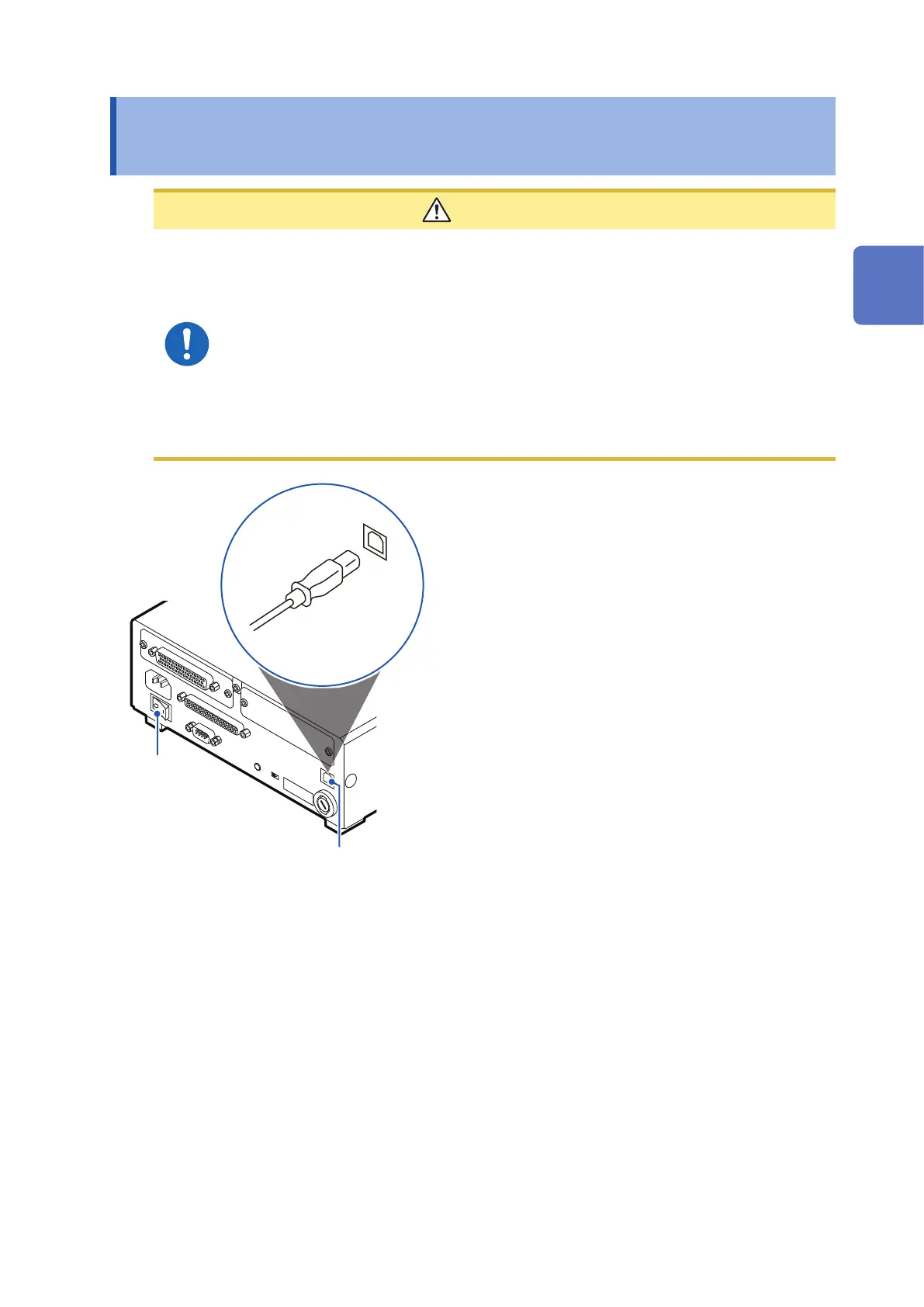
Verify that the RM2611 Electrode
Resistance Meter’s main power switch (on
the rear of the instrument) is in the OFF (○)
position.
2
Connect the USB cable to the USB port
on the rear of the RM2611 Electrode
Resistance Meter.
3
Connect the USB cable to a USB port on
the PC.
2
Preparing for Measurement



 To Next Page