51
4
Customizing Measurement
Conditions
4.1 Choosing the Measurement Speed
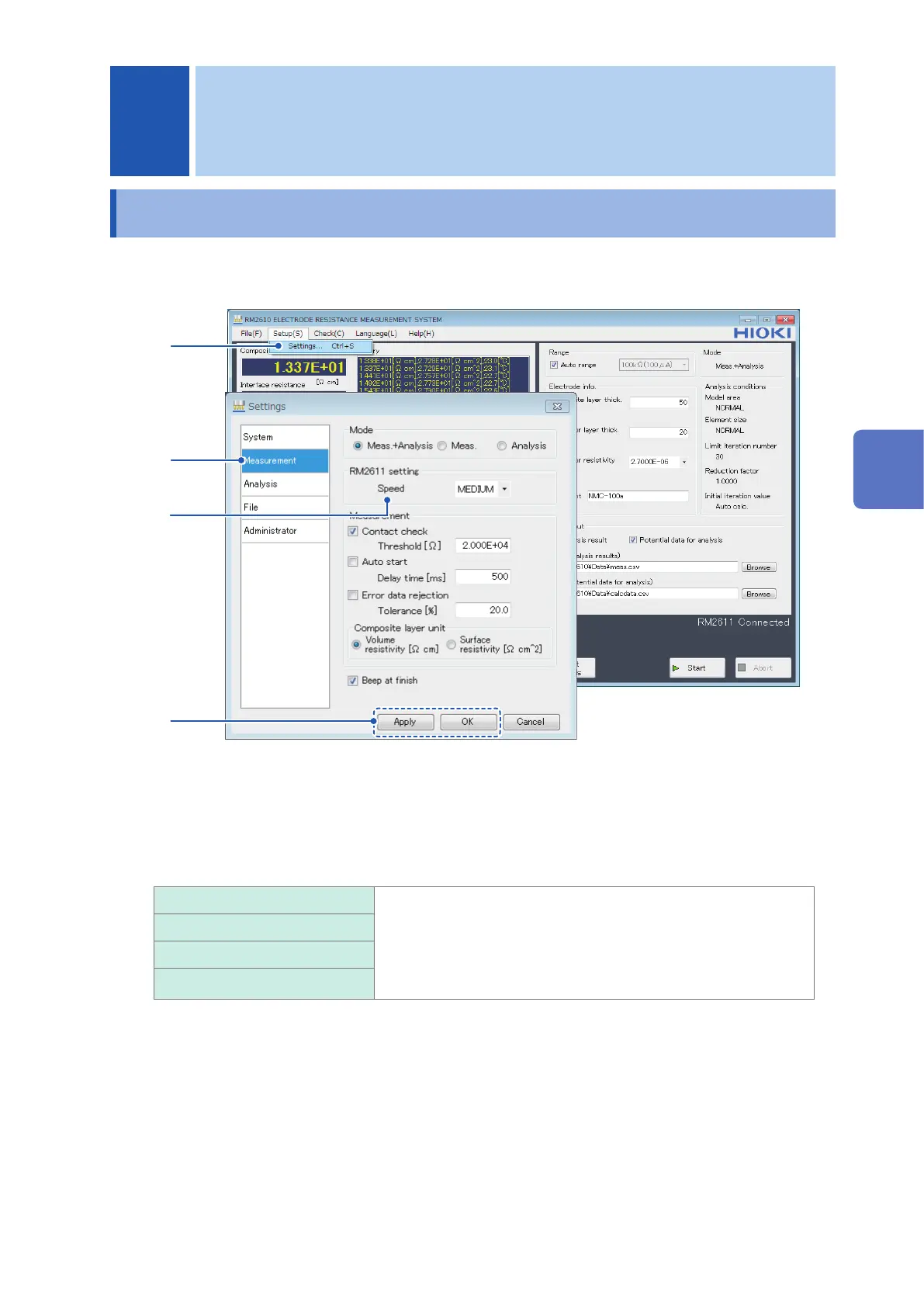
You can choose the measurement speed from four options: FAST, MEDIUM, SLOW1, and SLOW2.
1
2
3
4
1
Choose [Settings].
2
Choose [Measurement].
3
Choose one of the following settings for [Speed]:
FAST The measurement speed can be set to any of the following four
values: FAST, MEDIUM, SLOW1, and SLOW2. MEDIUM, SLOW1,
and SLOW2 have increased measurement precision compared
to FAST, making measurements less susceptible to the effects of
the external environment. However, those settings result in longer
measurement times than FAST.
MEDIUM
SLOW1
SLOW2
4
Click [Apply] or [OK] to accept the settings. (Clicking [OK] will cause you to return to the
main screen.)
4 Customizing Measurement Conditions
4
Customizing Measurement Conditions



 To Next Page