63
Outputting a 2D Potential Distribution File
4.12 Outputting a 2D Potential Distribution File
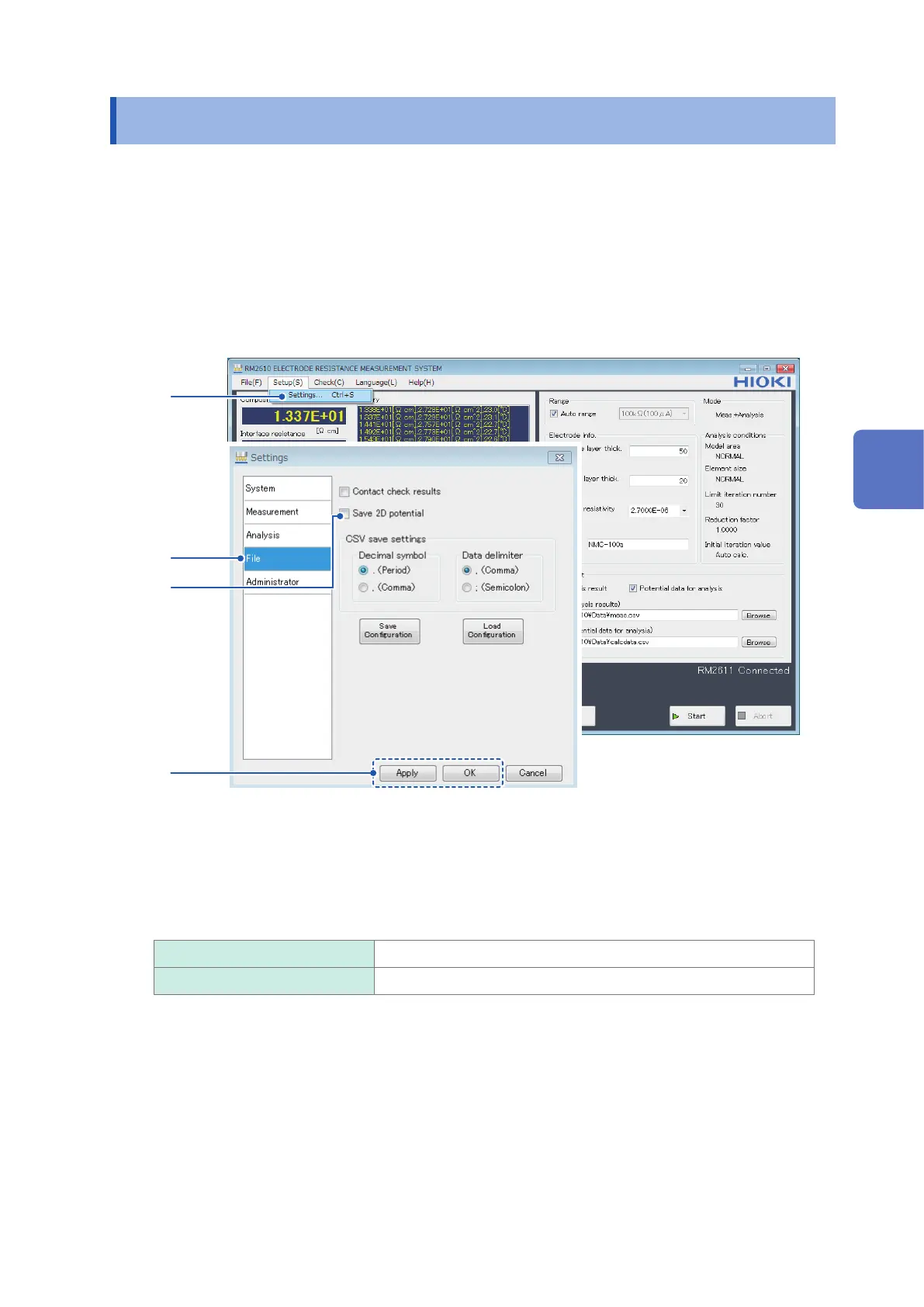
You can output a 2D potential distribution le of 5×5 potential measurements by enabling [Save 2D
potential]. Data is subject to averaging processing.
The 2D potential distribution le allows you to view the potential gradient that exists when current
ows to the electrode sheet. It can be used when you wish to perform analysis using a method
other than the RM2610 Electrode Resistance Measurement System.
The output le uses a lename derived by adding “vpot_” to the beginning of the lename specied
as the analysis results path.
For more information about the le format, see “2D Potential distribution le format” (p. 86).
1
2
3
4
1
Choose [Settings].
2
Choose [File].
3
Choose one of the following settings for [Save 2D potential]:
ON Save 2D potential file output results.
OFF
Do not save 2D potential le output results.
4
Click [Apply] or [OK] to accept the settings. (Clicking [OK] will cause you to return to the
main screen.)
4
Customizing Measurement Conditions



 To Next Page