31
Launching the RM2612 Resistance Calculation Software
Verify the connection between the RM2611 Electrode Resistance Meter
and the PC
1
2
3
1
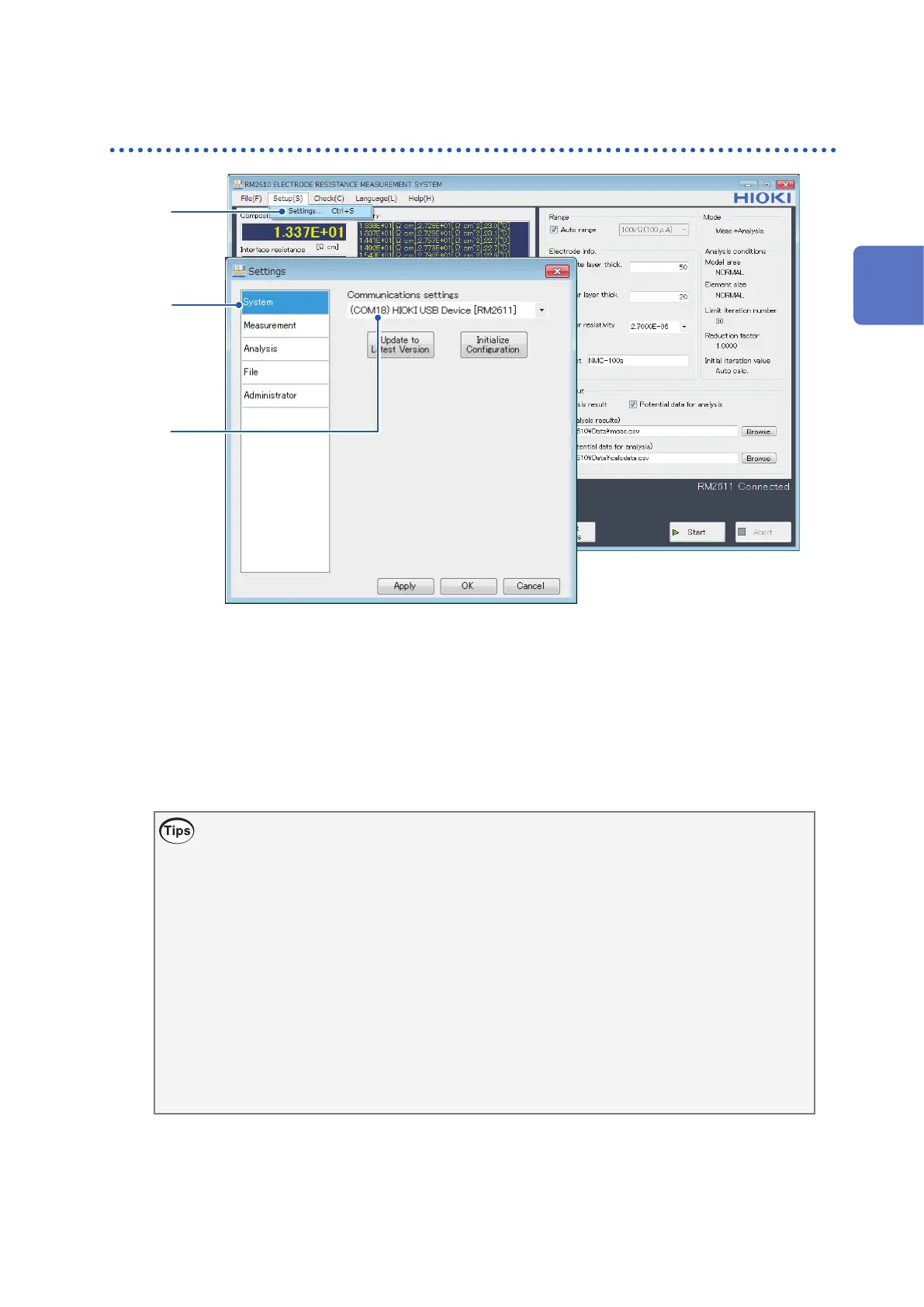
Choose [Settings].
2
Choose [System].
3
Verify that [Communications settings] shows “(COMxx) HIOKI USB Device [2611].”
If the [Communications settings] eld is blank, the RM2611 Electrode Resistance Meter is
not properly connected. Check the following items.
If you are unable to establish a connection
• Have you turned on the RM2611 Electrode Resistance Meter? (p. 29)
If the RM2611 Electrode Resistance Meter has not been turned on, nothing will be displayed in
the [Communications settings] eld.
• Have you connected the RM2611 Electrode Resistance Meter to the PC with a USB cable?
(p. 27)
If the instrument has not been connected to the PC with a USB cable, nothing will be displayed
in the [Communications settings] eld.
• Have you installed the dedicated Hioki USB driver? (p. 19)
If the USB driver has not been installed, nothing will be displayed in the [Communications
settings] eld.
To update the contents of the [Communications settings] eld, close and reopen the [Settings]
dialog box.
2
Preparing for Measurement



 To Next Page