57
Setting the Reduction Factor
4.6 Setting the Reduction Factor
You can set the magnitude of the correction applied during iterative calculation of interface
resistance (i.e., the reduction factor) to a value from 0.0001 to 1.0000.
1
2
3
4
1
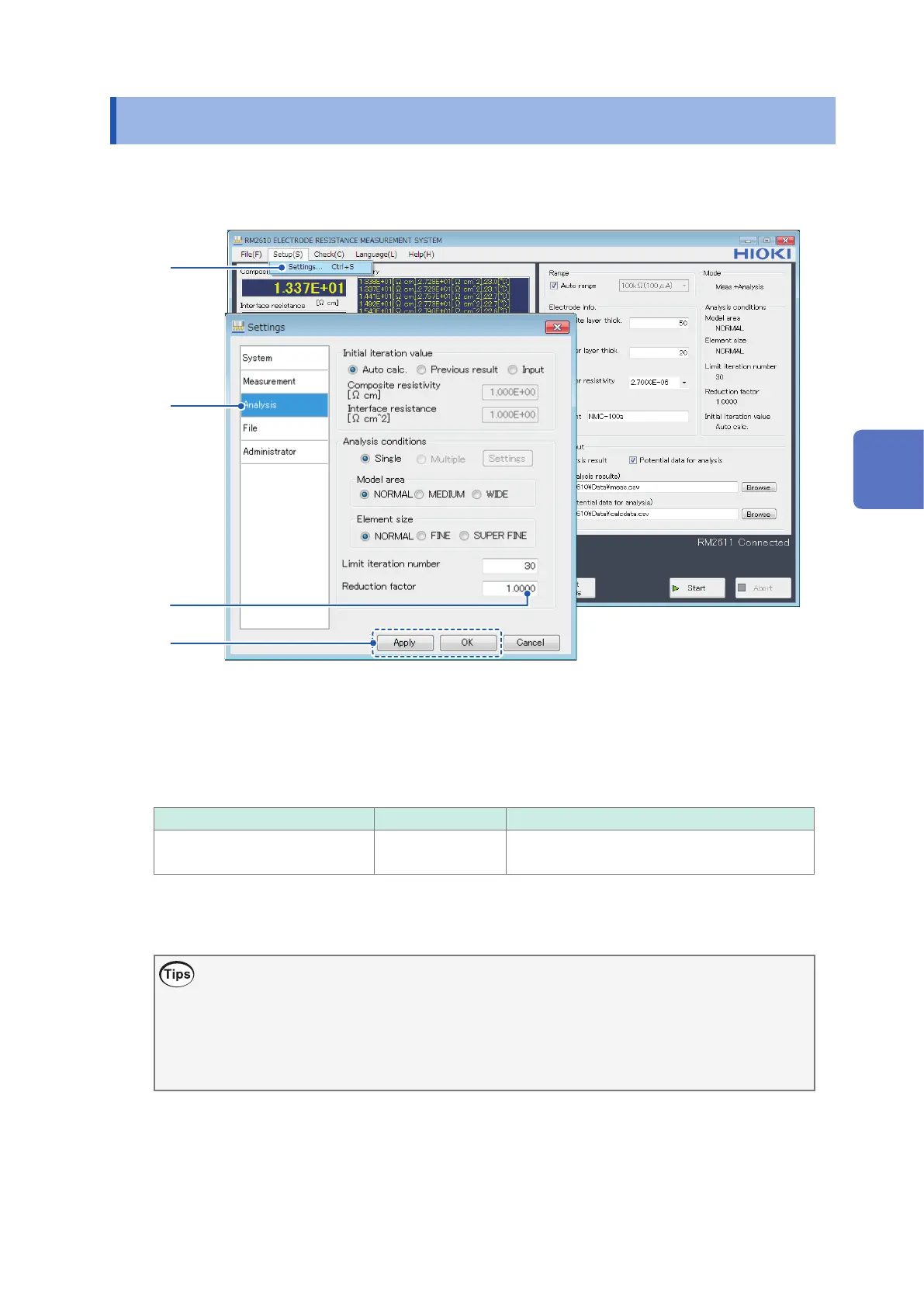
Choose [Settings].
2
Choose [Analysis].
3
Enter the desired value in the [Reduction factor] eld.
Valid setting range Initial value Format
0.0001 to 1.0000 1.0000 Decimal with 4 signicant digits to the right of
the decimal point (0.0000)
4
Click [Apply] or [OK] to accept the settings. (Clicking [OK] will cause you to return to the
main screen.)
What is the reduction factor?
The reduction factor is a parameter for adjusting the magnitude of the correction applied
during iterative calculation of interface resistance. Use of a small value results in a more stable
convergence process but incurs longer calculation times. When convergence is stable, it is
recommended to use the initial setting of 1.0000. The setting can be changed as necessary
(p. 94).
4
Customizing Measurement Conditions



 To Next Page