58
Entering the Initial Iteration Value
4.7 Entering the Initial Iteration Value
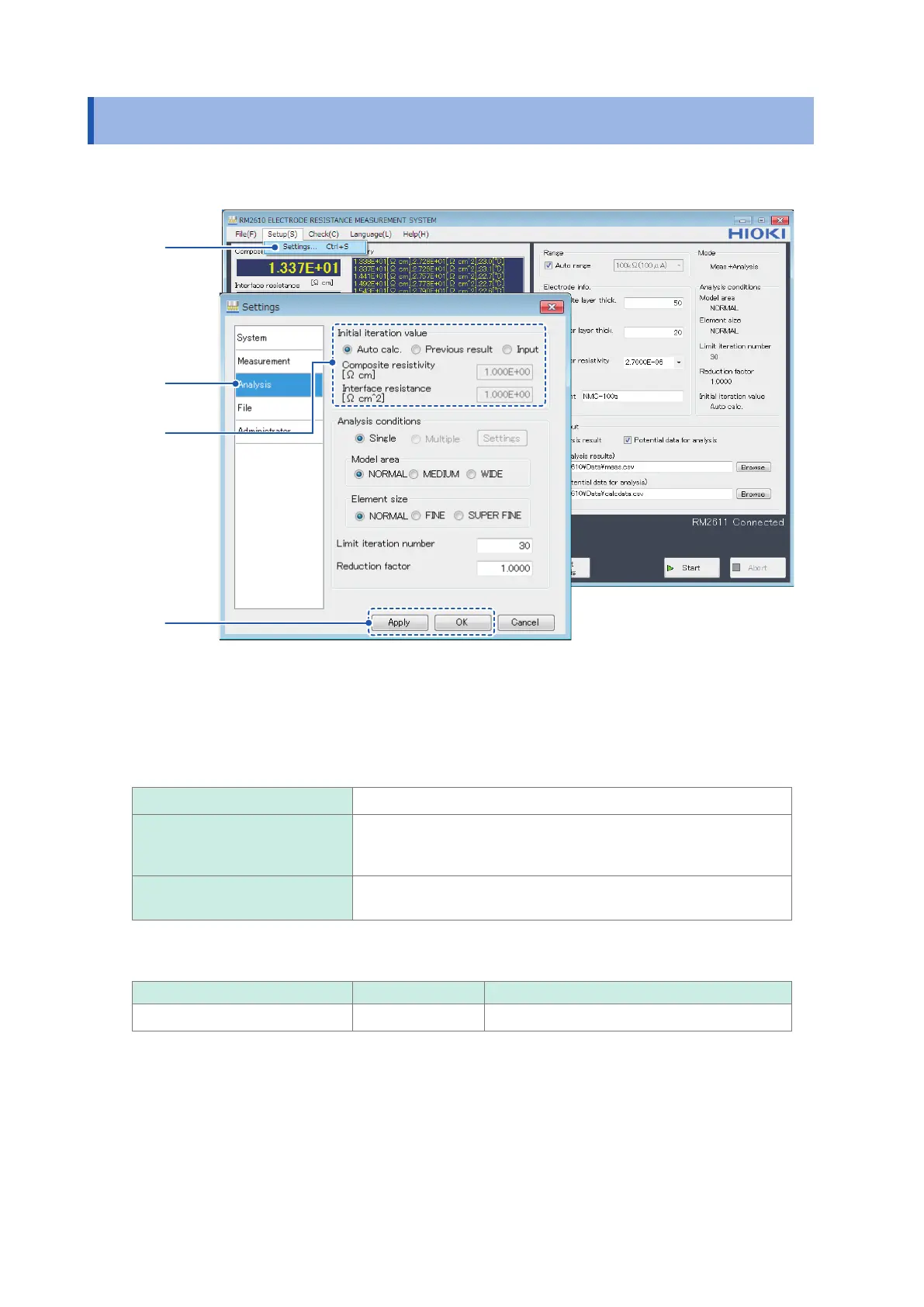
This section describes how to enter the initial value for iterative calculations.
1
2
3, 4
5
1
Choose [Settings].
2
Choose [Analysis].
3
Choose one of the following initial resistance values for [Initial iteration value]:
Auto calc.
(Skip step 4 below.)
Previous result (Skip step 4 below.)
If [Previous result] is selected, the initial resistance value will be
used as the [Auto calc.] value if the previous analysis result is FAIL.
Input Enter the [Composite resistivity [
Ω
cm]] and [Interface resistance
[
Ω
cm
^2
]] (step 4).
4
Enter values for [Composite resistivity [
Ω
cm]] and [Interface resistance [
Ω
cm^2]].
Valid setting range Initial value Format
1.0E-10 to 1.0E+5 1.000E+00 Decimal or exponential
5
Click [Apply] or [OK] to accept the settings. (Clicking [OK] will cause you to return to the
main screen.)



 To Next Page