64
Choosing the CSV Save Format
4.13 Choosing the CSV Save Format
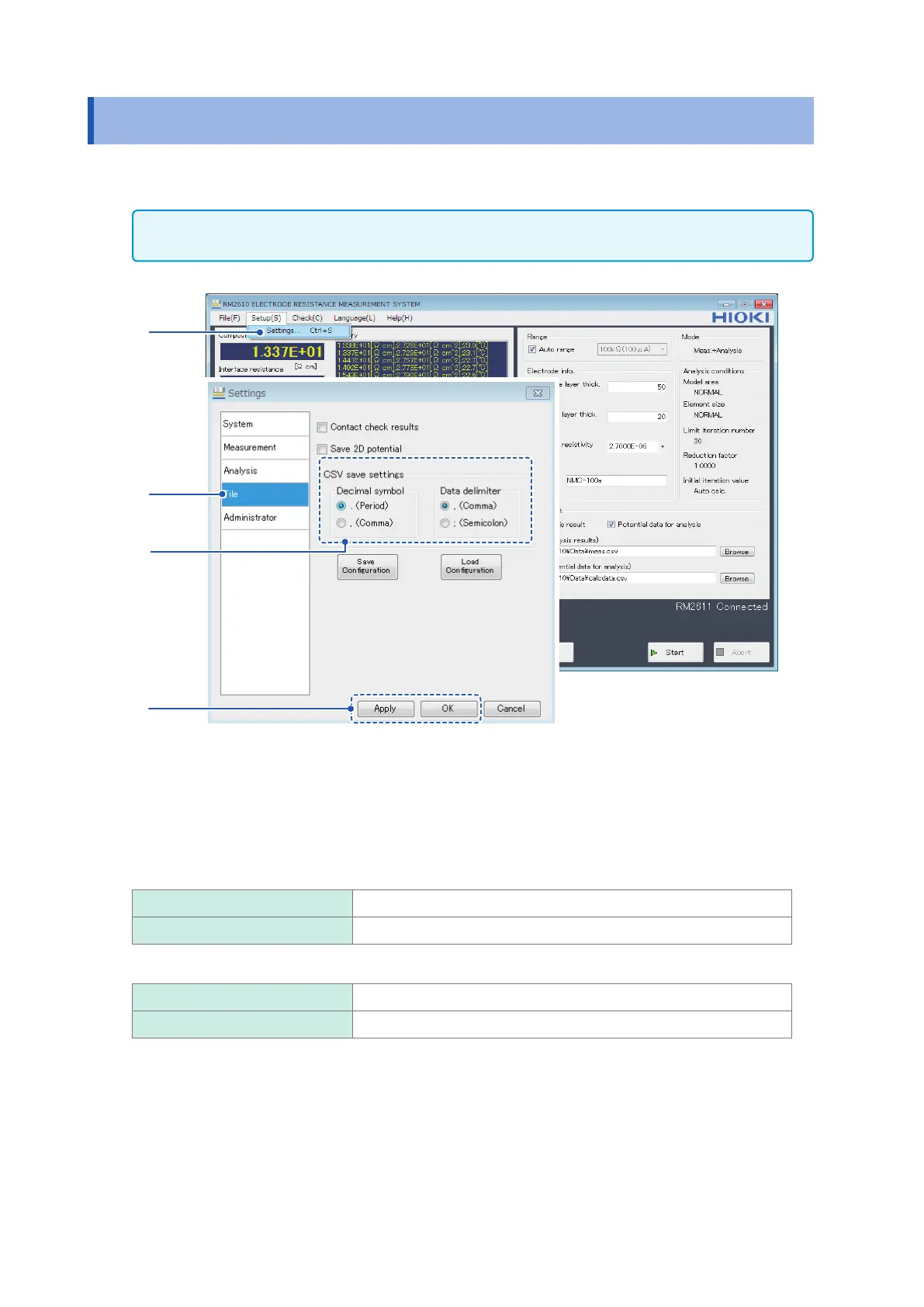
This section describes how to set the decimal symbol and choose the data delimiter for analysis
results les and 2D potential distribution les.
IMPORTANT
You cannot choose the comma (“,”) as both the decimal symbol and the data delimiter.
1
2
3
4
1
Choose [Settings].
2
Choose [File].
3
Choose one of the following settings for [CSV save settings]:
Decimal symbol
. (Period) Use the period (“.”) as the decimal symbol.
, (Comma) Use the comma (“,”) as the decimal symbol.
Data delimiter
, (Comma) Use the comma (“,”) as the data delimiter.
; (Semicolon) Use the semicolon (“;”) as the data delimiter.
4
Click [Apply] or [OK] to accept the settings. (Clicking [OK] will cause you to return to the
main screen.)



 To Next Page