Brevera Breast Biopsy System User Guide
Chapter 3: Components, Controls, and Indicators
Page 38 MAN-04303-002 Revision 006
3.3.2 Mode Controls and Biopsy Device Arm and Fire Controls
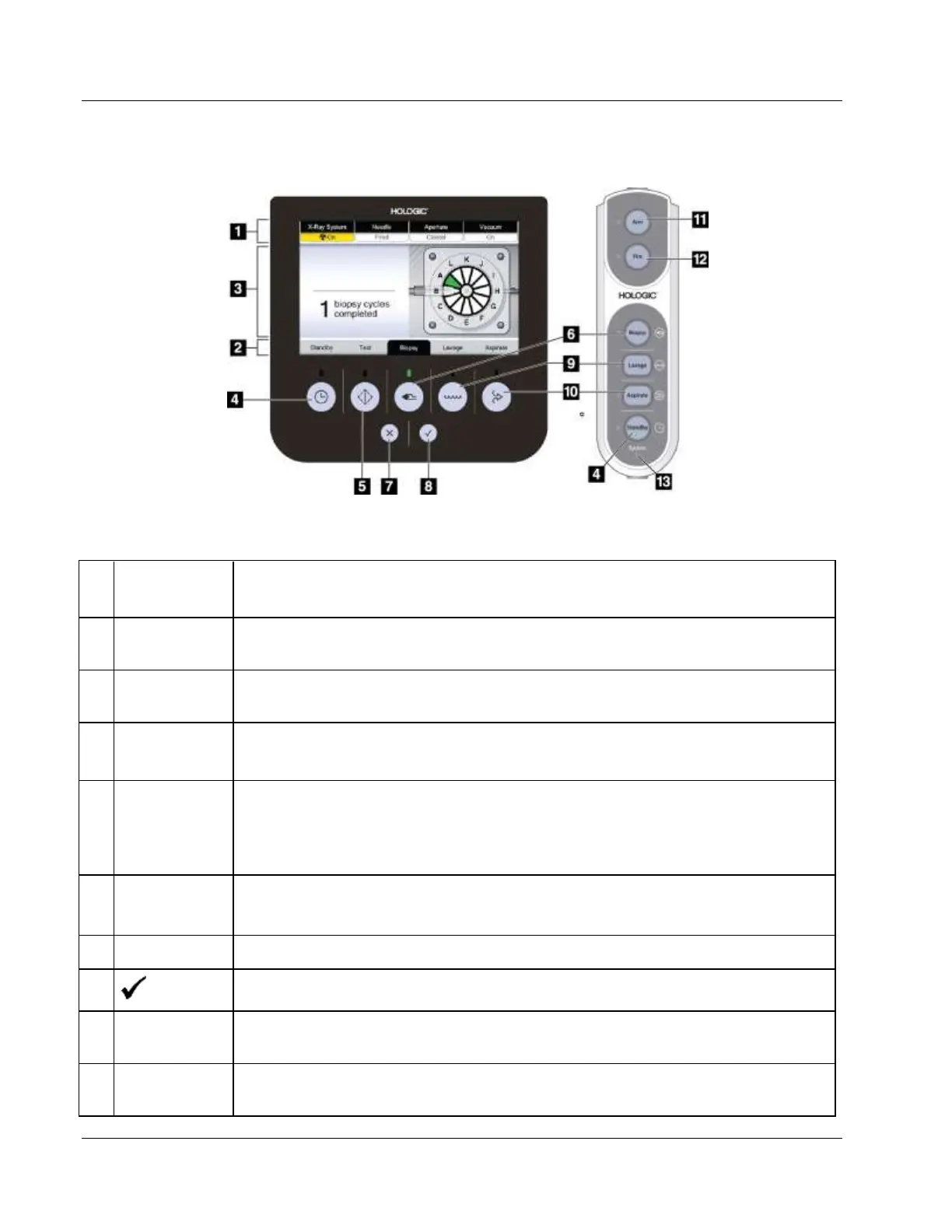
Figure 19: Mode, Arm and Fire Buttons
At the top of the Technologist display screen, four tabs indicate the x-ray status, the
needle position, the aperture size, and the vacuum status.
At the bottom of the Technologist display screen, the black highlight and green light
indicate the current mode.
At the center of the Technologist display screen, the system provides instructions and
other notifications.
This push-button control turns the vacuum off and closes the aperture on the needle.
This push-button control allows for the self-priming of the system with saline. When
placed in Test mode, the saline pinch valve is opened and the vacuum is turned on.
When placed in Test mode, the user is guided through a series of tests to confirm the
flow of saline and the completion of a cutting cycle.
When placed in Biopsy mode, the biopsy device is ready for tissue acquisition.
Footswitch input will initiate a biopsy cycle.
Reject the message on the Technologist display.
Accept the message on the Technologist display.
When placed in Lavage mode, the saline pinch valve is opened and the inner cutting
cannula is retracted. In Lavage mode, the vacuum is turned on.
When placed in Aspirate mode, the saline pinch valve is closed and the inner cutting
cannula is retracted. In Aspirate mode, the vacuum is turned on.













 To Next Page