● Activation through the power port: supply a DC voltage of 43.2–58 V to the
power terminal on the front panel for at least 5s.
1. The MANUAL ON/OFF button is a contact button. The interval for pressing the
button should be greater than 0.5s; otherwise, the operation is ineective.
2. If you have forcibly powered o the battery that is in charging, discharging, or
disconnected mode by pressing the MANUAL ON/OFF button, the ESM can be only
reactivated by pressing and holding this button.
Technical Specications
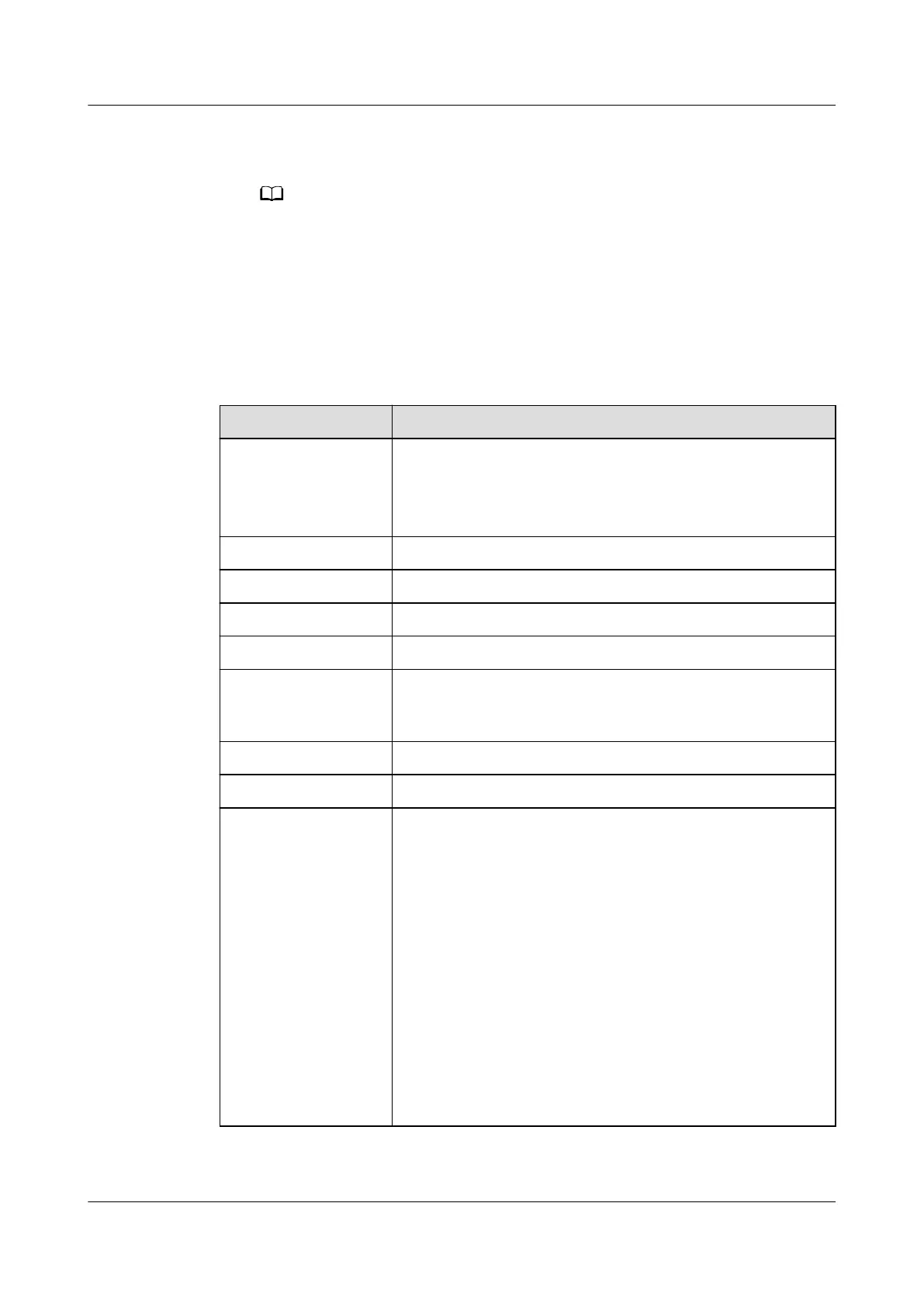
Table 3-81 Technical specications
Item Specications
Dimensions (W x D
x H)
● 442 mm x 396 mm x 130 mm (excluding mounting
ears)
● 482 mm x 396 mm x 130 mm (including mounting
ears)
Weight ≤ 48 kg
Installation mode Installed in a 19-inch rack
Maintenance mode Maintained from the front
Humidity 5%–95%
Altitude 0–4000 m (When the altitude ranges from 2000 m to
4000 m, the highest operating temperature decreases by
1°C for each additional 200 m.)
Ripple and noise ≤ 200 mV
IP rating IP40
Other requirements Indoor scenario:
● There is no conductive dust, corrosive gas, or
explosion hazard.
● Dust, corrosive substances, pests, molds, and other
indicators should be controlled in accordance with
class 3.1 requirements in ETSI EN 300 019-1-3 (V2.3.2
or a later version).
Outdoor scenario:
● There is no conductive dust, corrosive gas, or
explosion hazard.
● Dust, corrosive substances, pests, molds, and other
indicators should be controlled in accordance with
class 4.1 requirements in ETSI EN 300 019-1-4
(V2.2.1).
iSitePower Integrated Smart Site (ICC1000-A1-E1)
User Manual 3 Components
Issue 04 (2022-10-15) Copyright © Huawei Technologies Co., Ltd. 105









 To Next Page