4.1.4 AC/DC Power Distribution
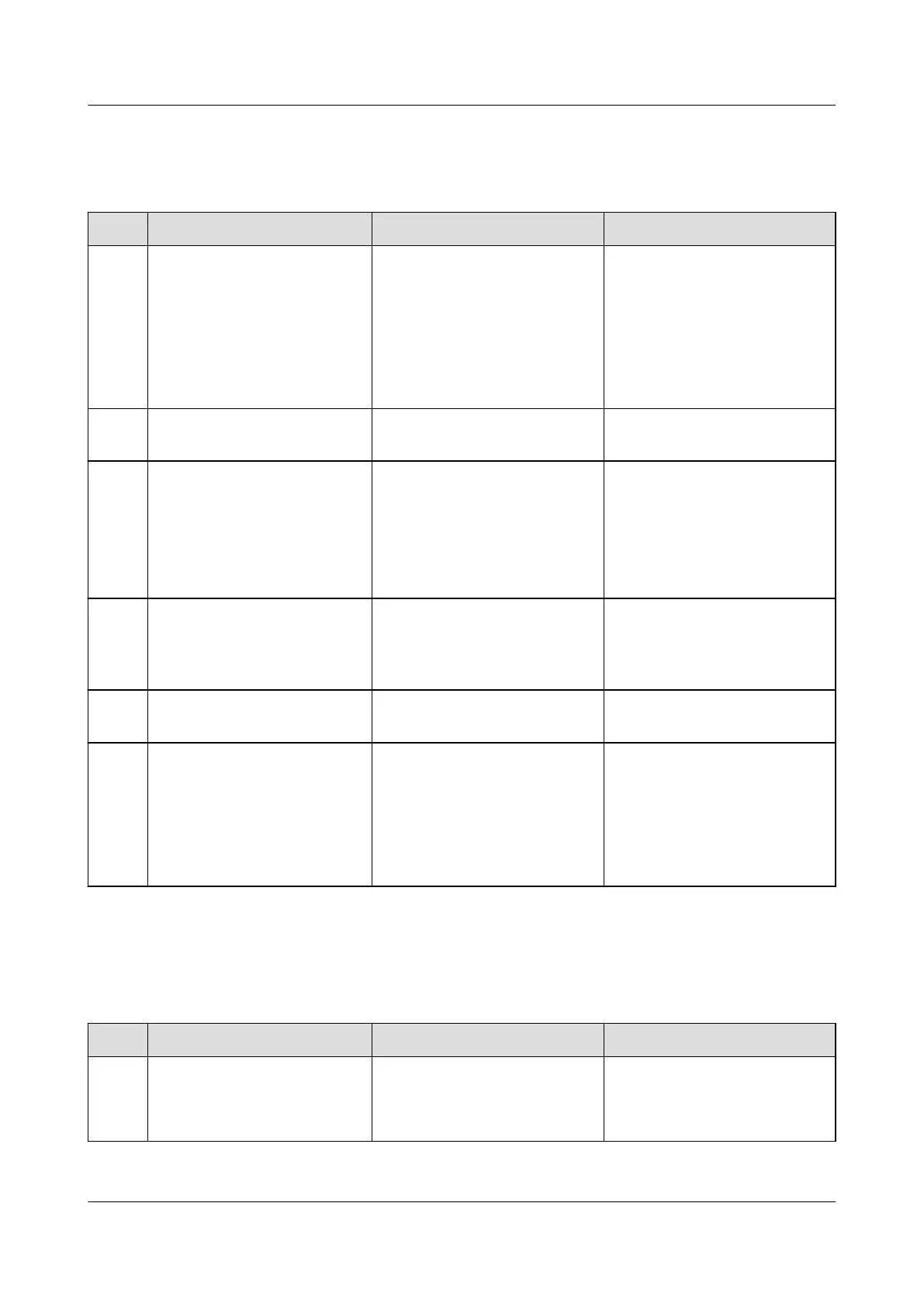
Table 4-4 AC/DC power distribution maintenance
No. Maintenance Item Possible Fault Cause Suggestion
1 Check for AC input
undervoltage.
● AC input power cables
have a large voltage
drop.
● AC input power cables
are in poor contact.
● The mains voltage is too
low.
1. Replace AC input power
cables with shorter or
thicker cables.
2. Connect AC input power
cables securely.
3. Provide the voltage data
to the power supplier.
2 Check for AC input
overvoltage.
The mains voltage is too
high.
Provide the voltage data to
the power supplier.
3 Check whether the AC
input voltage is open-
phase.
● AC input power cables
are in poor contact,
short-circuited, or
damaged.
● The mains supply has
failed.
1. Check and rectify the
cables.
2. Provide the open-phase
data to the power
supplier.
4 Check whether a DC output
circuit breaker is OFF and a
fuse is blown.
● Load overcurrent occurs.
● Load short-circuit occurs.
Rectify any overcurrent or
short circuit. Turn on the
circuit breaker or replace the
fuse.
5 Check for DC busbar
overvoltage.
A rectier is abnormal. Replace the abnormal
rectier.
6 Check for DC busbar
undervoltage.
● The AC power supply has
failed.
● The system is overloaded.
● A rectier is abnormal.
1. Resume the AC power
supply.
2. Check the load status and
rectify faults if any.
3. Replace the abnormal
rectier.
4.1.5
Rectier
Table 4-5 Rectier maintenance
No.
Maintenance Item Possible Fault Cause Suggestion
1 Check the green indicator
status (normal: steady on).
O:
● There is no AC input.
● The rectier is faulty.
1. Check the rectier AC
input.
2. Replace the rectier.
iSitePower Integrated Smart Site (ICC1000-A1-E1)
User Manual 4 Maintenance
Issue 04 (2022-10-15) Copyright © Huawei Technologies Co., Ltd. 110









 To Next Page