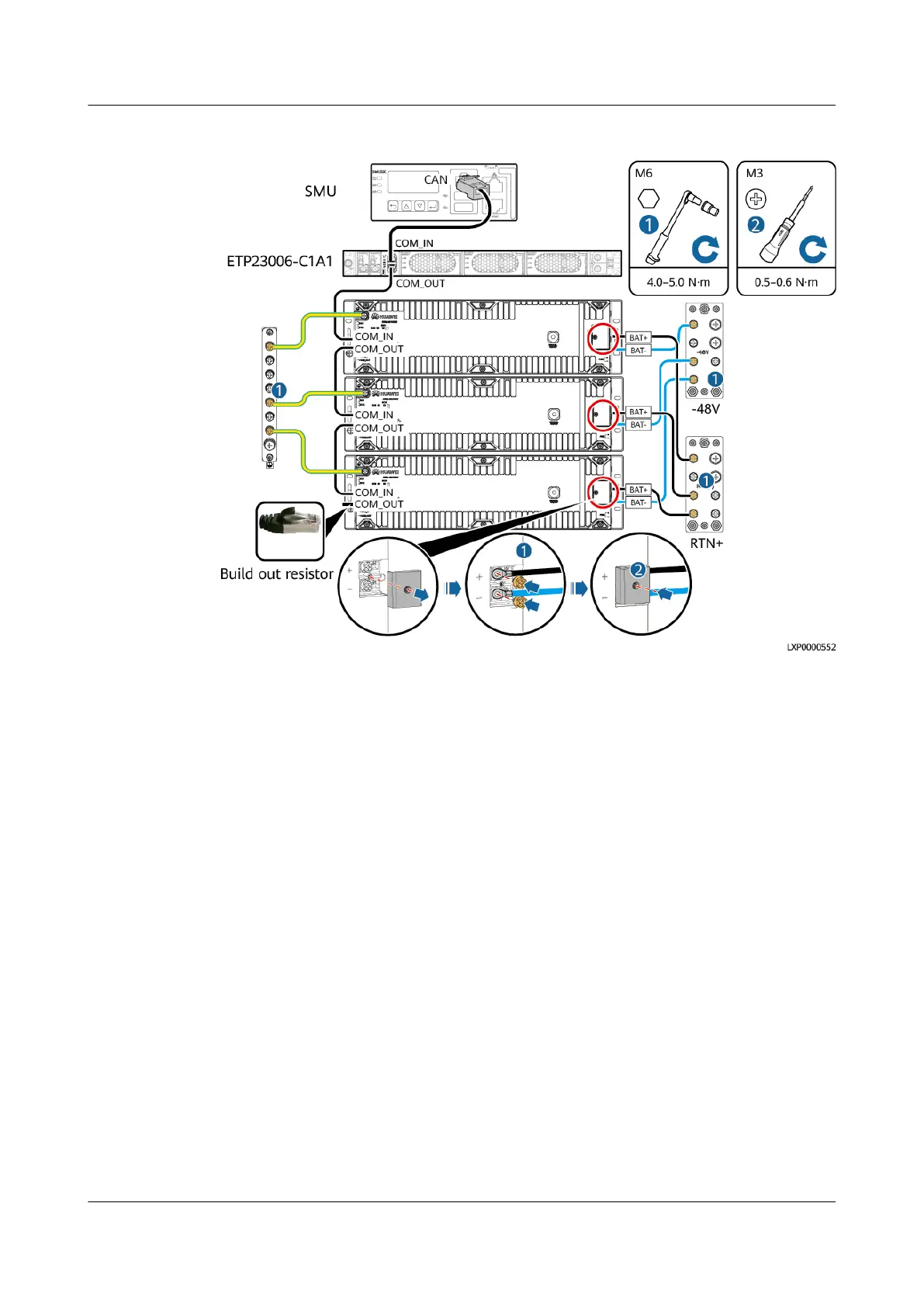
Figure 4-33 Installing ESM cables (using three ESM-48100B1s as an example)
Step 4 Hold down the Manual ON/OFF button for 15s for the ESM to exit the
maintenance mode. The ESM is automatically activated and connects to the power
system.
Step 5 Remove the protective gloves and pack up all tools.
----End
Follow-up Operations
● Put the removed component into the ESD box or bag and then place the ESD
box or bag into the carton box with foams or the bag of the new component.
● Fill in the fault card with the information about the removed component.
● Contact your local Huawei
oce to handle the faulty component.
4.3.19 Replacing an Air Conditioner PC3000D-2
Prerequisites
● You have obtained an ESD wrist strap, a pair of ESD gloves, a Phillips
screwdriver, a wrench, an ESD bag, and the cabinet door key.
● You have
conrmed the model of the air conditioner to be replaced and
prepared a replacement air conditioner.
● You are authorized to enter the site with the key.
iSitePower Integrated Smart Site (ICC1000-A1-E1)
User Manual 4 Maintenance
Issue 04 (2022-10-15) Copyright © Huawei Technologies Co., Ltd. 141









 To Next Page