Step 7 Connect the cables to the inverter based on the recorded information.
Step 8 Remove the ESD wrist strap or gloves and put all the tools away.
----End
Follow-up Procedure
Pack the removed components and send them to the local warehouse.
4.3.12 Replacing an Inverter Module I23002G1
Prerequisites
● The protective gloves and cabinet door key are available.
● The new inverter module is intact.
To prevent burns, exercise caution when removing an inverter module because it
may be hot as a result of continuous operation.
Procedure
Step 1 Wear protective gloves.
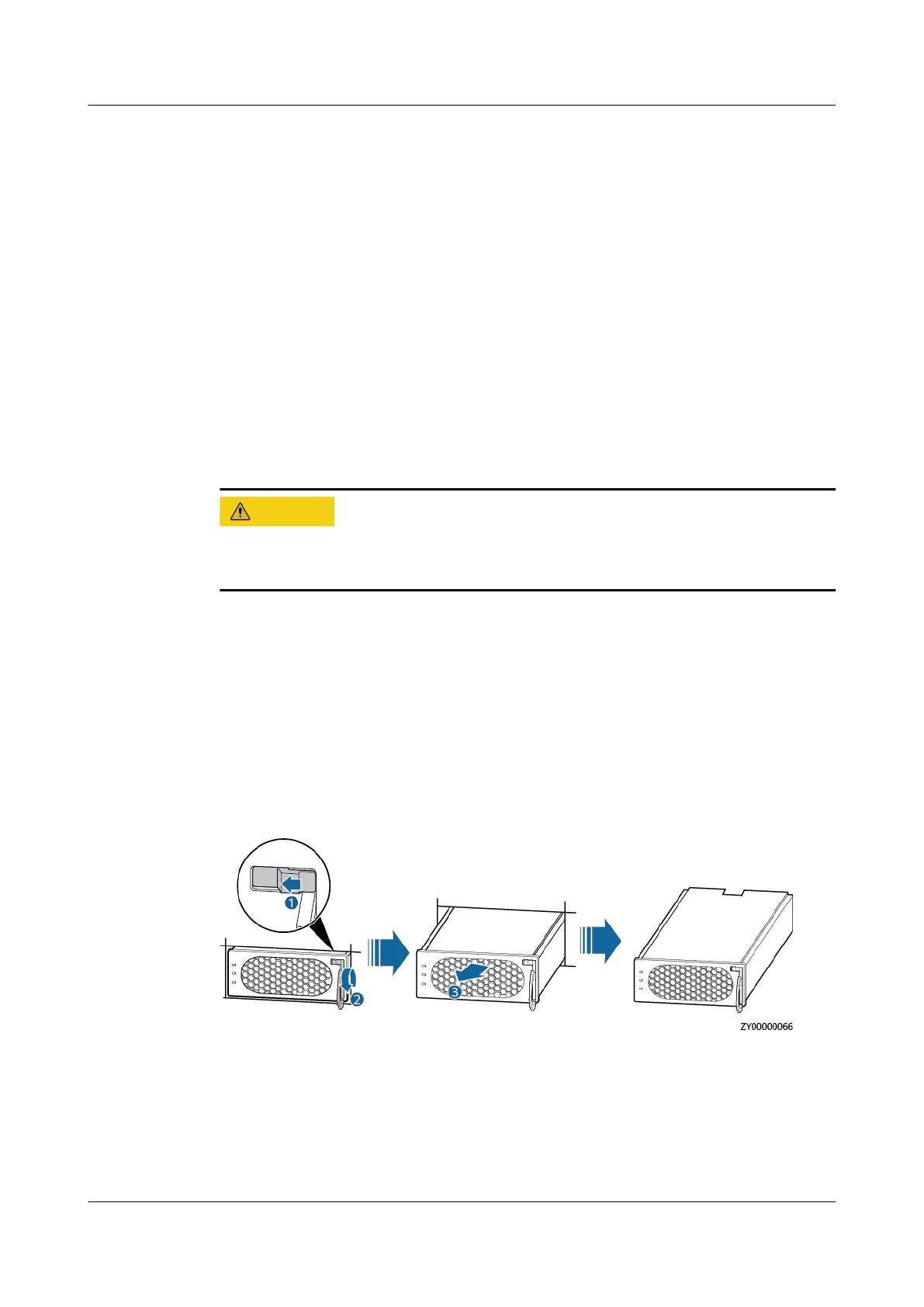
Step 2 Push the locking latch on the right side of the inverter module panel toward the
left.
Step 3 Gently pull out the handle to separate the handle from the subrack, and remove
the inverter module from the subrack.
Figure 4-21 Removing an inverter module
Step 4 Push the locking latch on the new inverter module toward the left, and pull out
the handle.
Step 5 Place the new inverter module at the entry of the correct slot.
Step 6 Gently slide the inverter module along the guide rails until it is in place, close the
handle, and push the locking latch toward the right to lock the handle.
iSitePower Integrated Smart Site (ICC1000-A1-E1)
User Manual 4 Maintenance
Issue 04 (2022-10-15) Copyright © Huawei Technologies Co., Ltd. 131









 To Next Page