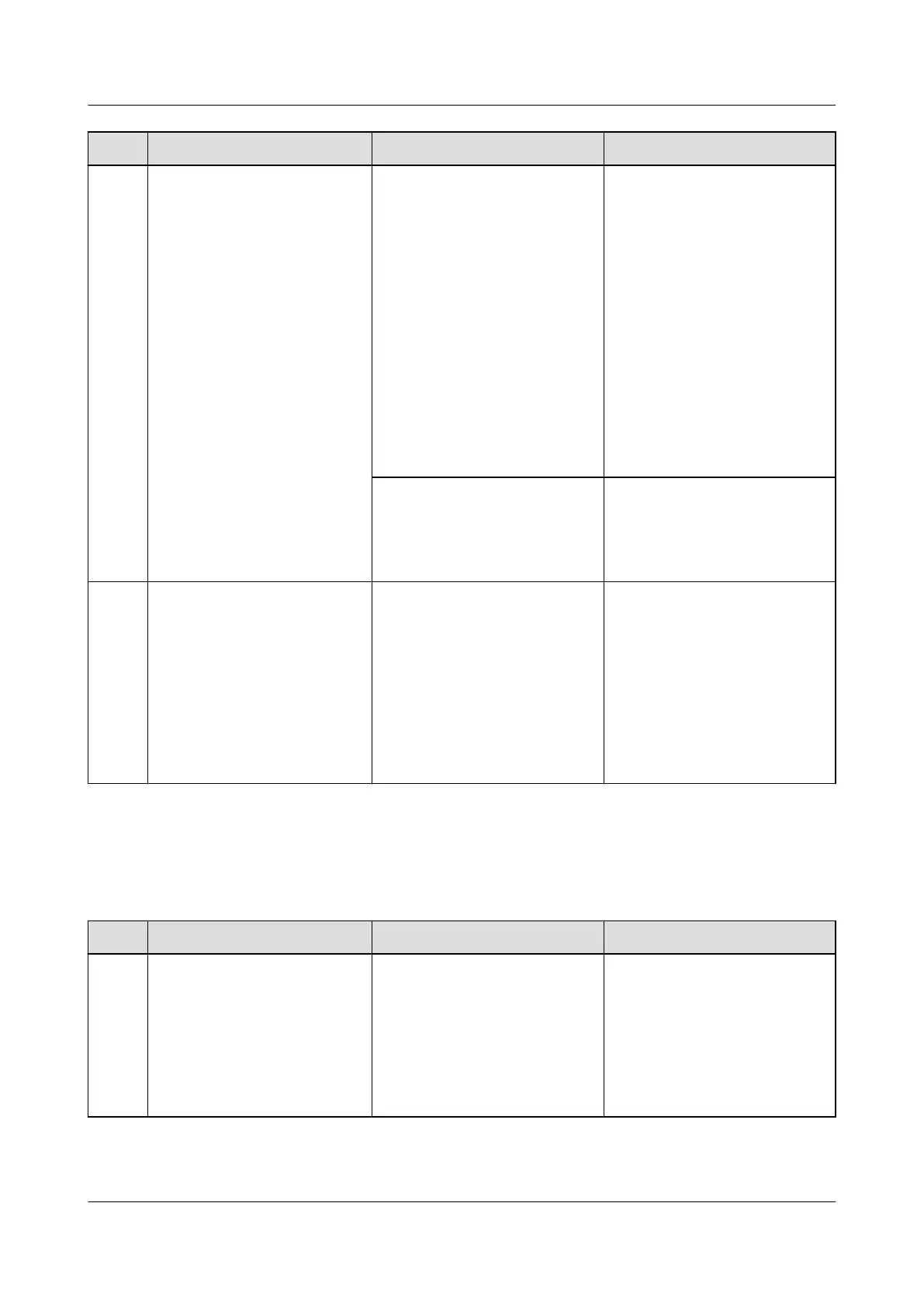
No. Maintenance Item Possible Fault Cause Suggestion
2 Check the yellow indicator
status (normal: o).
Steady on:
● Because the ambient
temperature is high, the
rectier power is limited.
● Because the ambient
temperature exceeds the
upper or lower threshold,
the
rectier shuts down
for protection.
● AC input over/
undervoltage protection
is triggered.
● The
rectier is in
hibernation.
1. Check the ambient
temperature status, and
clean the cabinet air
channel.
2. Rectify faults in the
indoor temperature
control system.
3. Check the AC input
voltage.
4. The
rectier is in
hibernation. No action is
required.
Blinking:
● The rectier
communication has failed
● The rectier is faulty.
1. Check that the rectier
communications cable is
securely connected.
2. Replace the rectier.
3 Check the red indicator
status (normal: o).
Steady on:
● The rectier is latched o
due to output
overvoltage.
● The rectier is faulty.
1. Check that the cabinet is
not connected to an
external DC power source
that has a voltage of
greater than 58.5 V DC.
2. Check that the
rectier
output voltage is within
58.5 V DC.
3. Replace the
rectier.
4.1.6 SMU
Table 4-6 SMU maintenance
No.
Maintenance Item Possible Fault Cause Suggestion
1 Check the green indicator
status.
O:
● There is no DC input.
● The SMU is faulty.
1. Check that the DC input
power cable is securely
connected.
2. Check that the
communications cable is
securely connected.
3. Replace the SMU.
iSitePower Integrated Smart Site (ICC1000-A1-E1)
User Manual 4 Maintenance
Issue 04 (2022-10-15) Copyright © Huawei Technologies Co., Ltd. 111









 To Next Page