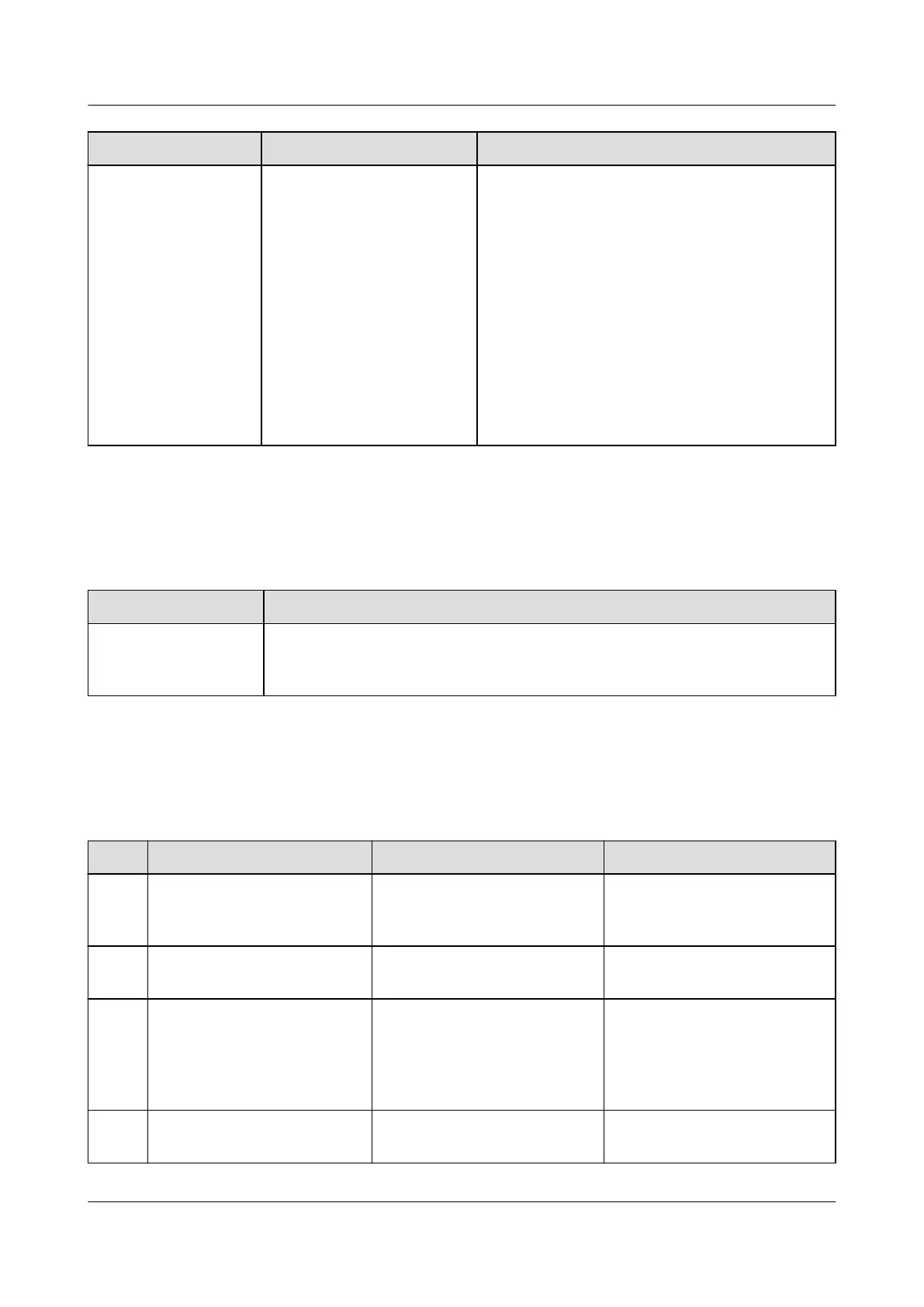
Symptom Possible Cause Suggestion
The fault indicator is
steady red.
● The SPD is faulty.
● A power frequency
synchronization
exception, carrier
synchronization
exception, INV_BPS
exception, or parallel
system CAN exception
occurs.
● Hardware address
conict, phase address
exception, or multi-
host conict occurs.
● Replace the inverter.
● Check whether the edge connectors of the
inverter module and connectors are
normal. Remove and reinstall the inverter
module. If the fault persists, replace the
inverter and inverter module.
● Check whether the DIP switch is correctly
set. If the DIP switch setting is correct and
the hardware addresses still
conict,
replace the inverter.
4.1.9 Inverter Module I23002G1
Table 4-9 Inverter module maintenance
Maintenance Object
Maintenance Method
Inverter Module
(I23002G1)
Check the running status of the inverter module by observing the
indicators on the inverter module. For details about the indicator status
description, see Table 3-50.
4.1.10 Cables
Table 4-10 Cable maintenance
No.
Maintenance Item Possible Fault Cause Suggestion
1 Check whether signal
cables and power cables
are separately bound.
Cables are not properly
installed.
Bind signal cables and
power cables separately.
2 Check whether all cables
are bound properly.
Cables are not properly
installed.
Bind cables properly.
3 Check whether the cabinet
ground bar is securely
connected to the site or
equipment room ground
point.
Cables are not properly
installed.
Connect the cabinet ground
bar to the site or equipment
room ground point.
4 Check whether ground
cables are rusty.
Cables corrode after being
used for a long time.
Replace rusty cables.
iSitePower Integrated Smart Site (ICC1000-A1-E1)
User Manual 4 Maintenance
Issue 04 (2022-10-15) Copyright © Huawei Technologies Co., Ltd. 114









 To Next Page