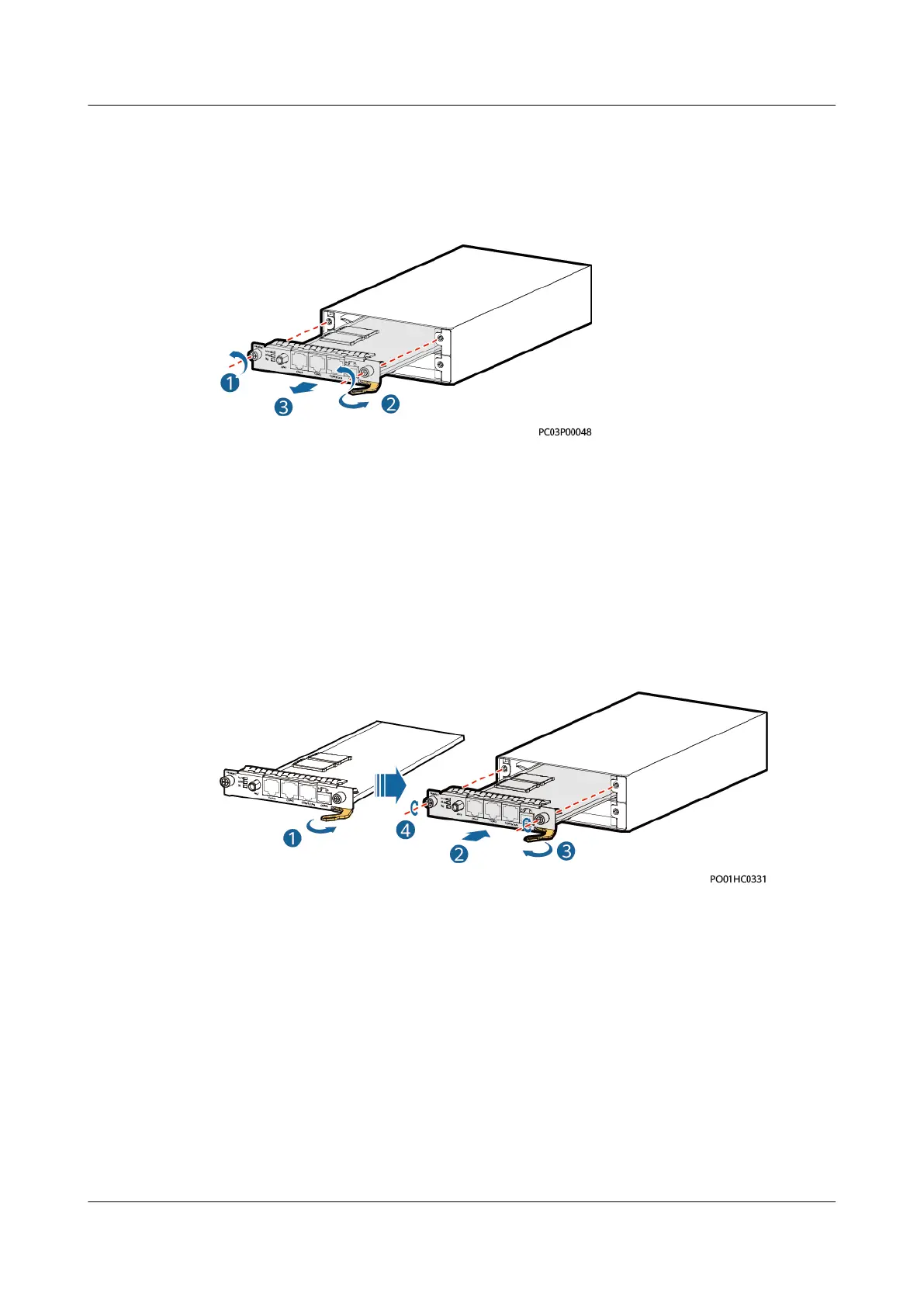
Step 3 Loosen the screws on both sides of the communications expansion module.
Step 4 Pull the handle rightwards and remove the communications expansion module.
Figure 4-16 Removing a communications expansion module
Step 5 Remove the SIM card from the SIM card slot, and insert the new communications
expansion module. Skip this step if no SIM card is installed.
Step 6 Place the new NIM01C3 in the corresponding slot of the monitoring unit subrack,
and push the NIM01C3 until its front panel is
ush with the front panel of the
monitoring unit subrack.
Step 7 Push the handle inwards until it is engaged, and then tighten the screws.
Figure 4-17 Installing a communications expansion module
Step 8 Reconnect cables to the panel of the new communications expansion module
based on the recorded information.
Step 9 Disconnect the ground cable from the ESD wrist strap, and remove the ESD wrist
strap and ESD gloves.
----End
Follow-up Procedure
Pack the removed component and have it sent to the local warehouse.
iSitePower Integrated Smart Site (ICC1000-A1-E1)
User Manual 4 Maintenance
Issue 04 (2022-10-15) Copyright © Huawei Technologies Co., Ltd. 128









 To Next Page