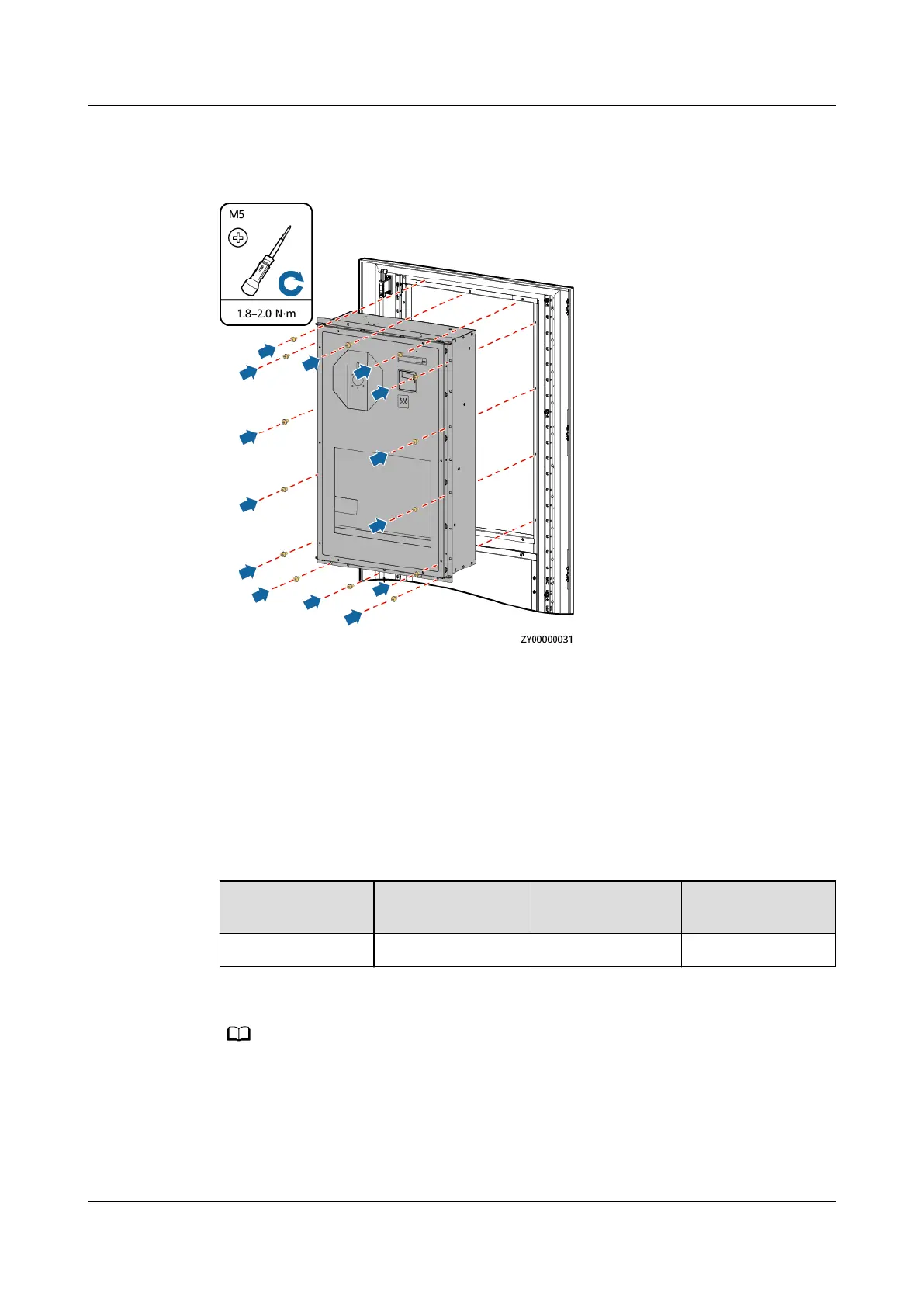
Step 5 Install the new air conditioner.
Figure 4-37 Installing the new air conditioner
Step 6 Apply sealant on the air conditioner rubber strip and the position where the air
conditioner passes through the cabinet.
Step 7 Reconnect the removed cables to the new air conditioner based on the recorded
information.
Step 8 Power on the air conditioner.
Step 9 Set the air conditioner address on the air conditioner LCD. For the air conditioner
addresses, see D Device Address Description.
Table 4-14 Setting air conditioner addresses
Main Menu
Second-Level
Menu
Third-Level
Menu
Settings
System Func Para Set Addr Set as required.
After the air conditioner is powered on, the language setting screen is displayed. The preset
password is 0001.
Step 10 Disconnect the ground cable of the ESD wrist strap, and remove the ESD wrist
strap and ESD gloves.
----End
iSitePower Integrated Smart Site (ICC1000-A1-E1)
User Manual 4 Maintenance
Issue 04 (2022-10-15) Copyright © Huawei Technologies Co., Ltd. 145









 To Next Page