● The new smoke sensor is intact.
Procedure
Step 1 Connect the ground cable to the ESD wrist strap, and put on the ESD wrist strap
and ESD gloves.
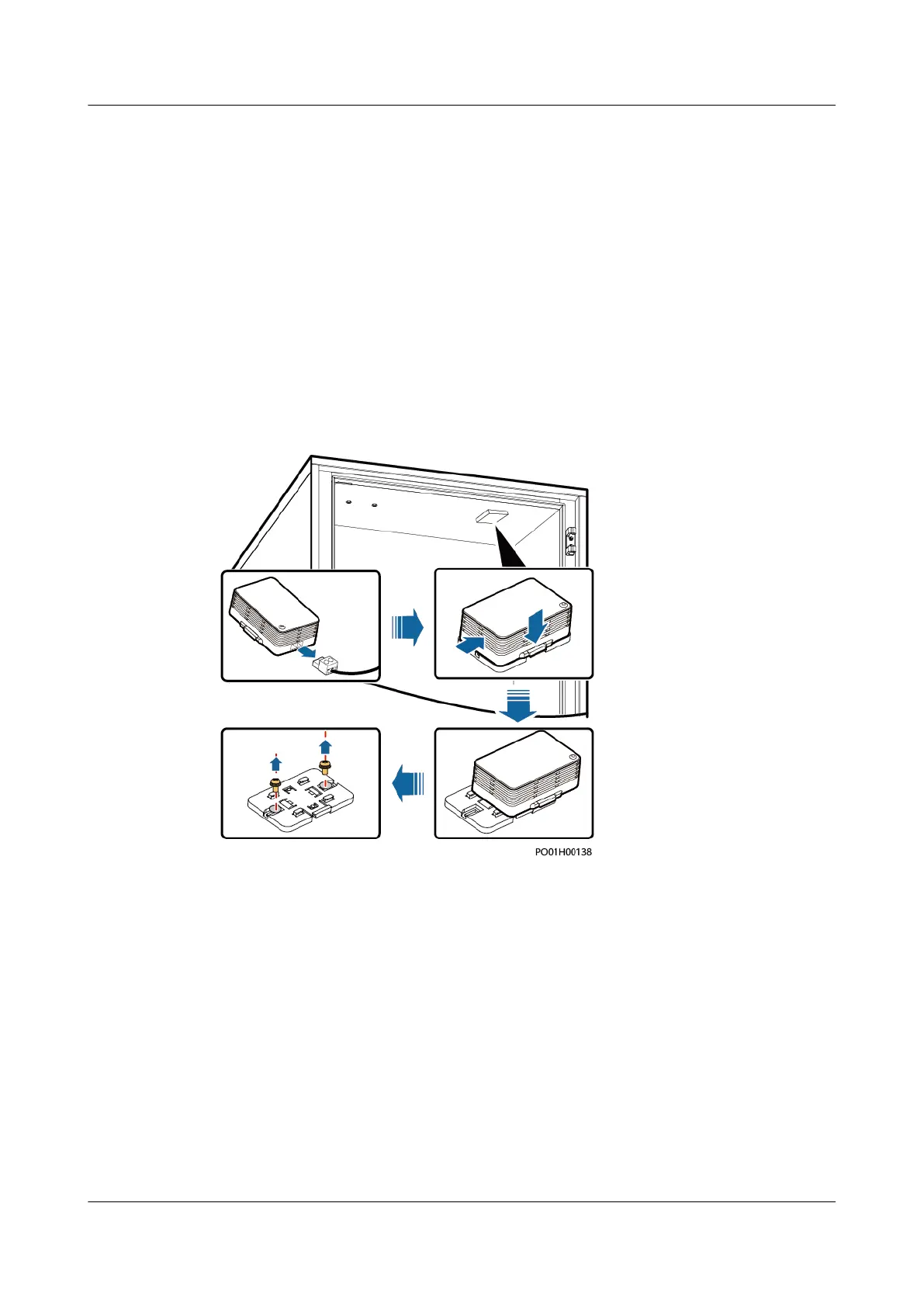
Step 2 Remove the smoke sensor.
1. Remove the connected cables from the smoke sensor.
2. Hold down the button on the smoke sensor and push the smoke sensor in the
OPEN direction.
3. Unscrew the smoke sensor base.
Figure 4-46 Removing the smoke sensor
Step 3 Install a new smoke sensor.
1. Properly place the smoke sensor base and tighten the screws for it.
2. Properly place the new smoke sensor and press and push it in the CLOSE
direction.
3. Reconnect the removed cables to the smoke sensor.
Step 4 Disconnect the ground cable from the ESD wrist strap, and take o the ESD wrist
strap and ESD gloves.
----End
Follow-up Procedure
Pack the removed component and send it to the local warehouse.
iSitePower Integrated Smart Site (ICC1000-A1-E1)
User Manual 4 Maintenance
Issue 04 (2022-10-15) Copyright © Huawei Technologies Co., Ltd. 151









 To Next Page