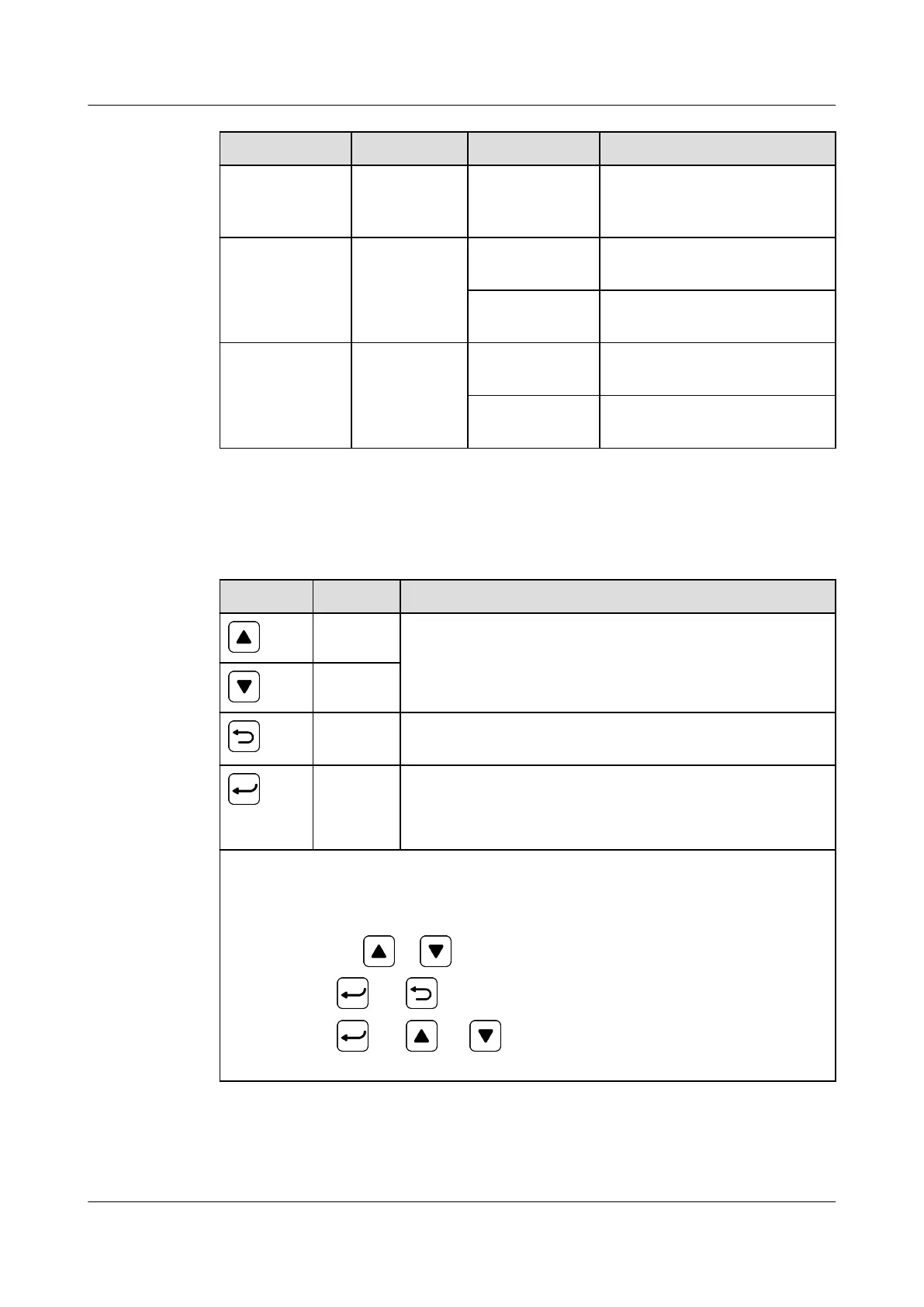
Item Color Status Description
Blinking fast (4
Hz)
The SMU is running properly
but fails to communicate
with the host.
Minor alarm
indicator
Yellow O No minor alarm or warning
is generated.
Steady on A minor alarm or warning is
generated.
Major alarm
indicator
Red O No critical or major alarm is
generated.
Steady on A critical or major alarm is
generated.
Buttons
Table 3-13 Button description
Button
Name Description
Up Scrolls menu items and sets parameters.
Down
Back Returns to the previous menu without saving the
settings.
OK ● Enters the main menu from the standby screen.
● Enters a submenu from the main menu.
● Saves the submenu settings.
Note:
● The LCD screen becomes dark if no button is pressed within 30s.
● You need to log in again if no button is pressed within 1 minute.
● Press and hold or to increase or decrease a parameter value quickly.
● Hold down and for 10s to restart the SMU.
● Hold down
and (or ) for 2s to increase (or decrease) the LCD
contrast.
iSitePower Integrated Smart Site (ICC1000-A1-E1)
User Manual 3 Components
Issue 04 (2022-10-15) Copyright © Huawei Technologies Co., Ltd. 39









 To Next Page